
Bottom line: Typebot’s free plan is the most generous free chatbot allowance in its class: 200 chats a month, unlimited bots, and the full visual builder at $0, verified on Typebot’s own pricing page on November 13, 2026. The catch most roundups miss is in that same page’s FAQ: when you hit 100% of your chat limit, your limit is automatically upgraded to the next tier — it does not simply pause. And AI answers are not included in the price: the OpenAI block runs on your own OpenAI account.
What is Typebot?
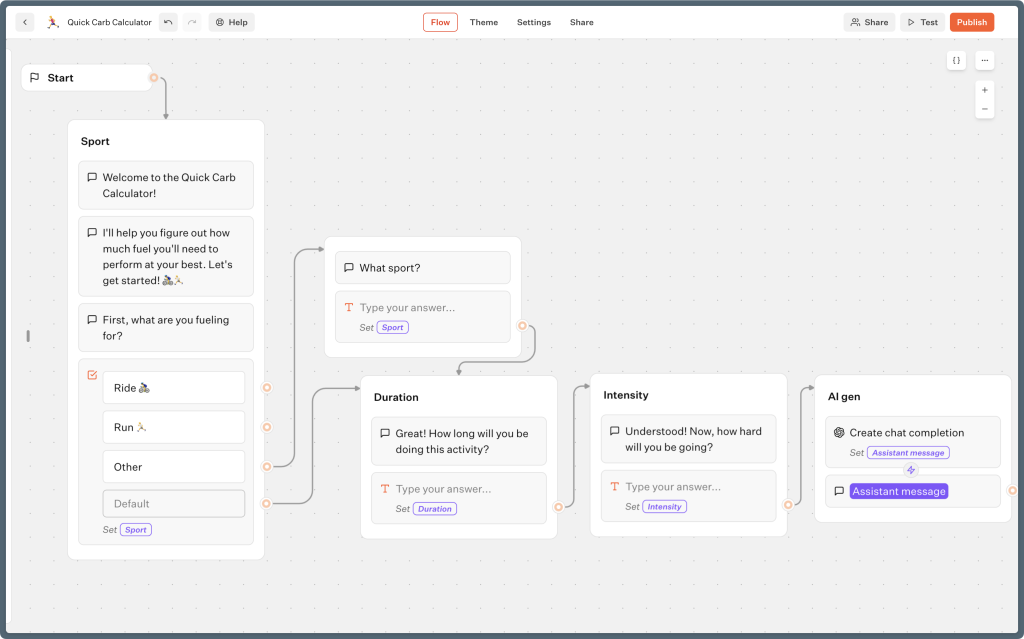
Typebot is a no-code builder for conversational forms and chatbots. Instead of a static form, visitors answer one question at a time in a chat-style flow you design by dragging blocks onto a canvas — text, choices, file questions, conditions, calculations, webhooks, and AI blocks. You can publish a bot as a full page, a pop-up, or an embedded bubble on your site, and on paid plans as a WhatsApp bot. It sits in the same category as the tool in our Botpress free plan review, but where Botpress leans toward AI agents, Typebot leans toward lead capture and conversational forms.
What is actually free on Typebot?
Per Typebot’s own pricing page (checked November 13, 2026), the Personal Free plan includes:
- 200 chats per month — a chat is counted when a visitor starts a discussion, not per message, so a 10-message conversation counts as 1 chat.
- Unlimited typebots — build as many bots and forms as you like.
- Native integrations, webhooks, and custom JavaScript and CSS.
- Community support and documentation; 1 seat (just you).
- Typebot branding stays on free bots — removal starts on Starter.
That is a real production allowance, not a demo. A small site’s lead form, quiz, or booking flow can run inside 200 chats a month for a long time, which puts Typebot ahead of the 100 conversations in our Chatbase free plan review on raw volume.
What the pricing page doesn’t make obvious
Three documented details from Typebot’s own pricing page and FAQ deserve plain type. First, hitting your limit auto-upgrades you: the FAQ says you get a warning email at 80%, another at 100%, and after that “your chat limit will be automatically upgraded to the next tier.” Watch your usage if a bot goes viral — success can turn into a bill.
Second, there is no annual billing at all. Typebot says subscriptions are monthly only because pricing is based on chat usage, so there is no yearly discount to hunt for. Third, AI is bring-your-own-key: the pricing page lists no AI allowance, and Typebot’s OpenAI block runs through your own OpenAI account, so AI answers cost whatever that provider charges, on top of Typebot. Scripted flows — the core product — cost nothing extra. If you self-host the open-source edition, the chat cap disappears entirely; you pay for your own hosting instead.
Free vs paid: what do you actually gain by upgrading?
| Plan | Price | Chats / month | What changes |
|---|---|---|---|
| Free (Personal) | $0 | 200 | Unlimited bots, integrations, webhooks, custom JS/CSS, 1 seat, branding stays |
| Starter | $39/month | 2,000 (extra chats $10 per 500) | 2 seats, branding removed, collect files from users, folders, priority support |
| Pro | $89/month | 10,000 | 5 seats, WhatsApp integration, custom domains, in-depth analytics |
| Enterprise | Custom | Custom | SSO, SLAs, dedicated support |
Our pick per use case: stay on Free for a single lead-capture or survey bot. Take Starter when the branding starts to look unprofessional on a client site or you need file uploads. Pro is for WhatsApp and serious volume.
Pros and cons
Pros
- 200 free chats a month is the largest free allowance among the major website chatbot builders.
- Unlimited bots on free — test several flows without deleting old ones.
- Full builder on free: logic, webhooks, and custom code are not paywalled.
- Open-source self-hosting removes the chat cap if you can run it.
Cons
- AI answers need your own OpenAI account and budget — not included.
- Auto-upgrade at the chat limit can surprise you if a bot spikes.
- Branding removal and file collection require Starter at $39/month.
- Monthly billing only — no annual discount.
Who is Typebot best for?
Typebot’s free plan is best for solo founders, freelancers, and small businesses that want a conversational lead form, quiz, or FAQ flow on a website without paying per seat. If you need a bot that answers open-ended questions from your documents with the AI included, compare it with our Voiceflow free plan review before deciding.
Verdict
For scripted conversational forms, Typebot Free is hard to beat: 200 chats, unlimited bots, and the real builder at $0. Just set a calendar check on your chat count — the auto-upgrade rule means the free plan’s one real risk is a bot that works too well.
FAQ
Is Typebot really free?
Yes. The Personal plan is $0 with 200 chats a month and unlimited typebots, verified on Typebot’s pricing page on November 13, 2026. It is not a trial.
What counts as a chat on Typebot?
One started discussion, regardless of how many messages it contains. If the same visitor returns and the session is remembered, it is not counted again.
Does Typebot include AI for free?
The builder includes AI blocks, but they run on your own provider account, such as OpenAI, so model usage is billed by that provider separately.
What happens if I use more than 200 chats?
Typebot emails you at 80% and 100% of the limit, then automatically upgrades your chat limit to the next tier, per its pricing FAQ.