
Quick verdict
Yamandu Native AI Content Creator Review 2026: AI Writing and Images in Native WordPress Workflows
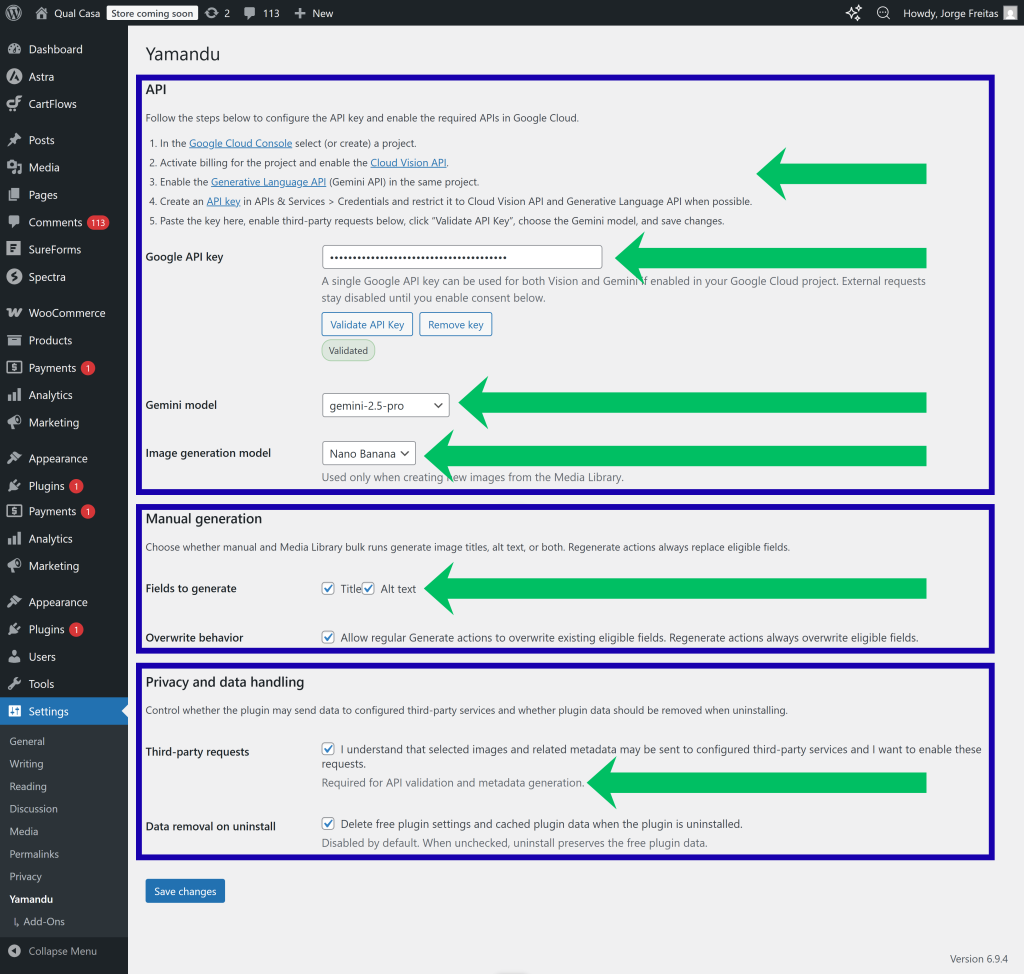
Yamandu Native AI Content Creator is a free WordPress plugin that bakes AI writing, image generation, and image titles/alt text into WordPress’s native workflows — Gutenberg, the Media Library, and bulk actions — instead of adding a separate AI dashboard. It connects through the WordPress AI Client/connectors or a direct Gemini API key, keeping the plugin itself free of subscriptions and credit systems.
Key features
- Native Gutenberg integration. AI writing assistance lives inside the block editor where you draft posts, rather than in a separate screen you have to visit, copy from, and paste back.
- Media Library AI. Image-related AI — generation, titles, alt text — works directly in the Media Library, so your existing image management workflow gains AI without changing shape.
- Bulk actions. Apply AI operations (like generating alt text) across many items at once via WordPress’s familiar bulk-action pattern — a genuine time-saver for sites with large existing media libraries missing alt text.
- AI writing plus image generation. Covers both sides of content creation: draft and refine text, and generate or describe images, from one plugin.
- Flexible AI backends. Works with the WordPress AI Client/connectors or a direct Gemini API key, so you are not locked into a single provider arrangement or a plugin-vendor credit store.
- Free plugin. No subscription or per-use fees from the plugin itself; costs (if any) come from whichever AI backend you connect.
Who it’s for
- WordPress bloggers and publishers who want AI help but do not want to learn — or pay for — yet another standalone AI writing tool.
- Site owners with big existing media libraries missing alt text: the bulk-action alt-text generation directly addresses an accessibility and SEO backlog.
- Agencies and freelancers who standardize on native WordPress workflows and want AI that fits client sites without new dashboards to train clients on.
- Cost-conscious users comfortable with a Gemini API key or the WordPress AI Client who prefer infrastructure they control over vendor credit packs.
It is a weaker fit if you want a guided, all-in-one AI content suite with templates and brand voices — Yamandu’s philosophy is “AI where you already work,” which means less hand-holding than purpose-built AI writing platforms.
What to watch out for
- Backend setup required. The plugin needs an AI backend — the WordPress AI Client/connectors or a direct Gemini API key. That is more setup than a plugin with built-in credits, and connector configuration is the kind of step where non-technical users get stuck.
- Output quality depends on the backend. The plugin is a workflow layer; the writing and image quality come from whichever model your connector or key points at. Manage expectations accordingly.
- AI writing still needs editing. Generated drafts need fact-checking, tone adjustment, and a human pass — especially for anything published under your name or brand. AI assistance is not AI authorship.
- Bulk actions need supervision. Running AI alt text across hundreds of images is powerful, but spot-check the results — auto-generated descriptions can be vague or wrong, and bulk operations multiply mistakes as efficiently as output.
- Research-based review. We have not installed or tested Yamandu ourselves; treat the WordPress.org listing and documentation as authoritative and re-check before relying on any specific feature.
Pricing
Pricing: check current pricing. The plugin is free, and it works with the WordPress AI Client/connectors or a direct Gemini API key — there are no subscriptions or per-use fees from the plugin itself. Your costs, if any, come from the AI backend you connect (for example, Google’s API rates for a direct Gemini key), so check that provider’s current pricing to estimate real cost.
Pros
- AI writing and image tools inside native WordPress workflows — Gutenberg, Media Library, bulk actions — with no new dashboard to learn.
- Bulk alt-text generation directly attacks the accessibility/SEO backlog on older sites.
- Free plugin with flexible backends (WordPress AI Client/connectors or direct Gemini key) — no vendor lock-in on credits.
- Covers both text and images in one install.
- Good fit for agencies standardizing client sites on native WordPress patterns.
Cons
- Requires configuring an AI backend — more setup friction than credit-based plugins.
- Less guided than purpose-built AI writing suites (no templates, brand voices, or workflows out of the box).
- Output quality is bounded by the connected model; the plugin adds convenience, not intelligence.
- Bulk AI operations need spot-checking — mistakes scale as fast as output.
- AI-generated drafts always need human editing and fact-checking before publishing.
Frequently asked questions
Is Yamandu Native AI Content Creator free?
The plugin is free. It connects to AI through the WordPress AI Client/connectors or a direct Gemini API key, so any usage costs come from that backend provider rather than from the plugin.
What does “native workflows” mean here?
Instead of a separate AI dashboard, the plugin adds AI features to the places you already work in WordPress: the Gutenberg block editor for writing, the Media Library for images, and bulk actions for applying AI operations to many items at once.
Can it fix my site’s missing alt text in bulk?
That is one of its headline use cases: bulk actions can generate alt text across many media items at once. Spot-check the results, since auto-generated descriptions are not always accurate.
Do I need a Gemini API key?
Not necessarily — the plugin also works with the WordPress AI Client/connectors. A direct Gemini API key is one supported backend option.
Will it write full blog posts for me?
It provides AI writing assistance inside the editor, but treating any AI output as publish-ready without editing and fact-checking is a bad idea. Think drafting assistant, not autopilot author.