
Quick verdict
Bottom line up front: Tana has reinvented itself. The outliner power users loved is now a meeting-memory product: a botless agent joins your Zoom, Teams, or Google Meet calls, transcribes and summarises them, and files the follow-up work into a structured workspace. If your notes problem is really a meetings problem, Pro at $20 a month billed yearly is a fair price for never writing minutes again. If you loved the old outliner, evaluate this as a new product — because it is one.
Key takeaway: Tana’s bet is that most knowledge work is said in meetings and then lost. Its agent captures what was said, extracts decisions and actions, and keeps them searchable alongside your notes and supertag-structured workspace.
What does Tana do now?
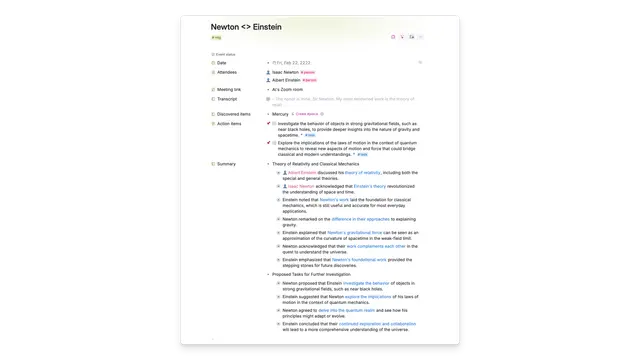
Tana’s current pitch is “perfect meeting memory without taking notes.” You connect a calendar, and Tana’s meeting agent — botless, meaning no visible bot joins the call — records, transcribes, and summarises your meetings on Zoom, Microsoft Teams, and Google Meet. Summaries come with decisions and action items extracted, and the results land in Tana’s workspace, where its signature Supertags structure can turn a meeting mention into a tracked task, a person record, or a project update.
Underneath the meeting layer, the workspace still offers outlining, AI queries over your own content, and — on paid plans — full MCP integrations, so other AI tools can read and write to your Tana data.
How much does Tana cost?
| Plan | Price | What you get |
|---|---|---|
| Free | $0 | 5 hosted meetings/month, 1 calendar connection, 50 AI queries |
| Pro | $25/user/mo, or $20/mo billed yearly | Unlimited hosted meetings, 20x more AI than Free, botless meeting agent, full MCP integrations |
| Max | $100/user/mo, or $80/mo billed yearly | 5x more AI than Pro, unlimited agents, skills and types, dedicated support and onboarding |
| Business | Custom | SAML SSO, advanced security controls, audit logs, custom data residency and retention |
New users get a 30-day free trial with no credit card, and yearly plans carry a 60-day refund window — unusually generous, and worth using, because a meeting tool only proves itself across a real month of calls.
What are Tana’s strengths?
- Botless meeting agent for Zoom, Teams, and Google Meet that transcribes, summarises, and extracts follow-ups.
- Structured by default: Supertags turn meeting content into tasks, people, and projects instead of a pile of transcripts.
- Full MCP integrations on Pro, so your meeting memory is usable by other AI tools and agents.
- A real free plan — 5 hosted meetings a month and 50 AI queries — plus a 30-day trial and 60-day refund window on annual plans.
- AI queries over your own workspace, so you can ask questions across everything your meetings produced.
What are Tana’s weaknesses?
- The pivot cuts both ways: the personal outliner many early users adopted Tana for is no longer the product’s centre — long-time users may find their workflow demoted.
- The free plan is light: 5 meetings a month covers about one recurring weekly call; anyone meeting-heavy hits the wall in week one.
- Max is a big jump: $100 a month per user is enterprise money, and the step from Pro is mostly AI volume and support, not a different product.
- Recording consent still applies: botless does not mean invisible in law — you remain responsible for your jurisdiction’s and your company’s recording rules.
Who is Tana for?
Managers, consultants, salespeople, and founders whose working memory lives in calls. Small teams who want meeting notes that become tracked work, not documents nobody reopens, get the most from Pro. Solo note-takers who rarely meet will find the free plan is all they can use.
Frequently asked questions
Is Tana free?
Yes. The free plan includes 5 hosted meetings a month, one calendar connection, and 50 AI queries. There is also a 30-day free trial of paid plans with no credit card required.
Does Tana join my meetings as a bot?
No — Tana describes its meeting agent as botless for Zoom, Teams, and Google Meet. You still need to follow your organisation’s recording-consent rules.
How much is Tana Pro?
Pro is $25 per user per month billed monthly, or $20 per month billed yearly. It removes the meeting cap, multiplies AI capacity by 20 over Free, and unlocks full MCP integrations.
What happened to the Tana outliner?
The workspace and Supertags are still there, but the product’s centre of gravity has moved to meeting memory. Treat current Tana as a meeting tool with a structured workspace attached.
Verdict
Judge Tana on the job it now does. As a meeting-memory system that files follow-up work instead of dumping transcripts, Pro is sensibly priced and the trial terms are generous. As a personal outliner, it is a different — and for some loyalists, lesser — product than the one they signed up for.