
Quick verdict
Trevor AI Review 2026: The $5 AI Planner That Time-Blocks Your To-Do List
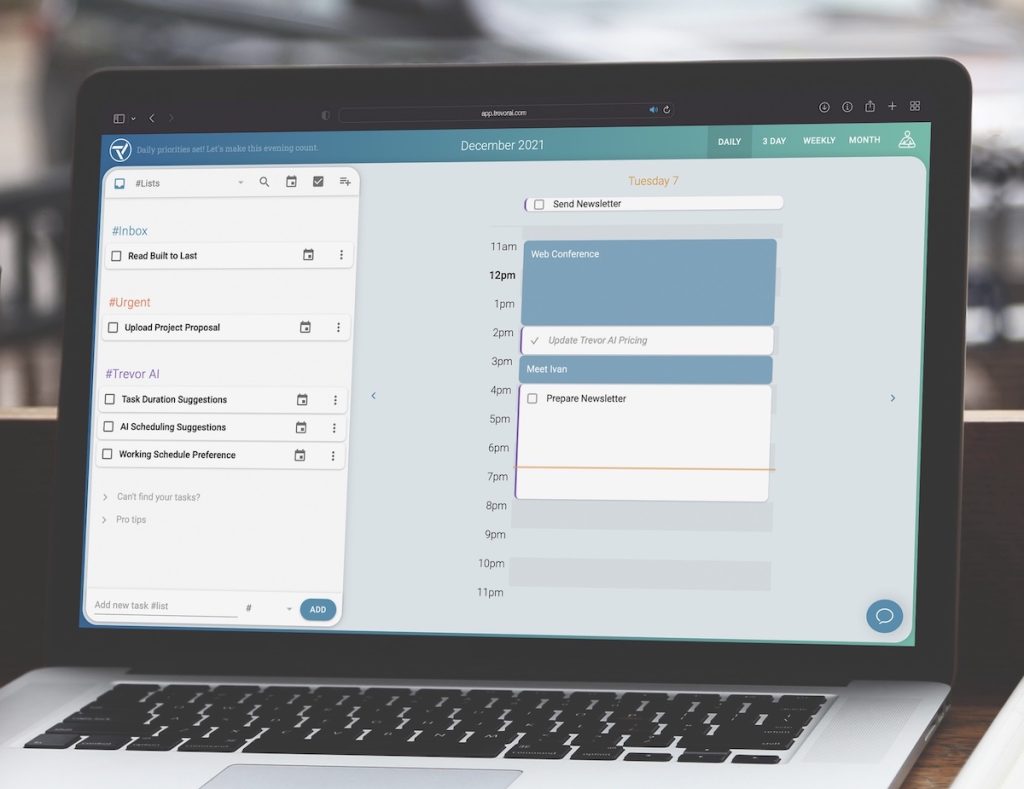
Trevor AI is a web-based daily planner that connects your task lists and calendars, predicts how long each task will take, and time-blocks those tasks into the gaps in your day — with one-click AI scheduling suggestions and a “Plan My Day” button that builds your schedule for you. There is a free plan for personal use, and Pro costs $5 per month billed annually or $6 billed monthly, making it one of the cheapest AI scheduling tools on the market — although Trevor notes the shown price may include a 25% sign-up discount.
What it is
Trevor AI (trevorai.com) starts from a simple observation: tasks written on a list compete invisibly, while tasks placed on a calendar have a time, a duration and a chance of actually happening. Connect your task sources and calendars and Trevor shows everything competing for your time in one view. You can drag tasks onto the calendar yourself, accept Trevor’s AI scheduling suggestions with a click, or press Plan My Day and let it arrange the day or week automatically.
Under the hood, Trevor’s AI estimates task durations, analyses your availability, and suggests a time-block for each task, adapting across sessions. An “Ask Trevor” chat assistant handles requests in plain language — it can create and move tasks and calendar events, manage lists and settings, and handle multi-step requests — and Focus Mode adds a timer for doing the block you scheduled. Trevor claims its scheduling lifts task completion to 85% versus roughly 40% for plain lists — its own marketing figure, not an independent measurement.
Key features
- AI time-blocking. Trevor predicts how long tasks will take, checks your availability, and suggests a calendar slot for each one — accept suggestions individually or in bulk, or drag and drop manually when you disagree.
- Plan My Day (and week). One button builds an optimised day or week from your task list and calendar, replacing hundreds of small scheduling decisions while leaving you in control of the result.
- Two-way, real-time integrations. Task lists from Todoist, Google Tasks and Microsoft To Do sync both ways in real time, alongside Google, Microsoft, Apple iCloud and other CalDAV calendars (Fastmail, Nextcloud and similar) — mark a task complete in any connected app and it updates everywhere.
- Ask Trevor chat assistant. Create, move and schedule tasks and calendar events by asking in plain language instead of clicking through the planner — it also manages lists and settings and handles multi-step requests, and it is included on the free plan. The interface is in English, but tasks and events can be written in any language.
- Focus Mode. A built-in focus timer works on the single task in front of you, with daily planning rituals and progress reviews rounding out the routine.
Pricing
Pricing is from Trevor’s own site. The free plan costs $0 and is aimed at personal use, with core planning, limited automation and one calendar account — the AI chat assistant and core AI scheduling suggestions are included, subject to usage limits. Pro is $5 per month billed annually, or $6 per month billed monthly, and raises those AI limits, unlocks more capable chat models, multiple calendar accounts and personal reporting: scheduling insights, completed-task and billable-hours reports, and PDF exports. Two details deserve highlighting because Trevor states them itself: the price shown may include a 25% discount applied on sign-up, so your renewal price may differ, and Trevor offers a 30-day money-back guarantee with cancellation at any time; new users receive a 7-day Pro trial with no credit card required. Even allowing for the discount caveat, Pro at single-digit dollars a month is priced far below AI calendar rivals that charge three to six times as much per seat.
Who it’s for
- Individuals whose to-do lists live in Todoist, Google Tasks or Microsoft To Do and who want those tasks turned into a realistic calendar without manual Tetris.
- Freelancers, solopreneurs and remote workers planning their own day — Trevor’s use cases centre on people who control their own schedule.
- Budget-conscious planners who want AI scheduling without paying project-suite prices: Pro is $5 a month billed annually.
What to watch out for
- That $5 price carries a footnote. Trevor says the shown price may include a 25% sign-up discount, so check the standard rate before you commit — the tool is cheap either way, but the headline is not the whole story.
- It manages events, but it is a planner first. You can create, edit, move and delete calendar events right inside Trevor, but it is a planning layer over your existing calendars — not a meeting tool with booking links.
- Mobile apps are still in beta. Trevor runs in a modern browser on desktop, tablet and phone, and its iOS and Android apps are available in public beta through TestFlight and Google Play testing — expect rough edges, and there is still no desktop app.
- Individuals first. Collaboration exists — shared task lists, task assignment and scheduling for collaborators with shared-calendar access — but there are no team analytics or collaborator progress reports of the kind managers expect from work platforms. The interface is in English only.
- Research-based review. This review is based on Trevor’s own product, pricing and documentation pages; we have not planned a live work week in it ourselves.
Pros
- Genuinely cheap: Pro at $5/month billed annually, with a free plan below it.
- Duration prediction plus one-click scheduling suggestions remove the worst planning friction.
- Real-time two-way sync with Todoist, Google Tasks, Microsoft To Do and your calendars.
- Narrow, honest scope — it plans your day instead of pretending to run your company.
Cons
- Headline price may include a 25% sign-up discount; renewal terms need a look.
- Mobile apps are public betas, not finished releases; no desktop app.
- No team analytics or collaborator progress reports (reporting is personal, and Pro-only).
- Interface is English-only, and the AI chat is a planning assistant rather than a general-purpose agent.
Frequently asked questions
Is Trevor AI free?
Yes. Trevor offers a free plan for personal use with core planning features, limited automation, the AI chat assistant and core AI scheduling suggestions (with usage limits). Pro, which raises the limits and adds multiple calendars and personal reporting, costs $5 per month billed annually or $6 billed monthly.
Does Trevor AI work with Todoist and Google Calendar?
Yes. Trevor integrates with Todoist, Google Tasks and Microsoft To Do, and with Google, Microsoft, Apple iCloud and other CalDAV calendars, syncing two-way in real time — completed tasks and scheduled blocks stay consistent across every connected app.
How does Trevor’s AI scheduling work?
Trevor predicts each task’s duration, analyses your calendar availability, and suggests a time-block you can accept with one click. Plan My Day goes further and arranges your whole day or week automatically, adapting its predictions as you keep planning with it.