
Krisp Review: Free AI Noise Cancellation for Every Call
What Krisp Is
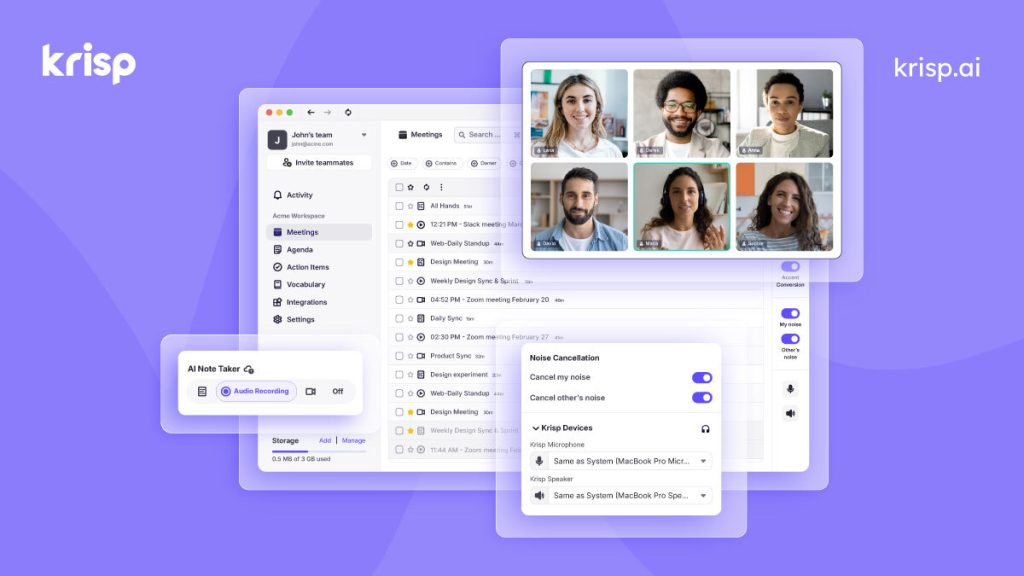
Krisp is an AI-powered audio app that sits between your microphone (and speakers) and your conferencing software. Install it, select “Krisp Microphone” in Zoom/Teams/Meet/Webex, and its neural networks strip background noise from your voice in real time — dogs, traffic, typing, crying babies — while echo cancellation and HD voice processing clean up the rest. It works in both directions, so it can also silence noise coming from other call participants.
Krisp has grown beyond noise cancellation into a full AI meeting assistant: unlimited transcription, AI-generated summaries and action items, call recording, and even real-time accent conversion (toward neutral American English) on paid tiers. But noise cancellation remains the killer feature and the reason most people install it.
Based on specs, pricing pages, and 2026 reviews, Krisp’s noise removal is consistently rated among the best available — better than the built-in suppression in most conferencing apps — though it uses noticeable CPU (around 10–15% on a modern laptop in independent testing) and requires an internet connection for AI processing.
What’s Actually Free
Krisp’s free plan is permanent (not a 14-day trial — that trial unlocks Pro features temporarily, then you drop to the free tier). Verified from Krisp’s pricing page and 2026 reviews:
- 60 minutes per day of AI noise cancellation
- Unlimited meeting transcripts and audio recording
- 2 AI meeting notes / action-item summaries per day
- 7-day meeting history
- English-only transcripts and summaries on free
- Works with every conferencing app via virtual mic/speaker drivers
The 60-minute daily cap is the main constraint — fine for a few calls, insufficient for all-day meeting marathons. Unlimited noise cancellation, unlimited AI notes, multilingual transcripts, and accent conversion require Pro (around $8–9/month billed annually) or Business ($15/month).
Key Features
- Bidirectional AI noise cancellation — removes noise from your mic and from other speakers
- Echo and room-reverb cancellation for cleaner, more natural voice
- HD Voice enhancement for fuller vocal quality
- Virtual microphone/speaker — works with Zoom, Google Meet, Teams, Webex, Skype, and any app that accepts audio devices
- AI meeting notes — automatic summaries and action items (2/day on free)
- Unlimited transcription and call recording even on the free plan
- Accent conversion — real-time softening toward neutral American English (paid)
- Low-power mode to reduce CPU load on older machines
Pros and Cons
✓ Pros
- Noise cancellation quality is genuinely excellent — dogs, keyboards, and street noise simply vanish
- Works with every conferencing app; no per-app setup
- Free tier includes unlimited transcripts, which many rivals charge for
- No credit card required to start
- Low CPU usage relative to the processing it does
✗ Cons
- 60 minutes/day of noise cancellation runs out fast on heavy meeting days
- Occasional audio distortion or “watery” artifacts reported by some users
- Requires internet — no offline processing
- Noticeable CPU/battery drain on older laptops
- Meeting recording reliability issues noted in some 2026 reviews
- No mobile app on the free tier’s feature set
Who It’s Best For
Krisp’s free tier is best for remote workers and freelancers taking a few calls a day from noisy environments — home offices with kids, pets, construction outside, or shared spaces. An hour of daily silence is enough to cover the calls that matter. It’s also a smart free meeting transcription tool even if you don’t need noise cancellation.
If you’re on calls all day, the 60-minute cap will frustrate you into Pro quickly — which, at ~$8/month, is reasonable for a daily driver. Gamers and streamers with NVIDIA GPUs should also check NVIDIA Broadcast, which does noise removal locally for free.
FAQ
Is Krisp really free?
Yes — the free plan is permanent with 60 minutes/day of noise cancellation, unlimited transcripts, and 2 AI notes per day. (There’s also a 14-day trial that temporarily unlocks all Pro features.)
Does Krisp work with Zoom, Teams, and Google Meet?
Yes. Krisp installs virtual microphone and speaker drivers — you select them in any conferencing app and it works everywhere, including browsers.
Does Krisp remove background noise from other people on the call?
Yes — its speaker-side cancellation can suppress noise coming from other participants’ audio too.
How much CPU does Krisp use?
Independent testing puts it around 10–15% on a modern laptop (e.g., M2 MacBook Air). Older machines may feel it more during video calls.
Can I use Krisp for podcast recording?
You can, and many do for remote interviews — but for the highest quality, record locally (Riverside, Descript) and clean up with Adobe Enhance or Audo Studio instead. Krisp is optimized for live calls, not production audio.
Bottom Line
Krisp solves one problem better than almost anything else: making you sound professional on calls from unprofessional environments. The free tier’s 60 daily minutes cover the average remote worker’s critical calls, and unlimited transcripts are a bonus nobody else gives away. Install it, flip it on for your next noisy call, and you’ll hear exactly why millions of remote workers keep it running.