
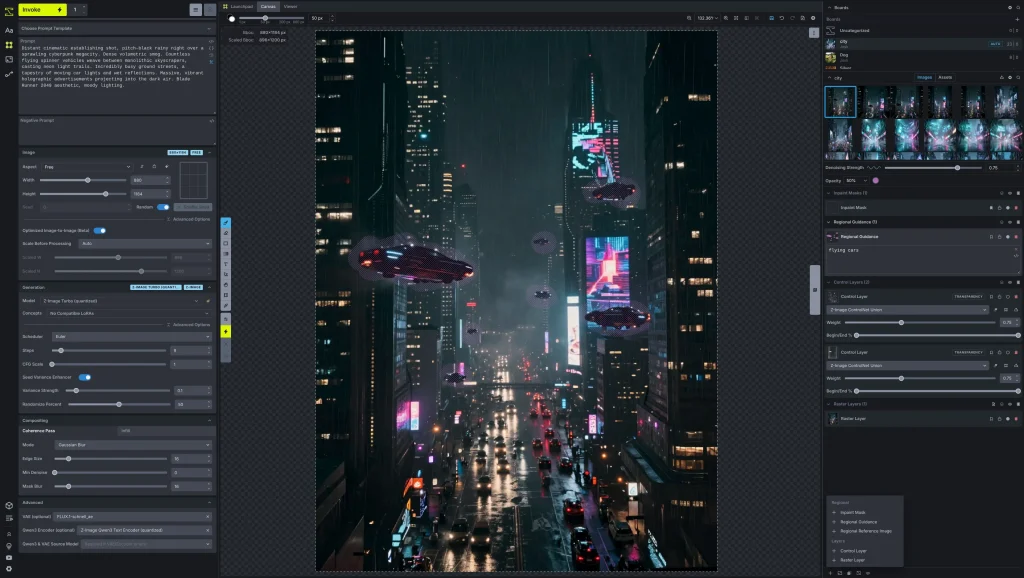
Bottom line up front: InvokeAI (now branded simply as Invoke) is a completely free, open-source AI image generation studio that runs on your own computer. There is no credit meter, no watermark, and no subscription — the trade-off is that your hardware does all the work, and the hardware bar for modern models is higher than most coverage admits.
What InvokeAI actually does
Invoke is a creative engine for generating and editing images with models such as Flux, SDXL, and SD 1.5. Its centerpiece is a unified canvas with layer-based editing, so you can generate, inpaint, outpaint, and composite in one place instead of bouncing between tools. It also includes node-based workflows for reproducible pipelines, a model manager for checkpoints, LoRAs, Textual Inversions, and ControlNets, and batch generation with upscaling. Everything runs locally: Invoke’s own site stresses that your data, prompts, and creations stay on your hardware.
What is actually free?
All of it. Invoke is free and open-source under the Apache 2.0 license, self-hosted, and available for Windows, macOS, and Linux. There are no paid tiers to unlock the canvas or the node editor. The only costs you can run into are optional: if you connect an externally hosted model (for example an API-backed model from another provider), that provider bills you under its own terms — the local models cost nothing per image.
What the download page doesn’t make obvious
Here is the detail most roundups skip, taken straight from Invoke’s official hardware documentation. The minimum VRAM depends entirely on the model family: SD 1.5 needs about 4GB of VRAM and 8GB of RAM, SDXL needs 8GB of VRAM and 16GB of RAM, and FLUX.1 needs 10GB of VRAM and 32GB of RAM. Nvidia cards older than the GTX 16xx / RTX 20xx generation (compute capability 7.5) are not supported by Invoke’s current CUDA build at all. AMD GPUs are supported on Linux only, and the Mac version requires Apple Silicon — Intel Macs are not compatible. In other words, “free” is real, but a 2017 gaming laptop will not run the headline models.
A second gotcha: there is no hosted Invoke anymore. Older coverage still lists hosted Starter and Premier plans, but Invoke’s own release notes describe current versions as Community Edition releases since the closure of the commercial venture. What you download today is the community-maintained local app — plan on installing and maintaining it yourself, with community support rather than a vendor help desk.
How it compares
If you want maximum node-level control and do not mind a steeper learning curve, our ComfyUI review covers the other big free local option. If you want the simplest possible offline generator, see our Fooocus review. Invoke sits between them: more polished and canvas-focused than ComfyUI, more capable and production-oriented than Fooocus.
Pros and cons
- Pros: Completely free with no generation caps or watermarks; layer-based canvas built for real editing, not just prompting; 100% local and private; broad model support including Flux and SDXL.
- Cons: No hosted version — you install, update, and troubleshoot it; modern models need a capable GPU and plenty of RAM; each model’s own license still governs commercial use of its outputs.
Who is InvokeAI best for?
Invoke is best for illustrators, designers, and hobbyists who generate images regularly, own a suitable GPU or Apple Silicon Mac, and would rather invest setup time once than pay a per-credit subscription forever. It is a poor fit if you need images from a phone, a Chromebook, or a work laptop you cannot install software on — use a hosted free tier instead.
Frequently asked questions
Is InvokeAI really free?
Yes. It is free and open-source under the Apache 2.0 license, with no paid tier for the local app. Optional externally hosted models are billed by their own providers.
Does InvokeAI add watermarks?
No. Images you generate locally carry no Invoke watermark.
Can I use InvokeAI on a Mac?
Yes, but only on Apple Silicon (M-series) Macs, with 16GB or more of memory recommended. Intel Macs are not compatible with the current download.
Can I sell images I make with InvokeAI?
The app’s Apache 2.0 license covers the software, not the models. Check each model’s own license before commercial use — that rule applies to every local generator, not just Invoke.
Free tier and hardware requirements checked November 21, 2026, against invoke.ai and Invoke’s official documentation. Research-based review; no hands-on testing claims.