
Quick verdict
InspectMind AI Review 2026: AI Plan Check That Prices by the Sheet and Cites Every Finding
Updated November 1, 2026 – Tested Intelligence
Quick verdict: InspectMind AI is a self-serve AI plan checker that reviews full drawing sets, specs and codes in hours and returns a prioritized issue list where every finding cites the sheet, a drawing snippet and the code or spec section. It fits architects, engineers, GCs and owners who want a second set of eyes before permitting. Pricing is pay-per-check, starting at $25, with no sales call required.
What it is
InspectMind, a Y Combinator W24 company, reviews construction PDFs across architectural, structural, civil, MEP, fire and landscape disciplines together with specifications, submittals, your own QA checklists and local ordinances. The vendor says it is used by 600+ firms on 1,700+ projects, and that a typical commercial project flags 259+ issues. Those are vendor-reported figures, stated here as such.
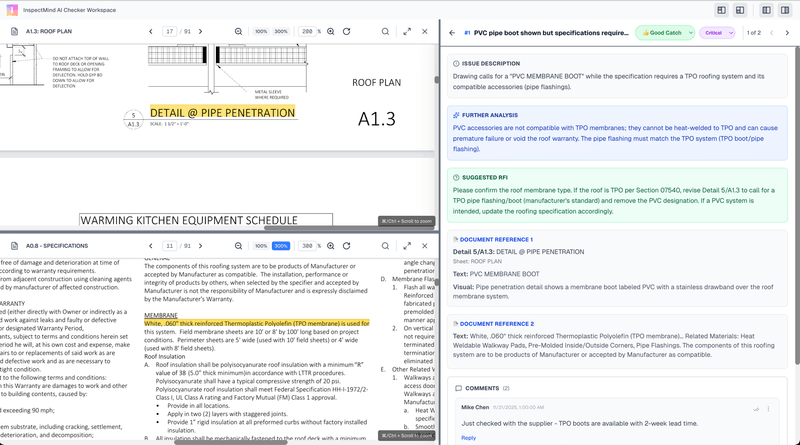
Findings are ranked critical to low – a fire-rated corridor break, an egress width below code, a spec-versus-drawing contradiction – and each carries evidence a person can verify in seconds. Results export to Excel or Procore, with a one-click RFI PDF per issue.
Key features
- Cross-discipline plan check: drawings, specs, reports and submittals cross-referenced against each other, not read sheet by sheet in isolation
- Code checking against IBC, CBC, FBC, ADA, Title 24, NFPA 13/20, FM Global and custom codes, with jurisdiction amendments uploaded as PDFs
- Evidence for every finding: sheet reference, drawing snippet and code or spec citation, ranked from critical to low
- Works with scanned, hand-drawn and native digital PDFs, at 30%, 60%, 90% or 100% design stages
- Self-serve workflow: upload, see the price before you run, pay by card online, with invoice, PO or ACH for enterprise accounts
Pricing
There is no subscription. Pricing is per check, shown before you run, and the vendor’s own FAQ gives the full tier math – which is where the useful detail sits.
What the pricing page doesn’t make obvious: On the vendor’s own site, Standard is $2.50 per drawing page, dropping to $1.50 per page after the first 100 pages, plus $0.25 per spec page, with a $25 minimum per check. Pro is $4 per drawing page and Max is $6, with spec pages at $0.50 and $0.75. The worked example the vendor gives is 125 drawings plus 1,200 spec pages costing $587.50 on Standard. Sets up to 10 drawing pages run free with no card required, rechecks of revised sets are charged at the same per-sheet price, and there is a money-back guarantee: five or more meaningful issues found, or a full refund.
Who it’s for
Architects, engineers, GC preconstruction and QA/QC teams, owners and developers who issue or receive large drawing sets and lose money to RFIs, change orders and field rework that started as a drawing conflict. Teams without a dedicated plan-review department get the clearest value, because it is self-serve with no implementation project.
Who should skip it
Teams looking for a stamped, licensed engineering review should skip it as a substitute – InspectMind itself says its findings do not certify compliance and do not replace professional judgment. If your sets are small, simple residential work you already check thoroughly in an hour, the per-check fee may buy you little beyond the free 10-page trial.
Pros
- Evidence-backed findings you can verify, instead of AI conclusions you have to trust
- Transparent per-sheet pricing with the price shown before you pay, and a free 10-page check
- Fast turnaround: the vendor says small checks often return in about an hour and 100-500 page projects in a few hours
- Catches cross-discipline and spec-versus-drawing conflicts that single-sheet review misses
- 5+ issues or a full refund guarantee lowers the risk of a first test
Cons
- AI findings can be wrong or incomplete; the vendor itself warns a clean result does not establish compliance
- Every finding still needs a qualified person to review it, so it adds a review step rather than removing one
- It checks the documents you upload; it cannot catch a requirement you never gave it and did not include in a code or checklist
- Issue counts and savings scenarios on the vendor site are modeled or vendor-reported, not guarantees
FAQ
How much does InspectMind AI cost for a real set?
Standard is $2.50 per drawing page for the first 100 pages and $1.50 after that, plus $0.25 per spec page, with a $25 minimum. A 200-sheet drawing set with no specs costs $400 on Standard by the vendor’s own math. Pro and Max cost $4 and $6 per drawing page. Up to 10 drawing pages are free, with no card required.
Does InspectMind replace a licensed plan reviewer?
No. The vendor states plainly that findings support your team’s review, do not certify compliance, and do not remove liability. Treat it as a fast, thorough second check whose evidence still needs professional review before you act on it.
What codes and documents can it check?
IBC, CBC, FBC, ADA, Title 24, NFPA 13/20, FM Global and custom codes, plus your internal QA checklists, standards and local ordinances uploaded as PDFs. It accepts architectural, structural, MEP, civil, fire and landscape drawings, specs, reports, shop drawings and submittals, including scanned PDFs.
Bottom line
InspectMind AI is one of the easiest construction AI tools to test honestly: run the free 10-page check, or better, run it on a completed project where you already know the issues, and judge it on how many real findings survive your own review. If it catches one critical conflict before permitting, the price is small next to one RFI – but budget it as an added QA step, not a replacement reviewer.