
The short version
ChatPDF lets you upload a PDF and ask it questions in plain English — summaries, specific facts, explanations of dense paragraphs — with every answer linked back to the page it came from. The free plan gives you 2 documents a day (up to 120 pages and 10 MB each) and about 50 questions a day, with no account required to start. That is genuinely useful for a student working through readings or anyone checking a contract. If you process documents all day, you will hit the wall fast, and ChatPDF Plus is $19.99/month.
What ChatPDF does
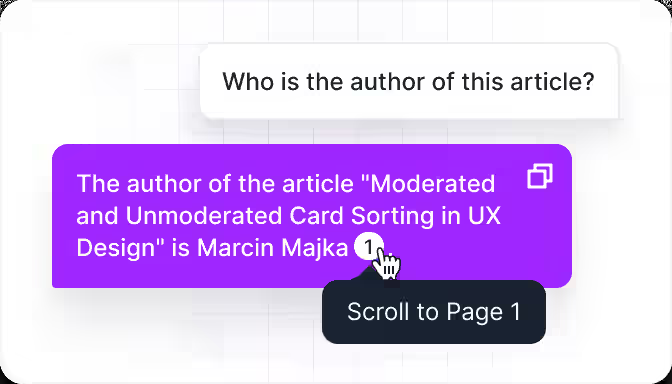
You drop a file onto chatpdf.com, wait a few seconds while it reads and indexes the document, then chat. It can summarize the whole thing, pull out a specific figure, explain a paragraph, or answer follow-ups while keeping the thread of the conversation. The feature that separates it from pasting text into a generic chatbot: every answer carries citations that scroll to the exact source page, so you can verify instead of trusting. It handles research papers, contracts, manuals, and textbooks, works in dozens of languages, and now also accepts Word, PowerPoint, Markdown, and text files.
What is free vs. what costs money
Free:
- 2 documents per day
- Up to 120 pages and 10 MB per file
- Roughly 50 questions per day
- Page-referenced answers and the side-by-side document view
- No account needed to start (a free account adds saved history and multi-file folders)
ChatPDF Plus ($19.99/month): unlimited documents, up to 2,000 pages and 150 MB per file, more daily questions, and the best available model. The exact Plus limits are shown at checkout, so confirm them there.
The honest limitations
Three things to know before you rely on it. First, it is one document at a time on the free plan — you cannot ask “how does Document A compare to Document B” without a multi-file setup. Second, answer quality is reliable on short and medium documents but degrades on very long ones; reviewers note it can miss details or blur sections together past a few hundred pages. Third, it struggles with scanned PDFs and low-quality document images, and like all AI tools it can occasionally misattribute a page reference — verify anything you intend to rely on.
Who ChatPDF is best for
- Students: summarize a chapter, quiz yourself with generated questions, or decode a dense paper before a seminar.
- Professionals: scan a contract or report for the clauses that matter without reading all 80 pages.
- Researchers: triage a stack of papers quickly, then read the important ones fully.
Pros and cons
Pros:
- Free plan starts instantly — no signup, no credit card
- Every answer is cited to a specific page you can inspect
- Purpose-built side-by-side interface beats a generic chat window for document work
- Multilingual documents and answers
Cons:
- Only 2 documents and ~50 questions a day on the free plan
- No cross-document comparison without a paid/multi-file setup
- Weak on scanned PDFs and very long documents
- Your documents are uploaded to ChatPDF’s servers — think twice before uploading confidential files
FAQ
Is ChatPDF free?
Yes — the free plan lets you analyze 2 documents a day (120 pages, 10 MB each) with about 50 questions, no account required. ChatPDF Plus ($19.99/month) removes those caps.
Do I need an account to use ChatPDF?
No. You can start chatting with a PDF immediately. A free account unlocks saved history, folders, and multi-file chats.
Is my document private on ChatPDF?
ChatPDF says files are encrypted in transit and at rest, and you can delete your documents at any time. Still, your file is processed on their servers — avoid uploading anything truly confidential.
ChatPDF vs. ChatGPT for PDFs — which is better?
For understanding a document, ChatPDF’s cited, side-by-side interface is faster to verify. For general questions plus light document help, ChatGPT or Google’s free NotebookLM (which handles many more sources) may serve you better.
What file types does ChatPDF accept?
PDF, Word (.doc/.docx), PowerPoint (.pptx), Markdown (.md), and plain text (.txt).
Free-tier details checked Oct 2, 2026. Limits and Plus pricing change — check chatpdf.com before you rely on them. This is a research-based review; no hands-on testing claims.