
Quick verdict
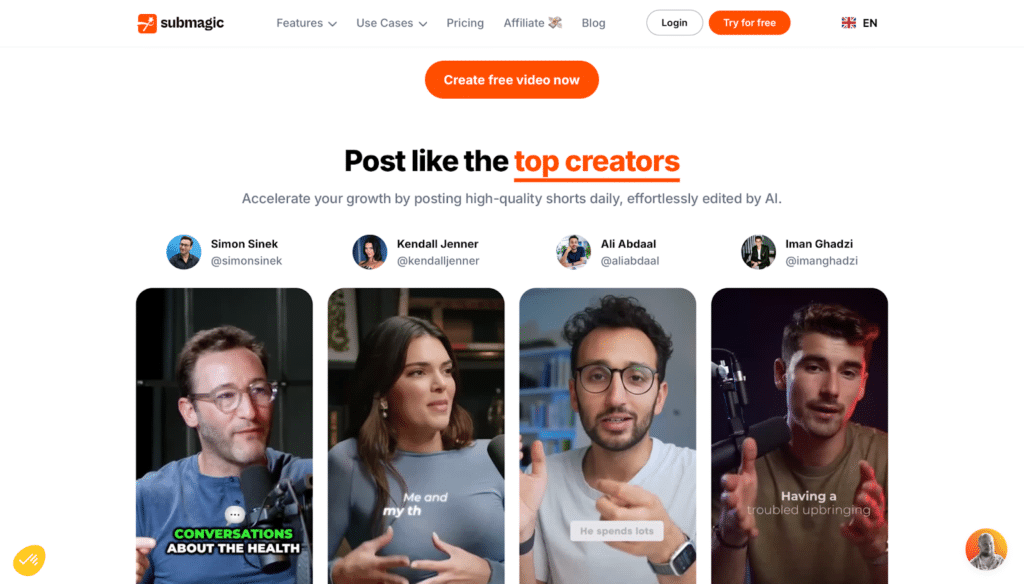
Bottom line up front: Submagic turns a plain talking-head video into a captioned short that looks native to TikTok, Reels, and Shorts — animated captions, emojis, zooms, B-roll, and silence removal in one pass. It is a finishing tool, not an editor and not a clip finder: you bring a short video, it makes that video look published. Starter is $19 a month, or $12 a month billed yearly, and the free tier is just 3 watermarked videos to test the look.
Key takeaway: Caption style is the product. If your shorts are already filmed and cut, Submagic’s templates and automation save the most tedious hour of the workflow. If you need to find clips inside long recordings, that is a different tool’s job.
What does Submagic do?
Upload a video and Submagic transcribes it, generates animated captions in a choice of trending styles, and layers on the short-form finishing touches: auto-emojis, AI zooms, B-roll (free stock on Starter, Storyblocks on Pro and up), sound effects, and hook titles. A text-based editor lets you trim by deleting words from the transcript, and higher tiers remove silences and bad takes, clean up audio, and correct eye contact.
Submagic says its captions work in 123 languages. Paid plans add brand kits, publishing with analytics, and — on Business — 4K exports and API access. Plans meter finished videos: each tier is defined by videos per month and a per-video length cap.
How much does Submagic cost?
| Plan | Price | What you get |
|---|---|---|
| Free | $0 | 3 videos/month with watermark, animated captions — a look-and-feel test, not a workflow |
| Starter | $19/mo, or $12/mo billed yearly | 15 videos/month, up to 2 minutes each, 1080p, no watermark, free B-roll and audio, text-based trimming |
| Pro | $39/mo, or $23/mo billed yearly | 40 videos/month, up to 5 minutes each, Storyblocks B-roll, 2K exports, AI zooms, clean audio, silence and bad-take removal, brand kit, 3 users |
| Business + API | $69/mo, or $41/mo billed yearly | 100 videos/month, up to 30 minutes each, 4K at 60 FPS, 10 custom templates, API minutes included |
Pricing is per member, and the meter that matters is videos per month combined with the per-video length cap. A daily poster exhausts Starter’s 15 videos in two weeks; a podcaster with 20-minute recordings cannot use Starter or Pro at all, because of the length caps, not the video count.
What are Submagic’s strengths?
- Animated caption styles that look native to short-form platforms, generated automatically from the transcript.
- Captions in 123 languages, with AI translation for publishing the same video to more than one market.
- One-pass finishing: B-roll, auto-zooms, emojis, hook titles, and sound effects applied together instead of tool-hopping.
- Text-based trimming plus silence and bad-take removal on Pro, so the rough cut happens in the transcript.
- Clear, honest metering: plans are counted in finished videos and minutes, which is easy to budget against a posting schedule.
What are Submagic’s weaknesses?
- Length caps bite first: 2 minutes on Starter and 5 on Pro rule out webinars, lessons, and most long-form repurposing.
- It does not find your clips: Submagic finishes a short you give it; mining a two-hour recording for moments is a different product category.
- The free tier is a demo: 3 watermarked videos a month is enough to judge caption style and nothing more.
- Style can outrun substance: the same animated templates are everywhere on short-form feeds now — recognisably ‘Submagic’ is a look some brands will not want.
Who is Submagic for?
Creators, coaches, and small marketing teams publishing talking-head video several times a week. Pro is the realistic tier for anyone posting daily. Solo creators posting a few times a week can live on Starter — provided every video is under two minutes.
Frequently asked questions
Is Submagic free?
There is a free tier with 3 videos a month, exported with a watermark. Watermark-free publishing starts with Starter at $19 a month, or $12 a month billed yearly.
How much does Submagic cost in 2026?
Starter is $19/month ($12 billed yearly) for 15 videos, Pro is $39/month ($23 yearly) for 40 videos, and Business is $69/month ($41 yearly) for 100 videos, priced per member.
Does Submagic work in other languages?
Yes — Submagic lists caption support for 123 languages and AI translation of captions, so one video can be published in several languages.
Can Submagic turn long videos into shorts?
Not really — that is a clip-finding tool’s job. Submagic’s own length caps (2 minutes on Starter, 5 on Pro, 30 on Business) tell the story: it finishes shorts you have already selected.
Verdict
Submagic is the right buy when captions and finishing are your bottleneck and your videos are already short. Price it against your posting calendar — videos per month and the length cap, not the headline price, decide which tier you actually need. If your bottleneck is finding the moments in long recordings, buy a clipping tool first and Submagic second, if at all.