
Quick verdict
Trimble Connect Review 2026: The Erection Model, Coordinated in the Cloud
Updated October 16, 2026 – Tested Intelligence
Quick verdict: Trimble Connect is the shared model room for a steel job: the Tekla model, engineering files and GC documents in one cloud project the crew opens on a tablet. Automated clash detection finds steel-versus-embed and steel-versus-MEP conflicts while they are still cheap, to-dos get pinned to the exact member in 3D, and workflow extensions track piece status from fab to erected. The Personal tier is free with clash detection included; Business is $12.99 per user per month.
What it is
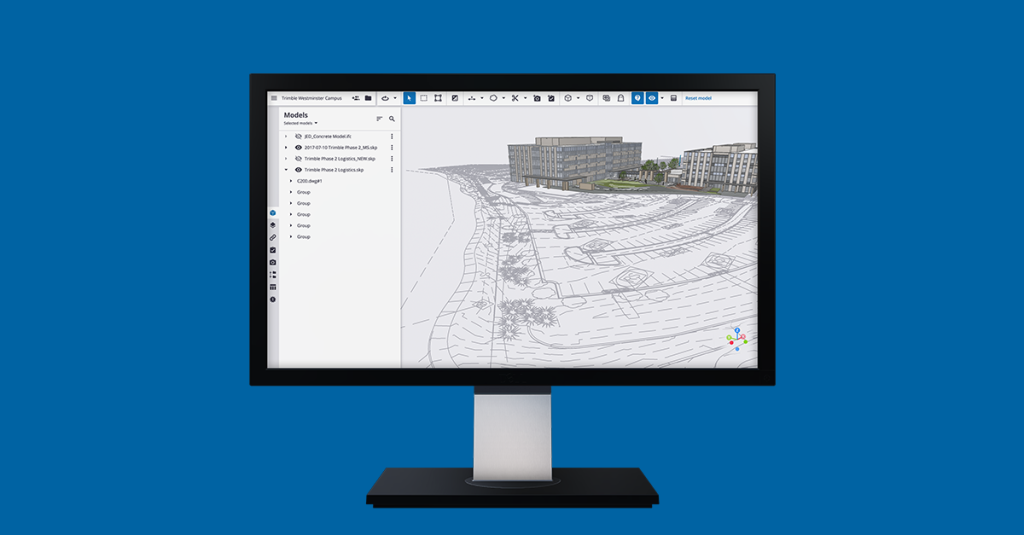
Trimble Connect is Trimble’s cloud collaboration platform – a common data environment for construction models and documents. It does not draw steel or design connections. It stores, combines and serves the models other tools make – Tekla’s native TrimBIM plus IFC, Revit, SketchUp, DWG and PDF – on one version for everyone.
For an erection outfit, the point is coordination before the pick. The foreman opens the federated model on a tablet, spins to the bay being set today, checks the connection in 3D, and raises a to-do pinned to the member itself when something does not line up. Self-perform steel contractors such as Barton Malow run their field workflow this way, per AEC Magazine’s Trimble Dimensions coverage.
Key features
- Automated clash detection (TrimBIM engine) across combined models – steel against embeds, concrete and MEP, with a deduplicated clash list
- Model viewing and combining on web, desktop and mobile; opens Tekla models natively plus IFC, Revit, SketchUp, DWG and PDFs
- ToDos assigned in 3D and exchanged via BCF, so a field issue lives on the member, not in an email thread
- Releases and version control: the crew always opens the current issued model
- Workflow extensions on Business Premium, including status sharing that colors model objects by fabrication and erection status
- Offline caching in the mobile apps for deck use
Pricing
Personal is free: one project, up to 10 GB of storage and up to five project members, including BIM coordination, clash detection and task tools. Business is $12.99 per user per month and removes the caps: unlimited projects, members and storage, plus file metadata and administration. Business Premium is $23.95 per user per month billed annually, adding advanced BIM tools and full access to the workflow extensions. Enterprise terms are quoted. Erectors invited into a GC’s project ride on its licensing – often zero cost to the crew.
Who it’s for
Erectors and foremen on modeled jobs – most commercial steel now – who need the current model in the field and a clean way to catch clashes and raise issues before they cost crane time. Detailers and GCs coordinating several trades get the federation and clash workflow. If your Tekla detailer already publishes to Connect, the crew side is nearly free to adopt.
Who should skip it
Anyone who needs to author the model or design the connections: Connect views, checks and coordinates, it does not detail. Crews on small, unmodeled jobs will not feel its absence. And if your GC will not share models or restricts field access, the platform has nothing to coordinate.
Pros
- Clash detection included even on the free tier – the highest-value feature is not paywalled
- Native Tekla/TrimBIM handling means the model the crew sees is the model the shop detailed
- To-dos and issues live on the 3D member, which ends the “which connection?” phone call
- Per-user price is low next to one hour of crane standby caused by a coordination miss
Cons
- Its value is borrowed: it depends on partners actually publishing current models and working the to-dos
- Very large federated models can strain older tablets, and field connectivity still matters for sync
- Status tracking and the richer extensions sit behind Business Premium
- Another login and project invite to manage on top of the GC’s own platform of choice
FAQ
Is Trimble Connect free for ironworkers?
There is a free Personal tier with one project, five members, 10 GB of storage and clash detection included. In practice, crews usually join the GC’s or detailer’s paid project and pay nothing.
Does Trimble Connect replace Tekla Structures?
No. Tekla authors the model; Connect distributes and coordinates it – the model in the foreman’s hand.
Can the crew use it without signal?
The mobile apps cache models locally, so a downloaded model opens offline on the deck. Updates sync on reconnect.
Bottom line
Trimble Connect will not hang a single beam for you, but it decides whether the beam that arrives fits the steel already standing. For erection crews on Tekla-modeled work, the free tier is a no-cost upgrade from guessing off PDFs, and Business pays for itself the first time a clash gets fixed in the model instead of at the hook.