
Quick verdict
Descon Plus Review 2026: Automated AISC Connection Design and Checks
Updated October 16, 2026 – Tested Intelligence
Quick verdict: Descon Plus (today’s version is Descon 8) does one job and has done it since 1984: designing and checking the structural steel connections ironworkers bolt and weld together. Feed it a beam-to-column joint and it generates an optimized design, checks every AISC limit state, and shows the governing ratio on a gauge while drawings and hand-style calculations update live. It is listed in the AISC software database and sells per seat, with a published $80-a-month Flex plan. It stays deliberately narrow: connections only.
What it is
Descon is structural steel connection design software for engineers and detailers. It covers the everyday erection diet: beam-to-column shear and moment connections, beam and column splices, beam-to-girder joints, and brace connections including Chevron, Knee and K-braces via the Uniform Force Method.
The workflow is built for speed and audit. In Design mode, Descon creates an optimized connection from your default preferences in a few clicks; in Check mode, it verifies a connection somebody else drew – the shop-drawing review and delegated-design case. Every result comes with complete calculations in hand-calc format, so an engineer of record can follow the math line by line.
Key features
- Automatically creates optimized connection designs from minimal input, then checks every AISC limit state, from bolt shear and block shear to weld strength
- Limit-state ratio gauges show the governing check and overall capacity at a glance; click a gauge to jump to that calculation
- On-the-fly switching between AISC 13th, 14th and 15th editions (AISC 360) and between ASD and LRFD, per connection
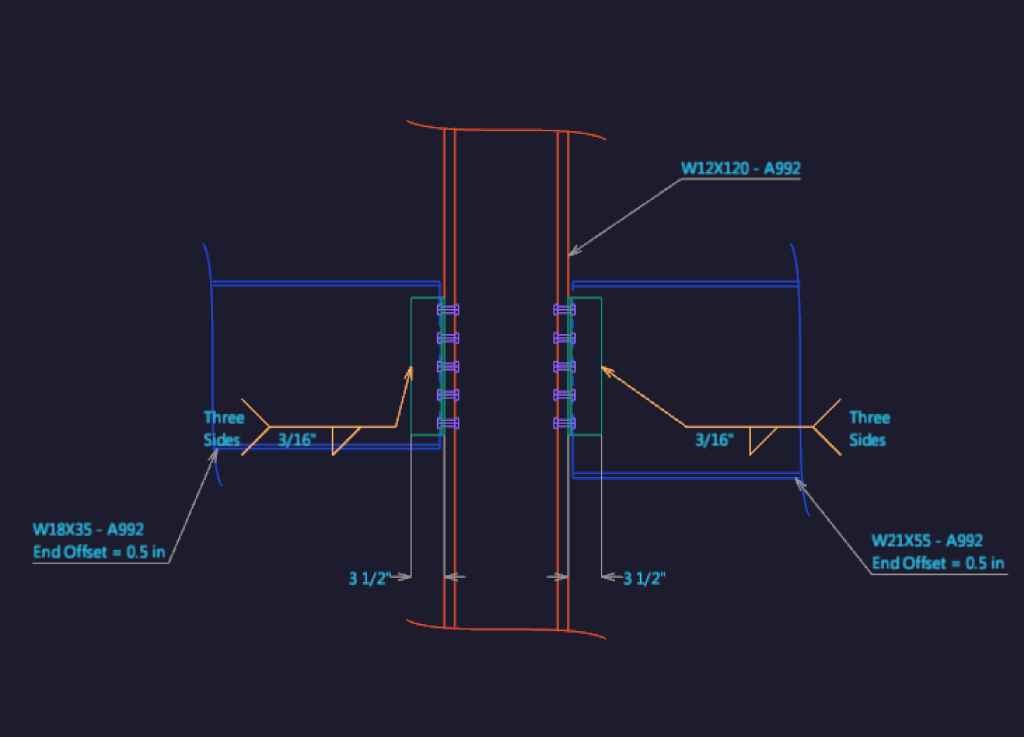
- Drawings and reports update instantly as inputs change, with 2D and 3D views of the joint and drag-adjustable callouts
- Complete hand-style calculation reports in PDF, RTF or HTML, plus a DXF of the connection drawing for CAD and detailing systems
- Seismic design covering ANSI/AISC 341 and prequalified moment connections per AISC 358; a project manager bundles many connections into one project
Pricing
Licensing is per seat: one seat allows one concurrent user, and extra named users sharing a seat can be added under an Annual Maintenance Plan. The vendor’s store lists the Descon 8 Next Flex plan at $80 per month per seat, month-to-month. Annual Maintenance Plans keep a permanent seat current, and a free trial lets you run your own standard connections through it first. No free tier; Windows desktop only.
Who it’s for
Connection engineers, detailing firms doing delegated design, and fabricators or erectors who check connections before steel is cut. If a crew has ever stood a beam down because the as-detailed joint did not match the design intent – or your office burns engineer hours hand-checking clip angles and end plates – this is the tool that compresses that work.
Who should skip it
Field crews. Descon has no plan viewing, no tasks, no mobile app – nothing an ironworker on the deck opens. Also skip it if you need whole-frame analysis and member design (a general structural package’s job), or if a BIM detailing platform already handles your connections.
Pros
- Four decades of focus on one problem; the connection library covers the joints steel buildings actually use
- Instant limit-state feedback turns connection checking from an afternoon into minutes
- Hand-style calc reports hold up to EOR and reviewer scrutiny – the output is the deliverable
- Published monthly Flex pricing and a free trial are refreshingly direct for engineering software
Cons
- Windows desktop only, and the interface shows its engineering-tool roots – expect a learning curve
- Narrow scope: it sits alongside, not instead of, analysis and detailing software
- Per-seat licensing means occasional checkers still need a seat or a Flex month
- No field or mobile component; results reach the iron through drawings, not the app
FAQ
What code does Descon Plus design to?
AISC 360 – toggle per connection between the 13th, 14th and 15th editions, ASD or LRFD. Seismic work follows ANSI/AISC 341 and prequalified connections per AISC 358.
How much does Descon Plus cost?
The vendor store lists a Flex plan at $80 per month per seat. Annual Maintenance Plans are the other route for year-round users, and a free trial is available.
Does Descon replace IDEA StatiCa or Tekla?
It overlaps IDEA StatiCa on connection checking but works in a simpler, template-driven way without finite-element modeling. Tekla is detailing and modeling software; Descon’s DXF output feeds CAD workflows rather than replacing them.
Bottom line
Descon Plus is the specialist’s specialist: unglamorous, fast and hard to argue with, because every answer arrives with its calculations showing. For shops and erectors who design or check their own connections, an $80 Flex month is an easy trial against the engineer-hours it replaces. Field crews: your connections simply show up better checked.