
Quick verdict
Workyard Review 2026: GPS-Verified Time Tracking and Job Costing for Construction Crews
Updated October 26, 2026 – Tested Intelligence
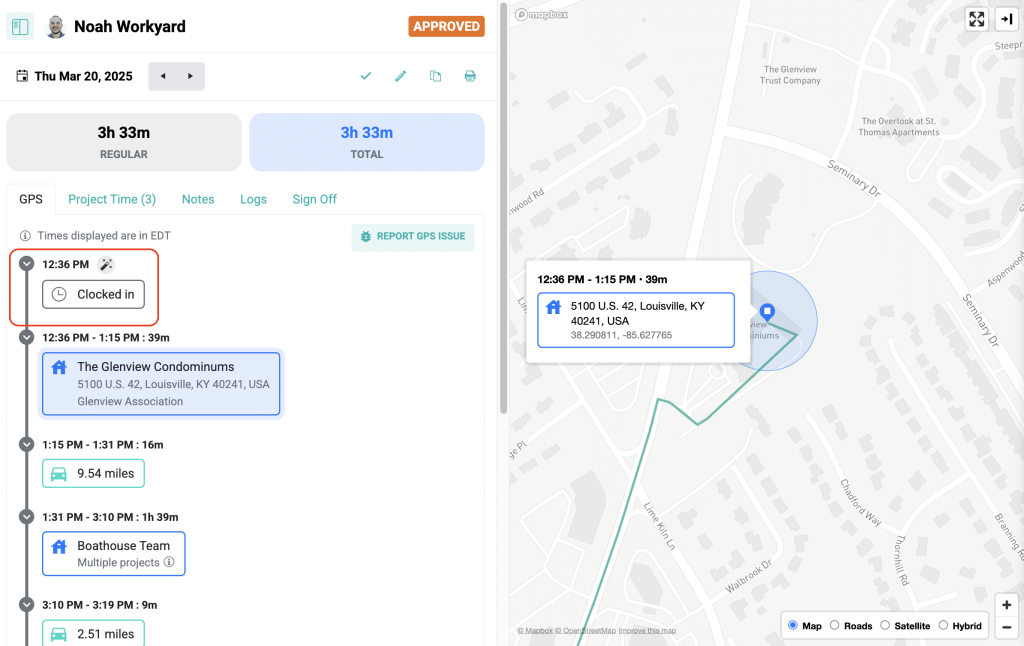
Quick verdict: Workyard is a workforce management platform built for construction and field service crews, centred on GPS-verified time tracking: geofences detect arrival on site, hours are coded to jobs and cost codes, and approved time flows into payroll and accounting systems. It solves a real, expensive problem – guessed hours and payroll cleanup. The trade-offs are continuous location tracking, which needs a clear crew policy, and a $50 monthly company base fee that makes very small crews pay more per head.
What it is
Workyard is a mobile-first time clock and workforce platform for contractors whose crews move between jobsites. Workers clock in three ways: the mobile app, where a GPS geofence around the site can clock them in automatically as they arrive; a shared iPad kiosk at the gate or trailer, verified with face detection; or a supervisor mode where a foreman clocks in the whole crew from one device. Workyard says it is trusted by more than 4,000 contractors (a vendor figure).
The point is what the punch carries: the job, the cost code and a GPS-verified timestamp, captured continuously through the day and usable offline on low-signal sites. That record feeds scheduling, job costing, approvals and payroll exports, instead of the office re-typing paper time cards.
Key features
- GPS-verified time clock: geofence arrival detection and location history through the workday
- Three clock-in modes: mobile app, iPad kiosk with face detection, and supervisor crew clock-in
- Job and cost-code tracking: workers switch cost codes in the app as they work
- Labor cost reporting: automatic labor cost calculation by project and cost code (higher tiers)
- Scheduling and tasks, with job details and checklists delivered to phones
- Configurable overtime rules, approval workflows and compliance questions at sign-off
- Certified payroll support: captures worker, project, classification and hour data
- Integrations: QuickBooks, Sage, ADP, Gusto and others (20+ payroll systems, per Workyard)
- Offline mode and English and Spanish language support
Pricing
Workyard publishes its entry price on its own site: Starter starts at $6 per user per month plus a $50 company base fee, billed annually, with a 14-day free trial and no credit card required. Its comparison pages have listed Pro at $13 per user per month plus the same base fee, while a current comparison lists Pro as a custom quote – confirm the Pro price before you budget. The base fee means a five-person crew pays a very different effective rate than a fifty-person one.
Who it’s for
Small and mid-sized contractors whose crews bounce between several sites a week and whose office loses hours to timesheet chasing and job-cost guesswork. It is a strong fit where certified payroll or client billing audits make a GPS-verified trail worth paying for.
Who should skip it
Contractors who mainly need project management, estimating or a CRM: Workyard is a workforce and time platform, not a general project management tool. Crews where continuous GPS tracking will be a fight also need to think first – the system works because location is recorded all day, and rolling it out without a clear, explained policy invites pushback and workarounds. One-site shops with a single stable crew may find a simpler, cheaper time clock does the job.
Pros
- GPS-verified hours tied to jobs and cost codes, not end-of-week memory
- Automatic geofence clock-in plus kiosk and supervisor modes for crews without phones
- Works offline, with English and Spanish support – built for real site conditions
- Wide payroll and accounting integrations reduce double entry
- Published entry pricing and a 14-day free trial with no credit card
Cons
- $50 monthly base fee raises the effective per-user cost for very small crews
- Job-costing depth sits on higher tiers, not Starter
- Continuous location tracking raises privacy concerns that need a clear company policy
- Higher-tier pricing is inconsistent across Workyard’s own pages – get a written quote
- No equipment dispatch, estimating or full project management features
FAQ
How does Workyard stop buddy punching?
By verifying place and person: workers must be inside the jobsite GPS geofence to clock in or out, and kiosk clock-ins use face detection, blocking at-home and proxy clock-ins.
Does Workyard work without cell signal?
Yes. Workyard documents an offline mode that keeps recording time and GPS on low-signal sites and syncs when coverage returns.
Is Workyard a project management platform?
No. It covers time tracking, scheduling, tasks and job costing for the workforce side. Estimating, submittals, RFIs and the rest of project management stay in your existing platform, with Workyard feeding it clean labor hours.
Bottom line
For contractors whose labor hours are their biggest controllable cost, Workyard replaces the weakest link – the paper time card – with GPS-verified, cost-coded hours that flow straight to payroll. Price it on your real crew size including the base fee, get the Pro quote in writing, and agree a location-tracking policy with your crews before day one.