
Quick verdict
Bottom line up front: Visily is an AI UI design tool built for people who are not designers. Describe an app screen in plain words, hand it a screenshot, or photograph a paper sketch, and it returns an editable wireframe or mockup you can click through as a prototype. The free Starter plan is genuinely usable — 2 boards and 300 AI credits a month — and Pro at $11 per editor a month billed annually is cheap for what it replaces: the first week of back-and-forth before a real design even starts. It will not replace Figma for professional design work, and it isn’t trying to.
What is Visily and what does it do?
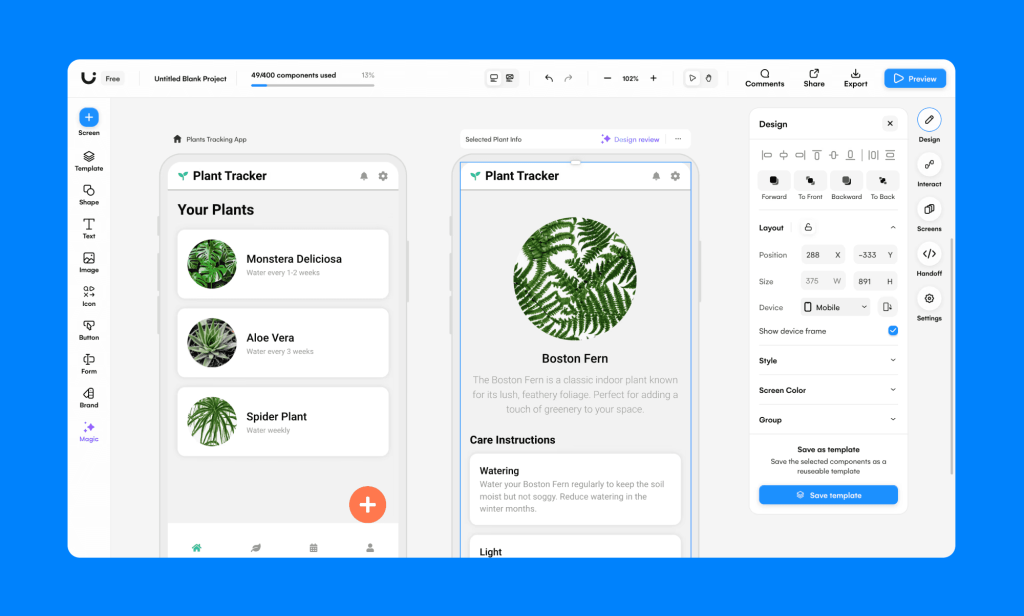
Visily is a browser-based design and prototyping tool. Its AI accepts several kinds of input: a text description (“a fitness app dashboard with a weekly activity chart”), a screenshot of an existing interface captured with its browser extension, or a hand-drawn sketch. Each becomes a set of editable design objects — real buttons, menus, tables, and forms you can resize, recolor, and rearrange on a canvas — rather than a flat picture of a screen.
Around that core sit the working tools: a library of 1,500+ pre-built templates and smart components, text-to-diagram generation for flows and charts, interactive prototyping that links screens into clickable flows, real-time collaboration and commenting, and exports. Paid plans add Figma import and export and design-to-code export (React, Vue, or HTML, up to ten screens per export). If your next step after a mockup is a no-code site, a planner like Relume covers the website side; Visily’s territory is the app or product interface itself, and general tools like Canva don’t produce editable UI components at all.
How much does Visily cost?
| Plan | Price | AI credits | Notes |
|---|---|---|---|
| Starter | Free | 300/month | 2 editable boards per workspace; exports limited to 1x scale |
| Pro | $14/editor/mo, or $11/editor/mo billed annually | 3,000/month | Unlimited boards, private boards, Figma and code export, watermark-free exports, 7-day version history |
| Business | $29/editor/mo billed annually | 10,000/month | SAML SSO, custom team management, 30-day version history |
| Enterprise | Custom | Custom | Custom limits and a dedicated account manager |
Two things to watch. Pricing is per editor, so a five-person product team pays five seats even if only two people generate designs. And AI work is metered: generating a screen costs credits (a layout generation runs about 15 credits per screen, and converting one screenshot about 30), so the free plan’s 300 monthly credits are roughly ten screenshot conversions or twenty generated screens — enough to evaluate the tool properly, not enough to run a project on.
What are Visily’s strengths?
- Multi-modal input: text, screenshots, and sketches all become editable designs. The screenshot-to-wireframe route is the standout — it recreates an existing screen as components you can immediately change.
- Editable output, not pictures: unlike image generators, every element is a real object on the canvas, so a mockup can be revised in minutes instead of regenerated from scratch.
- A free plan with real AI in it: 300 credits a month, renewing, beats the one-time token allowances most rivals offer.
- Prototyping and handoff in one place: clickable flows for feedback, then Figma or code export on paid plans when the idea graduates. Teams that live in a full website builder may still land in Framer afterward — Visily gets the concept approved first.
- Built for non-designers: templates, smart components, and a plain canvas mean a founder or product manager can produce something presentable without design training.
What are Visily’s weaknesses?
- AI edits regenerate rather than nudge: asking the AI to adjust a screen can rebuild more of it than you wanted, so fine changes are often faster by hand on the canvas.
- Diagram logic can wobble: the text-to-diagram feature occasionally produces flows with broken or illogical connections that need manual fixing.
- Not a professional design system: there is no equivalent of Figma’s component variants, variables, and design-token depth. Production UI still belongs in a pro tool.
- Per-editor pricing plus credit meters: costs scale with team size and generation habits in a way a flat subscription wouldn’t.
Who is Visily for?
Founders validating an app idea, product managers who need a screen to point at in a meeting, and marketers or developers sketching a feature before a designer is involved. If your bottleneck is “we can’t discuss this product because nobody can see it,” Visily removes that bottleneck for $11 a month or less.
Verdict: is Visily worth paying for?
Start free — the Starter plan’s renewing credits make it one of the few AI design tools you can evaluate on real work. Pay for Pro when you hit the 2-board limit or need Figma or code export; at $11 per editor a month billed annually, one approved mockup pays for a year of it. Skip it if your team already designs fluently in Figma: Visily’s value is speed for non-designers, and that advantage disappears in expert hands.
Frequently asked questions
Is Visily free?
Yes. The Starter plan is free forever with 2 editable boards per workspace and 300 AI credits a month. Exports on the free plan are limited to 1x scale.
Can Visily turn a screenshot into an editable design?
Yes. Its browser extension for Chrome, Firefox, and Edge captures a screen and converts it into an editable wireframe; a conversion costs roughly 30 AI credits.
Does Visily export to Figma or code?
On paid plans. Pro and Business add Figma import/export and design-to-code export in React, Vue, or HTML for up to ten screens per export.
Is Visily a replacement for Figma?
No. It is a faster starting point for non-designers and early concepts. Professional design systems and production UI work still belong in Figma.