
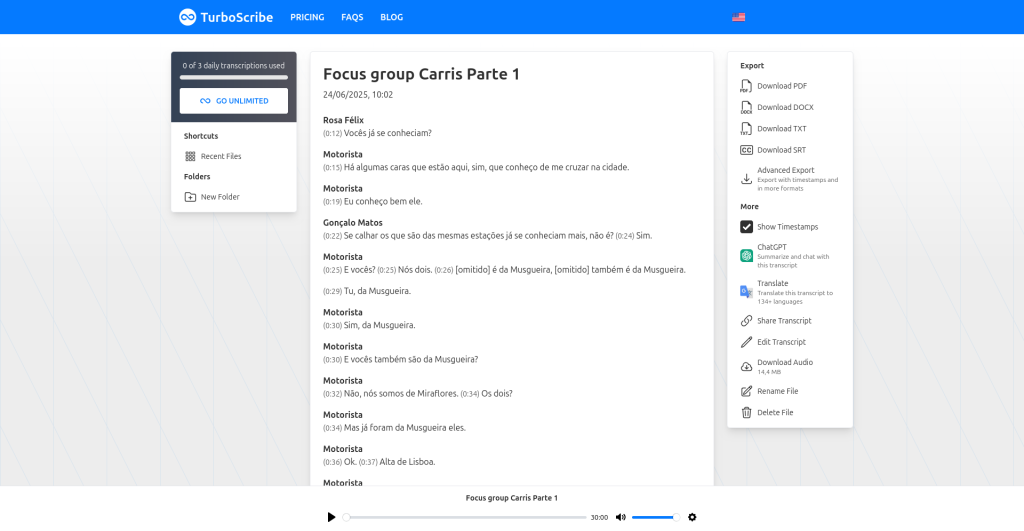
The bottom line: TurboScribe’s free plan gives you 3 AI transcriptions every day — up to 30 minutes each — with speaker recognition, timestamps, and exports in PDF, DOCX, SRT, and TXT. The catches: one file at a time, lower processing priority, and no translation features. It’s one of the most generous free transcription allowances online, built for people who transcribe regularly but not constantly.
What is TurboScribe?
TurboScribe is an AI transcription service that turns audio and video files into text. Upload a recording — an interview, lecture, meeting, podcast episode — and it returns a timestamped transcript with automatic speaker labels. It transcribes in 98+ languages using what it describes as an enhanced Whisper-based AI model, and the paid tier can also translate transcripts into 130+ languages.
The free plan is a proper ongoing tier, not a trial — it resets 3 transcriptions every day and never asks for a credit card.
What’s actually free
The Free plan ($0) includes:
- 3 transcriptions per day, resetting daily — each file can be up to 30 minutes long
- All transcription modes and languages — the same 98+ language support as paid
- Speaker recognition — automatic labels for who’s talking
- Every export format — PDF, DOCX, SRT/VTT subtitles, CSV, and TXT
- Timestamps — per-sentence timing so you can jump to any moment in the audio
- Audio restoration option — AI noise cleanup for rough recordings
Three 30-minute files a day works out to up to 90 minutes of transcription daily — plenty for interviews, class lectures, and podcast episodes.
What’s behind the paywall
The free tier has firm boundaries:
- One file at a time: no bulk uploads — each file queues individually.
- Lower priority: free files wait longer in the processing queue.
- 30-minute cap per file: longer recordings get cut off — the paid tier handles files up to 10 hours / 5GB.
- No translation: transcript translation into 130+ languages is a paid feature.
- No bulk actions: exporting many files at once requires the paid plan.
TurboScribe Unlimited costs $10/month billed annually ($120/year) or $20/month month-to-month — unlimited transcriptions, up to 50 files at once, and unlimited storage.
Who it’s best for
TurboScribe’s free plan is best for students, journalists, podcasters, and researchers who transcribe a few recordings a week — interviews, lectures, meetings, voice memos. If your daily transcription need fits in three 30-minute files, you may never need to pay.
It’s not for production pipelines, hour-long webinars, or anyone needing translated transcripts — the file-length cap and missing translation push those use cases to paid.
Pros and cons
Pros
- 3 free 30-minute transcriptions daily — unusually generous for this category
- Speaker recognition and all export formats included on free
- 98+ transcription languages
- Simple upload-and-wait workflow; no software to install
- Flat-rate unlimited paid plan ($10/mo annual) is cheap for heavy users
Cons
- 30-minute per-file cap on free
- One file at a time, with lower processing priority
- No transcript translation on the free tier
- Like all AI transcription, accuracy drops on heavy accents, overlapping speech, and noisy audio — proofread important work
Frequently asked questions
Is TurboScribe really free?
Yes — the Free plan costs $0, needs no credit card, and gives you 3 transcriptions per day (up to 30 minutes each) with speaker recognition and all export formats.
What file formats does TurboScribe accept?
Most common audio and video formats: MP3, M4A, MP4, MOV, AAC, WAV, OGG, FLAC, AVI, MKV, WEBM, and more.
Can I export subtitles?
Yes — SRT and VTT caption/subtitle exports are included on the free plan.
How accurate is TurboScribe?
TurboScribe claims very high accuracy in clear conditions. Independent reviews confirm strong results on clean audio, with the usual AI-transcription caveats for accents, crosstalk, and background noise.
Verdict
TurboScribe’s free tier is the real deal for everyday transcription: three 30-minute files a day with the features that matter — speaker labels, timestamps, and subtitle exports — costs nothing. If you transcribe interviews, lectures, or meetings a few times a week, start here before paying anyone. (Reviewed October 2026; free-tier terms can change, so check the live pricing page before planning anything big.)