
Quick verdict
Toolpath Review 2026: AI Cycle-Time Prediction Before You Quote the Job
Updated October 16, 2026 – Tested Intelligence
Quick verdict: Toolpath attacks the scariest moment in a job shop: quoting a part you have never made. Upload a CAD file and its AI predicts machining time, lays out a sequence of operations and returns cost estimates as honest ranges instead of a single made-up number. Pricing is public – monthly plans built around DFM analyses and estimate allowances – and the company is backed by Kennametal. It will not quote for you, but it gives your estimator a fast, defensible starting point.
What it is
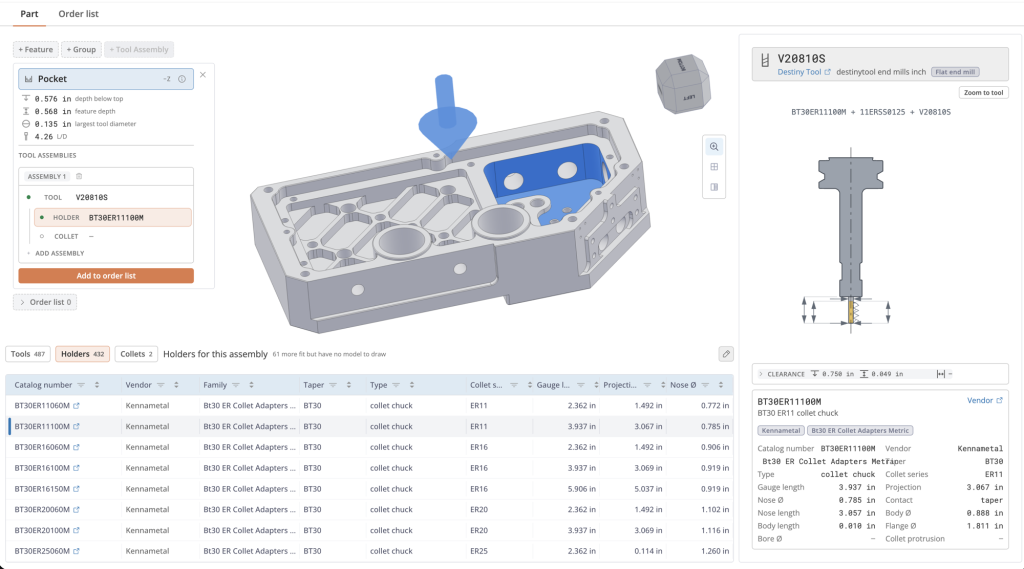
Toolpath is an Orlando, Florida software company selling to CNC machine shops. Its core product analyzes a part’s CAD model – common formats including STEP, Parasolid, CATIA, NX and SOLIDWORKS files – and estimates how the part would be machined: operations required, cycle time, and what that time costs on your machines. A companion tool, Preflight, runs a design-for-manufacturability check in the same viewer.
Toolpath does not claim to spit out a finished quote. Its own material talks about “collapsing the uncertainty” in machining time, and its outputs are deliberately ranges: a likely cycle time, a range around it, and the cost to you at your shop rate. That is a more honest design than one precise-looking number for a part nobody has ever cut.
The company has industry weight behind it: Modern Machine Shop reported in February 2025 that Kennametal made an undisclosed strategic investment in Toolpath, describing the platform as technology its own team had been using. Toolpath also integrates with Autodesk Fusion, so an estimate can flow toward the CAM side instead of dying in a spreadsheet.
Key features
- AI machining-time prediction from an uploaded 3D CAD model
- Returns estimates as ranges – likely outcome plus best and worst cases
- Generates a process plan: a sequence of operations for making the part
- Estimates your cost per part using machine time and shop rates
- Preflight DFM check flags manufacturability problems in the same 3D viewer
- Works alongside existing quoting tools such as Paperless Parts
Pricing
Pricing is public, which is rare in this category. Toolpath sells monthly plans built on usage allowances: a Free tier ($0, no credit card required) includes 100 DFM analyses and 10 estimates a month; Core runs $400 a month with 500 DFM analyses and 60 estimates; Pro runs $1,500 a month with 2,500 DFM analyses and 400 estimates. The plans are framed around API access for shops and developers, so map the estimate allowances to your RFQ volume before comparing it to a flat-rate quoting platform.
Who it’s for
Job shops and contract manufacturers whose estimators are the bottleneck. If you lose money on jobs that were quoted too fast, or lose bids because quoting takes a week, a same-day AI estimate with a defensible range is directly useful. It also suits shops quoting more complex milled parts, where experience-based guessing is riskiest.
Who should skip it
Shops whose quote volume dwarfs the plan allowances will outgrow the published tiers fast and should talk to Toolpath about scale pricing first. Simple turned parts and repeat work gain little – you know those cycle times cold. And if you need a full quoting-to-invoice platform, Toolpath is an estimating engine, not your front office.
Pros
- Public, understandable pricing – no sales call needed to budget it
- Outputs ranges instead of false-precision single numbers
- Backed by Kennametal, a name your customers already know
- Process plan output helps junior estimators learn how a part gets made
Cons
- Published plans are API-framed with monthly estimate caps, so very high quote volumes outgrow them
- Predictions are only as good as the model – it is decision support, not a guarantee
- Worked examples on its site assume a $90/hour shop rate; check outputs against your real rate
- Does not replace your quoting, CRM or invoicing system
FAQ
Does Toolpath write my quote for me?
No. It predicts machining time and cost and lays out a process plan. Your estimator still sets margin, material, outside processes and the final price.
What file types does it accept?
Common CAD formats including STEP, Parasolid, CATIA, NX and SOLIDWORKS files. It also integrates with Autodesk Fusion.
How much does Toolpath cost?
Plans are monthly: Free ($0) includes 100 DFM analyses and 10 estimates a month; Core is $400 a month (500 DFM analyses, 60 estimates); Pro is $1,500 a month (2,500 DFM analyses, 400 estimates). Exploring on the free tier costs nothing and needs no card.
Bottom line
Toolpath is the practical front end of AI in machining: not a robot programmer, just a fast, honest read on how long a part will take and what it will cost you. The usage-capped plans mean high-volume shops should run the numbers, and the ranges-not-promises design means your estimator stays in charge. For shops bleeding margin on bad estimates, that is the right scope.