
Quick verdict
Snaptrude Review 2026: AI Concept Design That Turns a Brief Into BIM
Updated October 16, 2026 – Tested Intelligence
Quick verdict: Snaptrude is a browser-based concept design platform that behaves like a sketch tool but carries real BIM data underneath, with AI agents that can take a brief through program, massing and cores. It fits architects and developers who need fast, defensible early options that hand off cleanly to Revit. It is not a replacement for Revit in documentation and coordination.
What it is
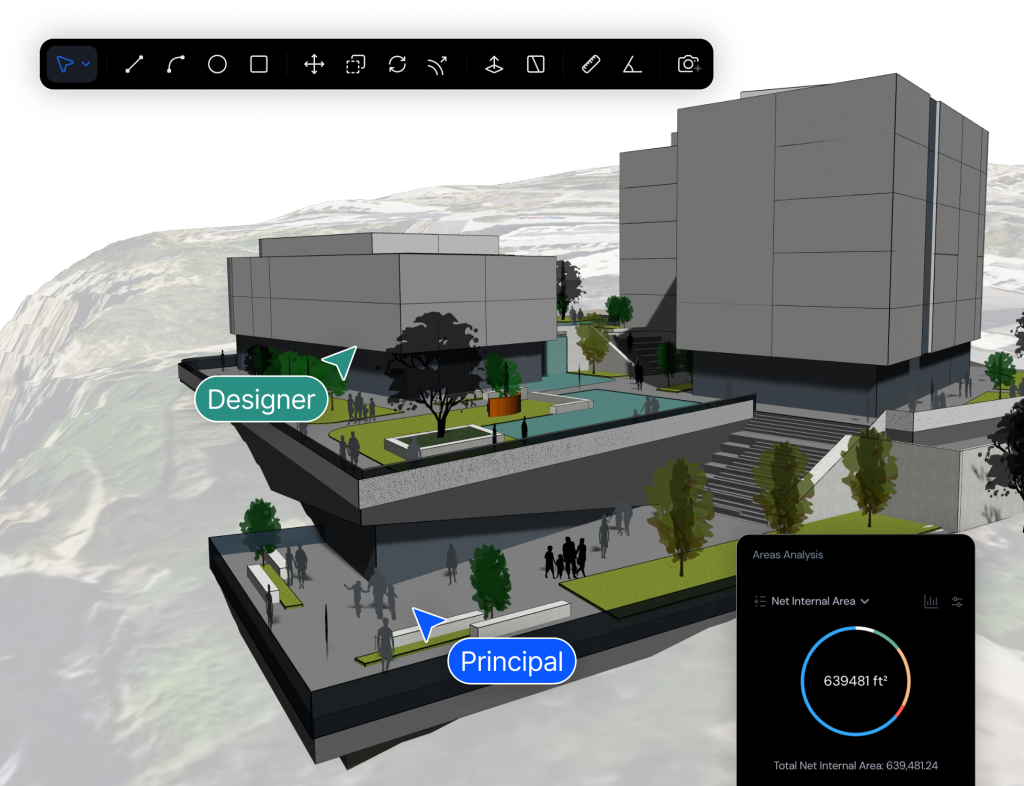
Snaptrude covers program, concept and schematic design in four connected modes – program data, geometry, BIM detail, and presentation – so a program change updates areas, massing and schedules instead of living in a separate spreadsheet.
Its AI workflow is the headline. As its CEO described it to AEC Magazine, the AI aims to automate much of early concept design, taking a project from an RFP toward a developed model while respecting adjacencies, zoning, codes and climate, in roughly seven to ten minutes, with the user approving steps. Treat that as a design target, not a promise for every brief.
Key features
- AI agents for program, stacking and packing, massing and cores, with zoning checks against live US municipal code data through its Zoneomics connection, per Snaptrude
- One-click conversion of massing into parametric BIM elements – walls, slabs, doors, windows and rooms – instead of a dumb solid that must be rebuilt later
- Live program tables bidirectionally linked to the model, with automatic area schedules and custom program sheets as you design
- Real-time multi-user editing in the browser on Mac and Windows, with no install and no version lock across the team
- Native Revit export and in-browser Revit import, plus IFC, DWG, PDF and SketchUp file support, and Rhino geometry round-tripping for complex forms
- Built-in presentation, renders and drawings inside the same workspace, so options can be shown without rebuilding them in other tools
Pricing
Snaptrude publishes pricing. Free is $0 for a single free project on the live pricing page – some Snaptrude pages describe a three-project allowance, so confirm the current limit at signup – with basic BIM and Revit export and limited presentation outputs. Individual is $60 per month, unlimited projects, single user. Organization is $100 per month billed annually, adding teams, licence management, custom roles, and a BIM library with custom RFAs. Enterprise is custom, adding SSO, SAML, open API and premium support.
Who it’s for
Architects and developer-side teams doing feasibility, competitions, test fits and concept-to-schematic work – especially SketchUp-heavy teams who keep rebuilding the same model in Revit.
Who should skip it
Teams whose work is mostly construction documents or production BIM should stay in Revit or ArchiCAD – Snaptrude hands off to them. Also skip it for small interiors with no program or massing problem to solve.
Pros
- Concept speed with BIM underneath: options carry areas and data instead of being throwaway sketches
- A genuinely usable free tier and published paid prices, which is still uncommon in this category
- Browser collaboration removes install, version and file-passing friction for distributed teams
- The Revit handoff is designed in from the start, so early work is not stranded in a sketch tool
Cons
- Documentation and detailed coordination still happen downstream in Revit or similar – you are adding a tool, not removing one
- AI-generated starting points need professional checking against local codes and the real brief; zoning data coverage is US-focused in the vendor’s description
- Free-plan project limits have differed between Snaptrude pages, so verify the current allowance before planning an evaluation around it
FAQ
Does Snaptrude replace Revit?
No, by design. Snaptrude owns concept through schematic design and exports natively to Revit for documentation and coordination. Its own positioning is as a Revit companion for the front of the project.
How much does Snaptrude cost?
Free is $0 with basic BIM and Revit export. Individual is $60 per month, Organization is $100 per month billed annually, and Enterprise is custom. Prices are from Snaptrude’s published pricing page.
What do the Snaptrude AI agents actually do?
Per Snaptrude and AEC Magazine, agents work through program, stacking, massing and cores, checking zoning, and return a model to approve and refine. The designer can override or turn off steps.
Bottom line
Snaptrude is for the weeks when a project is won on fast, credible options. If you sketch in one tool, count areas in a spreadsheet, and rebuild in Revit, it collapses that loop into one live model. Run the free project on a real brief and have your documentation team judge the Revit export.