
Quick verdict
SALUS Review 2026: Field-First Safety Software With an AI Assistant Named Rosie
Updated November 23, 2026 – Tested Intelligence
Quick verdict: SALUS is a construction safety platform built around field capture: crews scan a QR code at the workface, complete task-specific forms offline and in their own language, and its AI assistant Rosie turns those records into answers, corrective actions and audit-ready proof. It fits general contractors and specialty trades running safety across multiple crews and sites. Pricing is not public – SALUS deliberately publishes no fixed tiers – and the platform is more than a one-off checklist shop needs.
What it is
SALUS, at salussafety.io, is an operational safety platform for construction: digital forms, inspections, orientations, incident reporting, certificates and corrective actions in one connected record, designed to be used on site rather than filled in later in the trailer. Its AI layer is called SALUS IQ, and the assistant crews and safety directors talk to is named Rosie.
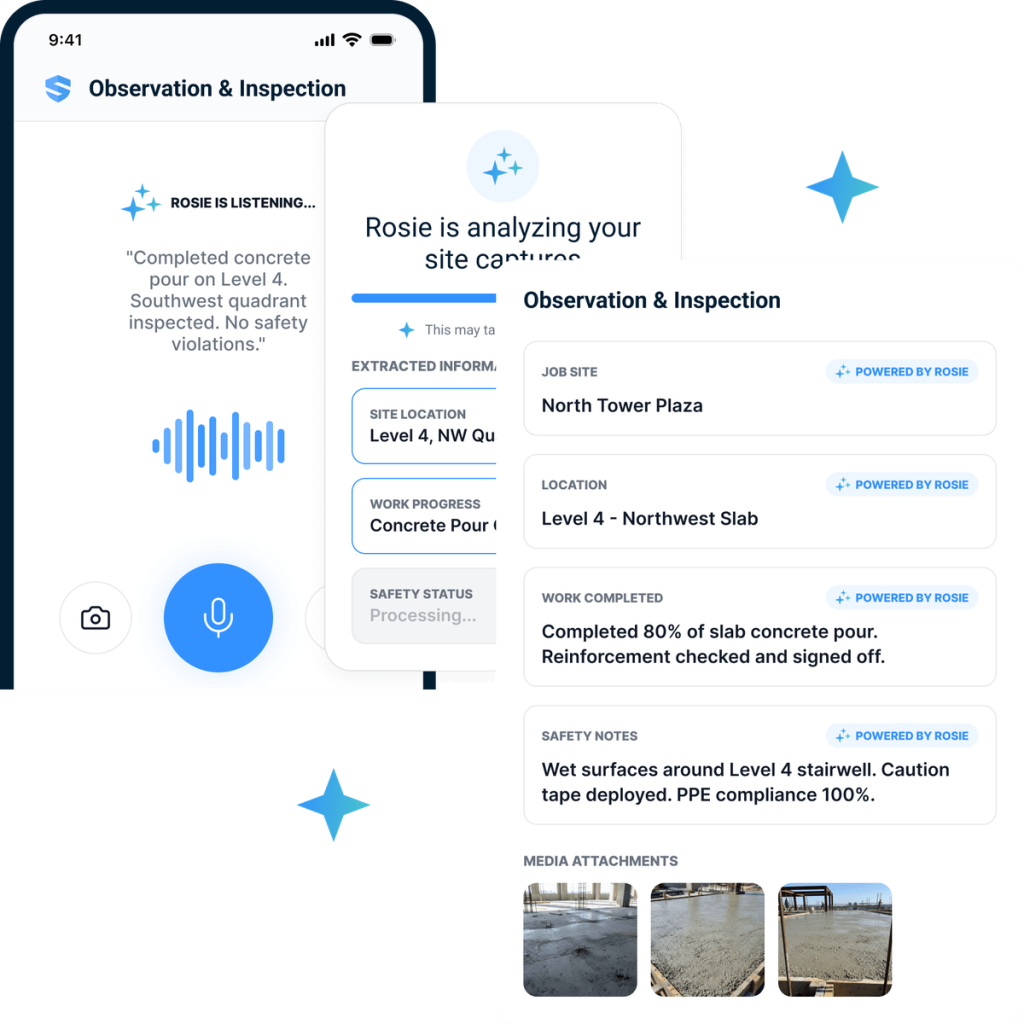
The workflow SALUS leads with is capture at the source. On its electrical contractor pages, for example, an electrician scans a QR code on a panel and gets the current, version-controlled lockout/tagout procedure in seconds, on the phone, offline if needed. Energized-work permits auto-populate voltage and incident-energy data and match the required PPE, qualified-person status is checked against the specific task, and a hazard report can be spoken – Rosie writes the structured record, routes it to a named person, and tracks closure with a photo. Workers can complete forms and ask Rosie questions in their own language while the office reads everything in English.
There is also a free on-ramp most buyers miss: in May 2025 SALUS launched the Construction Safety Assistant at ai.salussafety.io, a free, field-ready tool that generates safety documents from a phone or tablet. SALUS describes it as a free introduction to SALUS IQ, the AI engine inside the paid platform. Trying the free assistant first is the cheapest way to judge the AI’s output quality before a sales call.
Key features
- QR capture at the point of work: procedures, permits and forms pulled up by scanning equipment or area codes, with offline use in the field
- Rosie AI assistant: voice hazard reports become structured records, and safety directors can ask questions answered from the company’s own field record
- Task-specific digital forms: inspections, orientations, incidents, certificates, training and equipment in one system, replacing paper and spreadsheets
- Corrective actions assigned to a named person, tracked when viewed and closed with a photo
- Leading-indicator visibility: form completion, near-miss rates and certification expirations surfaced before they become incidents
- Integrations including Procore, plus proof exports and dashboards for audits, insurers and prequalification
Pricing
Pricing is not public, and SALUS is unusually direct about why. Its own pricing page states there are no fixed pricing tiers: a generic tier, it argues, can hide the real cost. Your quote is scoped from five named inputs – crew and jobsite footprint, the safety workflows you want to run, setup and migration from paper or PDFs, integrations and data needs, and rollout and support. After a short discovery call you receive a written quote showing what is included. What the pricing page does not make obvious is the starting scope: SALUS says many teams begin with a single high-friction workflow – daily forms, inspections, orientations or incident reporting – and expand later, and that a focused deployment can launch in as little as two weeks. Start with one workflow in the quote, not the whole safety manual.
Who it’s for
General contractors and specialty trade contractors – electrical firms are a showcased fit – that manage and standardize safety across multiple crews, jobsites or subcontractors, need contemporaneous evidence for audits, claims and prequalification, and want to retire paper forms without a months-long enterprise rollout.
Who should skip it
Skip SALUS if you only need a one-off checklist, a PDF archive or a standalone form builder, or if you are running a single short project with no ongoing safety record to build. SALUS says so itself on its pricing page. Very small crews should also weigh a quote-based platform against simpler tools already covered on Tested Intelligence, such as SiteDocs, before committing.
Pros
- Built for the field first: QR capture, offline use and multilingual forms target adoption, which is where safety software usually dies
- Rosie turns voice notes and field captures into structured records and answers from your own data
- Free Construction Safety Assistant lets crews test the AI before any purchase
- Quote shows included workflows, services and user allowance explicitly before you commit
- Focused deployments can launch in as little as two weeks, per the vendor
Cons
- Pricing is not public: no tiers to compare without a discovery call and a written quote
- Quote depends on five scoping inputs, so costs are hard to predict for budgeting until you engage
- Overkill for one-off forms or a single short project, by the vendor’s own admission
- Software does not replace internal ownership of the safety program – SALUS states this plainly
FAQ
How much does SALUS cost?
Pricing is not public. SALUS publishes no fixed tiers; after a short discovery call you get a written quote based on crew and jobsite footprint, workflows, setup and migration, integrations, and rollout support. Ask for a one-workflow starting scope to keep the first quote lean.
Is there a free way to try SALUS?
Yes. The SALUS Construction Safety Assistant at ai.salussafety.io is a free tool that generates safety documents from a phone or tablet. SALUS presents it as an introduction to SALUS IQ, the AI engine in the full platform, which is subscription-based.
How long does a SALUS rollout take?
A focused deployment can launch in as little as two weeks, according to SALUS, depending on the number of workflows, form configuration, integrations and how broadly you roll out first.
Bottom line
SALUS is the safety pick when field adoption is the real problem: QR capture at the workface, task-specific forms and Rosie doing the paperwork are aimed squarely at crews actually using the system. Test the free Safety Assistant first, then get the quote scoped to one workflow – and compare it against the written proposal, not a tier page that does not exist.