
Quick verdict
reMarkable Paper Pro Review 2026: Color Writing, Premium Price
The short answer
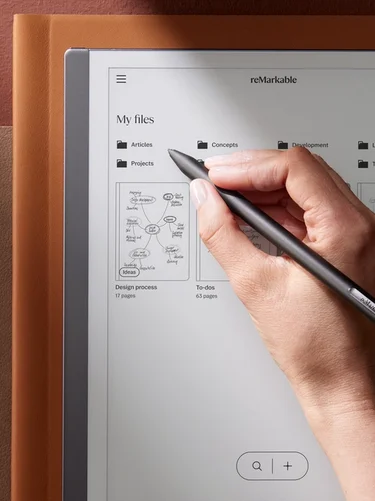
The reMarkable Paper Pro is the flagship color paper tablet: an 11.8-inch E Ink Gallery 3 display with color built into the pixels, a front light, the best handwriting feel in the business, and an optional Type Folio keyboard — starting at $579. It’s a beautiful, focused tool, but the premium price and muted Gallery 3 color mean it’s only for dedicated note-takers with the budget to match. Rating: 4.1/5.
Launched in September 2024, the Paper Pro was reMarkable’s big bet that writers would pay a premium for color: an 11.8-inch E Ink Gallery 3 display — a panel technology no other tablet uses — in a 5.1 mm aluminum body. Two years later it remains the flagship of the lineup and the most expensive mainstream e-ink writing tablet, a deliberate luxury object in a category where Boox competes on versatility and Kindle on ecosystem.
This is a research-based review. We have not tested the reMarkable Paper Pro hands-on; every fact below comes from the manufacturer’s published specs, pricing, and independent reporting. Prices and specs checked September 30, 2026.
Key specs
| Spec | Detail |
|---|---|
| Display | 11.8-inch Canvas Color (E Ink Gallery 3), 2,160 x 1,620 (229 ppi); color built into the pixels, not a separate filter layer |
| Front light | Yes (adjustable reading light) |
| Processor / RAM | 1.8 GHz quad-core Cortex-A53; 2 GB LPDDR4 |
| Storage | 64 GB |
| Battery | 5,030 mAh; up to 14 days of typical usage; fast charges to 90% in about 90 minutes |
| Dimensions / weight | 5.1 mm thin; 525 g |
| Pen latency | As low as 12 ms |
| Connectivity | Wi-Fi, USB-C |
| OS | Linux-based reMarkableOS |
| Formats | PDF, ePub |
| Cloud services | Google Drive, Microsoft OneDrive, Dropbox |
| Accessories | Marker ($79), Marker Plus ($129), Type Folio keyboard ($229) |
Price and availability
The Paper Pro starts at $579 with the standard Marker and $629 with the Marker Plus (which adds a built-in eraser). Bundles climb quickly: Marker Plus with a Book Folio runs $749-$779, and adding the Type Folio keyboard pushes configurations to $779-$829. It’s sold through reMarkable’s store and Amazon, where the line saw discounts up to $100 off during 2026 sales (as low as $679 with Marker Plus in the US).
As with all reMarkable tablets, the optional Connect subscription ($4/month or $39/year) unlocks handwriting search, unlimited cloud sync, and third-party integrations.
What it’s good at
- Color e-ink done differently. The Gallery 3 panel builds color into the pixels themselves rather than layering a filter over monochrome e-ink, giving a more paper-like color experience than Kaleido 3 — softer and more natural, if less saturated.
- Best-in-class writing feel. The textured writing surface, 12 ms pen latency, and 4,096 pressure levels deliver the closest thing to pen on paper in a digital device — reviewers consistently rank it above every rival for handwriting.
- Big, bright canvas. The 11.8-inch display is close to a full sheet of paper, and unlike the monochrome reMarkables it has a front light — so you can actually work in dim rooms and on evening flights.
- Type Folio turns it into a typewriter. The attachable keyboard with full-size keys gives the Paper Pro a genuine second mode: distraction-free drafting on e-ink, a combination no Kindle or Kobo offers.
- Distraction-free by design. No apps, no browser, no notifications — just writing, reading, and annotating. For deep work, the discipline is built into the hardware.
- Premium, thin build. At 5.1 mm thin with textured aluminum edges, it’s an object you’d happily leave on a desk — and 64 GB of storage is generous for a device like this.
Where it falls short
- Very expensive. $579-$629 to start, $779+ with keyboard — that’s iPad Air money for a device that does a fraction of what an iPad does. Reviewers call it a luxury purchase, and they’re right.
- Gallery 3 color is muted and slow. Colors look washed out next to any LCD, and color refreshes are visibly slower than monochrome e-ink. It’s fine for highlights and light sketching, not for art or media.
- Heavy for one-handed use. At 525 g it’s the heaviest tablet in reMarkable’s lineup — fine on a desk, tiring to hold like a book.
- Subscription-gated features. Handwriting search, unlimited sync, and integrations require Connect — on a $600+ device, that stings.
- Limited as a reader. PDF and ePub support exist, but the reading experience trails dedicated e-readers, and at 229 ppi text is softer than the Kindle Scribe’s 300 ppi.
- Closed ecosystem. No apps, no browser, no sideloading — if your workflow needs anything beyond notes and documents, look at the Boox Note Air 6C instead.
Who should buy it
Dedicated note-takers, researchers, and creatives who want color highlighting and sketching in a distraction-free device and can justify the premium: academics marking up papers, designers sketching in color, executives who live in meeting notes. If you were already considering the $549 Kindle Scribe, the Paper Pro’s color and superior writing feel make the step up defensible.
Who should skip it
Anyone on a budget (the Paper Pure gives you the same writing feel in monochrome for $180 less), anyone who needs apps or a browser, and anyone who mainly wants to read books (a Kindle Scribe or Kobo Elipsa reads better for less). If you want a general-purpose tablet, an iPad does incomparably more for similar money.
Verdict
The Paper Pro is the finest writing experience money can buy in color e-ink — and it charges accordingly. For the specific person who writes by hand all day and wants color without distractions, it’s unmatched. For everyone else, it’s a luxury that’s hard to justify.
How it compares: The monochrome Paper Pure ($399) delivers the same legendary writing feel for $180 less — choose it unless you specifically need color highlighting. The Kindle Scribe Colorsoft ($630+) brings Amazon’s ecosystem and a sharper reading display to color writing, but costs more and writes less beautifully. An M-series iPad Air does infinitely more for similar money, but that’s a different product for a different need.
4.1/5
FAQ
What is the difference between the Paper Pro and the Paper Pure?
The Paper Pro ($579+) is larger (11.8-inch vs 10.3-inch), has a color Gallery 3 display, includes a front light, and supports the Type Folio keyboard. The Paper Pure ($399) is monochrome, has no front light, and is lighter and cheaper.
Can you type on the reMarkable Paper Pro?
Yes, with the optional Type Folio ($229) — a slim attachable keyboard with full-size keys that turns the tablet into a distraction-free typing device.
Does the Paper Pro have a front light?
Yes. Unlike the monochrome reMarkable 2 and Paper Pure, the Paper Pro includes an adjustable reading light for low-light use.
Is the Marker included?
The $579 base configuration includes the standard Marker; the $629 configuration includes the Marker Plus with a built-in eraser. Both use active pen technology with 4,096 pressure levels and never need charging.
Where to buy
As an Amazon Associate we earn from qualifying purchases.