
Quick verdict
Bottom line: PhantomBuster is a cloud automation library for lead generation — 100-plus ready-made “Phantoms” that extract, enrich and route data from LinkedIn, Sales Navigator, Google Maps and other sites, priced per workspace rather than per seat. Start is $69 a month for 20 execution hours. It is a poor buy for a one-off list, because you are renting monthly capacity, not buying contacts.
A team workflow tool like Clay charges for its data workbench; PhantomBuster instead meters how long your automations run, how many can stay active, and how many metered lookups they make. Price those three meters against your real workflow and the plans make sense.
What does PhantomBuster actually do?
Phantoms are small, pre-built automations: pull profiles from a LinkedIn or Sales Navigator search, extract Google Maps listings, find and verify professional emails, enrich records, and push results out as CSV/JSON, through its API, or into connected tools. Multi-step Workflows chain Phantoms together — extract, filter, enrich, then route to your CRM or outreach tool, where a sequencer such as Instantly.ai or Lemlist takes over. Everything runs in PhantomBuster’s cloud on a schedule, so work continues with your laptop closed. Every plan includes all Phantoms and Workflows, API access and up to 100 workspace members: you are not feature-gated, you are capacity-gated.
How much does PhantomBuster cost?
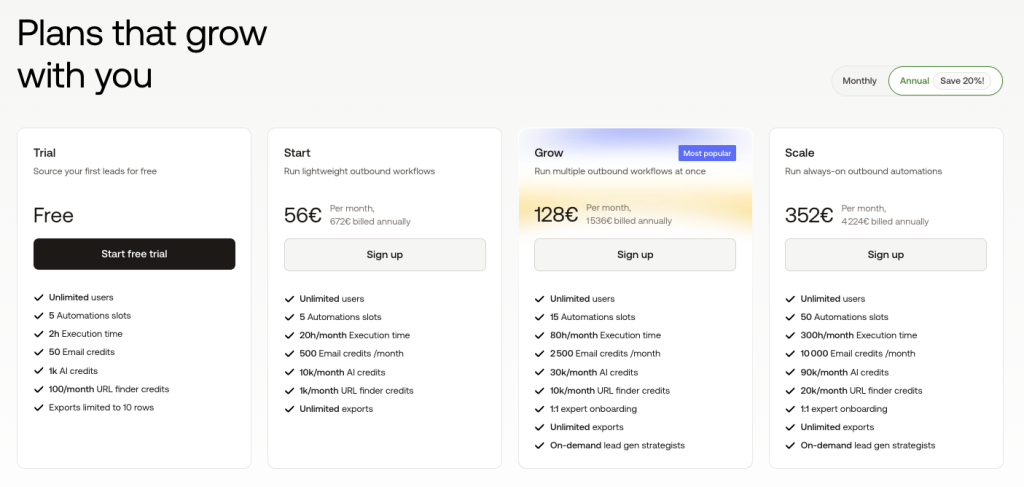
| Plan | Price | Execution time | Slots | Email / AI credits |
|---|---|---|---|---|
| Free (after trial) | $0 | 30 min / month | 1 | None / none |
| Start | $69/mo ($56 annual) | 20 hours / month | 5 | 500 / 10,000 per month |
| Grow | $159/mo ($128 annual) | 80 hours / month | 15 | 2,500 / 30,000 per month |
| Scale | $439/mo ($352 annual) | 300 hours / month | 50 | 10,000 / 90,000 per month |
The 14-day trial needs no card and includes 2 hours of execution time in total, 5 slots, 50 email credits and 1,000 AI credits. Prices verified on PhantomBuster’s own pages on November 11, 2026, excluding VAT.
What the pricing page doesn’t make obvious
PhantomBuster’s own pricing guide states that one email credit is consumed per discovery attempt, whether or not an email is returned. Your real cost per verified email therefore depends on your match rate, not the headline 500 credits: at a 40% match rate, Start’s 500 attempts yield roughly 200 verified emails. Three more gotchas from the vendor’s own docs: free and trial exports are capped at 10 rows per export or API call, so the trial validates fields, not volume; your billing currency (EUR or USD) is set at your first payment and cannot be changed later; and credits cannot be traded for a discount — unused credits simply reset at the next cycle.
What are PhantomBuster’s strengths?
- No per-seat pricing: up to 100 workspace members share one plan’s resources.
- All features on every plan: tiers change capacity, not the automation library, exports or API access.
- Broad source coverage — LinkedIn, Sales Navigator, Google Maps, Instagram, Facebook and X — chained into CRM and outreach tools.
- A usable evaluation path: a 14-day, no-card trial, then a permanent free plan.
- Unlimited exports on paid plans, in CSV and JSON, with API access included.
What are PhantomBuster’s weaknesses?
- Three meters to forecast, failing independently: more execution time does not fix a slot shortage or empty email credits.
- Email credits burn on misses, so poor targeting costs the same as good targeting.
- The entry price is real money — $69 a month is steep for occasional prospecting.
- Resources reset monthly, so a busy first week can leave automations waiting.
- Platform risk sits with you: automating activity on sites like LinkedIn carries account and terms risk no vendor can remove.
Who should pay for PhantomBuster — and who should skip it?
Pay if you run repeatable prospecting every week — an SDR, consultant or agency building, enriching and routing lists, especially with several people sharing one workspace. Skip it if you need one list a quarter, want a searchable database instead of live extraction, or mainly need sending and inbox management.
Verdict
PhantomBuster is fairly priced for steady workflows and expensive for sporadic ones — the meter, not the sticker, decides. Run the trial on one complete workflow, measure your email match rate and execution time, then pick a plan from those numbers. Research-based review; pricing verified from PhantomBuster’s official support and pricing-guide pages on November 11, 2026, with no hands-on testing claimed.
Frequently asked questions
Is PhantomBuster free?
There is a 14-day free trial with no credit card (2 hours of execution time in total), then a free plan with 30 minutes a month, 1 slot and 10-row exports.
How does PhantomBuster pricing work?
Per workspace, not per user — up to 100 members share execution hours, slots and credit pools, all resetting monthly.
Do email credits get used on failed lookups?
Yes. PhantomBuster’s pricing guide says one email credit is consumed per attempt, whether or not an email is returned.
Can I change my billing currency later?
No. Support docs say your currency — EUR or USD — is set during your first payment and cannot be changed later.