
Quick verdict
OutriggerPlan Review 2026: Lift Planning From Real Load Charts, With AI Chart Extraction
Updated October 13, 2026 – Tested Intelligence
Quick verdict: OutriggerPlan, from an independent vendor, is a lift-planning app that starts where a lift starts: the manufacturer’s load chart for the exact crane on site. It runs live capacity checks against that chart, its core tools are permanently free, and paid plans add AI extraction of chart tables. It is a young, small product, and extraction is still labelled Beta.
What it is
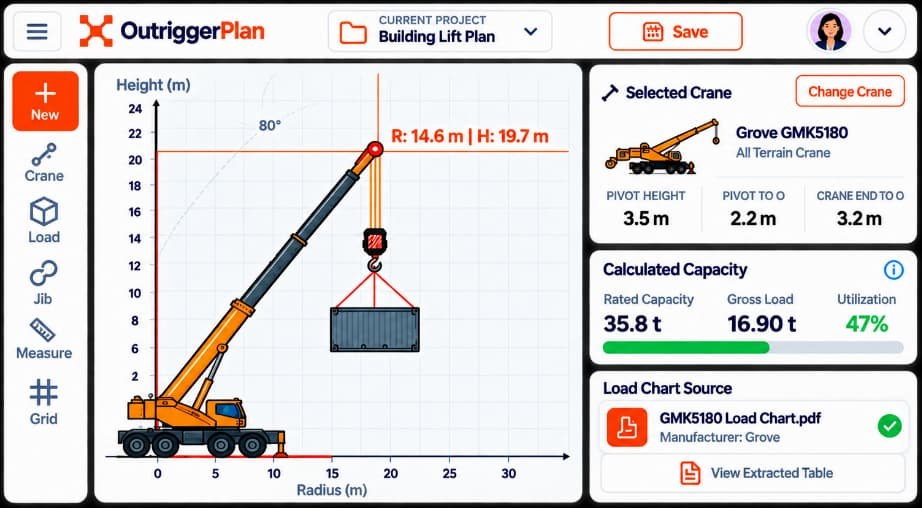
OutriggerPlan is built around manufacturers’ load charts rather than generic crane data. You upload or enter the chart for the exact crane on site, then run live capacity checks against it: utilisation, outrigger reactions and ground-bearing pressure. Rigging notes can be added, and the finished plan produced as a sign-off PDF.
It also works offline on site, where a signal cannot be assumed. The vendor’s tutorials illustrate the workflow using a Tadano GR-1000EX-4 rough-terrain crane.
Be clear about the scope. This is chart, capacity and ground-bearing planning. It is not full multi-crane 3D erection simulation.
Key features
- Upload or enter the chart for the exact crane on site
- Live capacity checks covering utilisation, outrigger reactions and ground-bearing pressure
- Rigging notes attached to the plan, with a sign-off PDF output
- Works offline on site
- AI load-chart extraction on paid plans: upload an OEM load-chart PDF and the tables are extracted for the checks
Pricing
There is a genuinely, permanently free plan, with no credit card required. It covers range charts, calculations and the core lift-planning tools, so a rigger can do real chart-based work for nothing.
One limit matters: AI load-chart extraction is not in the free plan. It is paid only. The paid tiers are Solo and Team. App Store in-app purchase listings show, for example, Solo Monthly at $5.99 and Solo Annual at $59.99, plus Team 5 Annual at $269.99 and Team 10 Annual at $499.99. Those are App Store listing figures; confirm current pricing before you buy.
Who it’s for
Riggers and lift planners who live in OEM load charts. If your day involves checking utilisation against the chart for the crane on site, working out outrigger reactions and ground-bearing pressure, and documenting the result for sign-off, it is aimed directly at you.
Who should skip it
Skip it if you need full multi-crane 3D erection simulation: that is a different category of tool. Crews unwilling to verify extracted chart values against the OEM original should not rely on the paid extraction feature either.
Pros
- Built on the manufacturer’s chart for the actual crane, not generic capacity data
- Utilisation, outrigger reactions and ground-bearing pressure checked in one workflow
- Permanently free plan covers the core tools, with no credit card required
- Offline working suits real site conditions, and the sign-off PDF suits documentation
Cons
- The AI load-chart extraction feature is labelled Beta by the vendor
- Extracted values must be verified against the OEM chart – the vendor says the same
- AI extraction is paid only, so the free plan still means entering chart data yourself
- It is a young, small product, without a long track record
- No full multi-crane 3D erection simulation
FAQ
Is OutriggerPlan really free?
Yes, in part. The free plan is permanent, needs no credit card, and covers range charts, calculations and core lift-planning tools. AI load-chart extraction is not included; it sits on the paid Solo and Team plans.
How does the AI load-chart extraction work?
On a paid plan, you upload an OEM load-chart PDF and the tables are extracted for use in the capacity checks. The feature is labelled Beta by the vendor, and extracted values must be verified against the OEM chart.
Does OutriggerPlan replace 3D lift-planning software?
No. It handles chart, capacity and ground-bearing planning. Full multi-crane 3D erection simulation is outside what it does, so projects needing that still need dedicated simulation software.
Bottom line
OutriggerPlan does a practical job: chart-based lift planning with live capacity, outrigger and ground-bearing checks, documented in a sign-off PDF, and usable offline. The permanently free plan makes it easy to try. Pay for Solo or Team only if the AI chart extraction saves you enough manual entry to be worth it – and verify every extracted value against the OEM chart, every time.