
Quick verdict
Mozaik Review 2026: Cabinet Design-to-Manufacture With AI Rendering Built In
Updated October 19, 2026 – Tested Intelligence
Quick verdict: Mozaik follows a cabinet job the whole way: design the room, price it, generate cut lists and shop drawings, then hand machine-ready G-code to your CNC router. New in V15, AI Rendering turns your exact design into presentation visuals without an outside app. It is Windows-only and the AI is a paid add-on, but for cabinet shops it covers more of the job than design-only software. Plans start at $125/month.
What it is
Mozaik, part of Cyncly, is design-to-manufacture software built for the cabinet industry – software by cabinetmakers, for cabinetmakers, in the vendor’s words. It designs cabinets, closets, casework and furniture for cabinet makers, woodworkers and carpenters, from small shops cutting on a table saw to larger manufacturers nesting on a CNC router.
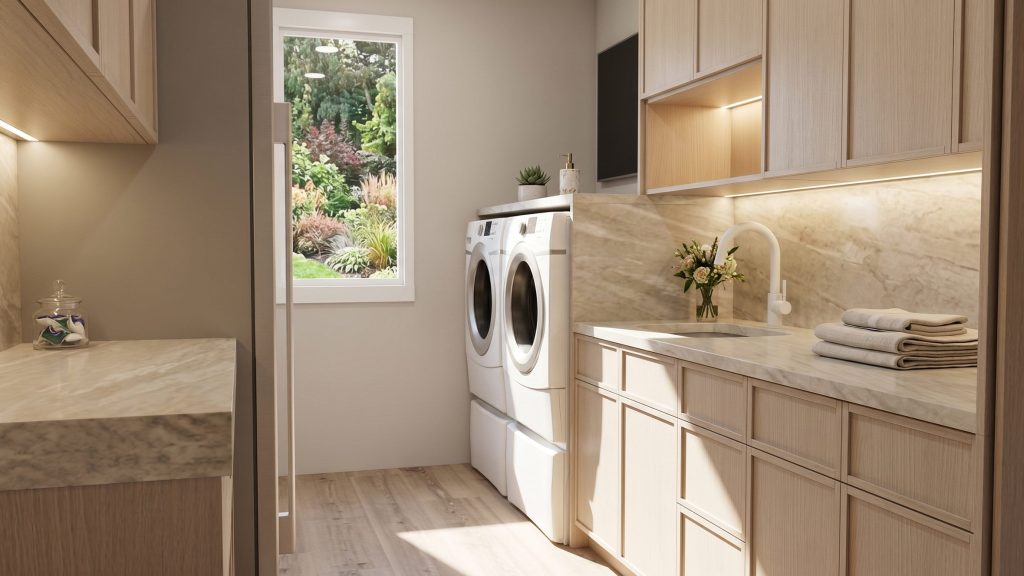
One design drives everything downstream: pricing, cut lists, hardware requirements and submittal drawings all come from the same data, and on the CNC tiers Mozaik generates machine-ready G-code in seconds. Shop-floor apps handle labeling, cutting and assembly. The headline addition in V15 is AI Rendering, an optional add-on on every subscription that styles your scene with furnishings, decor and lighting – while preserving your layout, geometry, materials and joinery exactly as designed.
Key features
- Custom cabinet design – frameless, face-framed, built-ins, closets – with customizable construction methods and libraries
- AI Rendering (V15 add-on): presentation visuals inside Mozaik, no prompt writing, dropped into Multi-Print
- Automatic cut lists, hardware requirements and submittal drawings
- Pricing module calculating materials, hardware, labor and taxes, with contracts and reports
- Mozaik Optimizer add-on for table and panel saws; advanced nesting on CNC tiers
- Machine-ready G-code and post processors for leading CNC routers (CNC and Enterprise)
- Paperless Shop add-on apps for Windows tablets; SketchUp integration
Pricing
On the vendor’s site: Manufacturing is $125/month for non-CNC shops – design, pricing, planning and cut lists. CNC is $225/month, adding nesting and machine-ready G-code. Enterprise is $325/month for multi-machine shops, adding user permissions, job management and machine routing; its page lists extra seats at $60/month. Rendering is separate, priced per company, not per seat: Cloud Rendering is $50/month (unlimited cloud renders); AI Rendering is $75/month (250 AI renders a month, plus unlimited cloud renders); AI Rendering Plus is $195/month (2,000 AI renders). AI credits do not roll over. There is no free trial – a 3-month paid trial converts to a one-year subscription.
Who it’s for
Cabinet, closet and casework shops – finish carpenters who design what they build – wanting one system from first client sketch to cut list or router. It fits a table-saw shop pricing jobs properly for the first time, and a growing CNC shop whose paperwork needs to keep up with the machine. The AI renders aim at sales: showing a homeowner their actual kitchen, styled and lit, before a sheet is cut.
Who should skip it
General carpenters who do not build cabinets or casework – Mozaik’s depth is cabinet-specific and wasted on framing or trim. Mac-based shops should also pass: Mozaik is Windows-only, with no iOS or Android app. And if you only need a quick room sketch for a quote, simpler design apps cost less.
Pros
- One design feeds pricing, cut lists, drawings and G-code – no re-drawing
- AI Rendering preserves your exact design instead of inventing an unbuildable one
- Published pricing, with a tier for non-CNC shops most cabinet software ignores
- Rendering priced per company, not per seat, with unlimited cloud renders
Cons
- Windows only – no native Mac version and no phone app for site work
- AI Rendering is an add-on ($75-$195/month), with monthly credits that expire
- No free trial; the paid 3-month trial converts to a one-year subscription
- Cabinet-only focus – not a general estimating or job-management platform
FAQ
How much does Mozaik cost?
$125/month for Manufacturing, $225/month for CNC and $325/month for Enterprise. AI Rendering adds $75/month (250 AI renders) or $195/month for Plus (2,000), priced per company.
What does Mozaik’s AI actually do?
AI Rendering, new in V15, turns your 3D design into presentation visuals inside Mozaik: it adds furnishings, decor and lighting while keeping your layout, geometry, materials and joinery unchanged. Manufacturing output still comes from your design data, not the AI.
Can Mozaik run my CNC router?
On the CNC and Enterprise tiers, yes: Mozaik generates machine-ready G-code and ships post processors for leading flat-table CNC routers. Manufacturing is for non-CNC shops cutting on table or panel saws.
Bottom line
Mozaik earns its subscription the way good shop software should: the design you sell is the job you cut. AI Rendering makes selling easier without touching the engineering, and the $125 entry tier respects shops without a router yet. If cabinets are your trade and you work on Windows, this is the benchmark to beat.