
Quick verdict
Magician by Diagram Review 2026: AI Icons, Images, and Copy Inside Figma
Magician by Diagram is one of the better-known AI plugins for Figma, generating icons, images, and interface copy from plain text prompts without leaving the canvas. It is strongest as a rapid ideation aid for early-stage design work — think placeholder icons, hero imagery, and draft microcopy — rather than as a finished-asset pipeline.
Key features
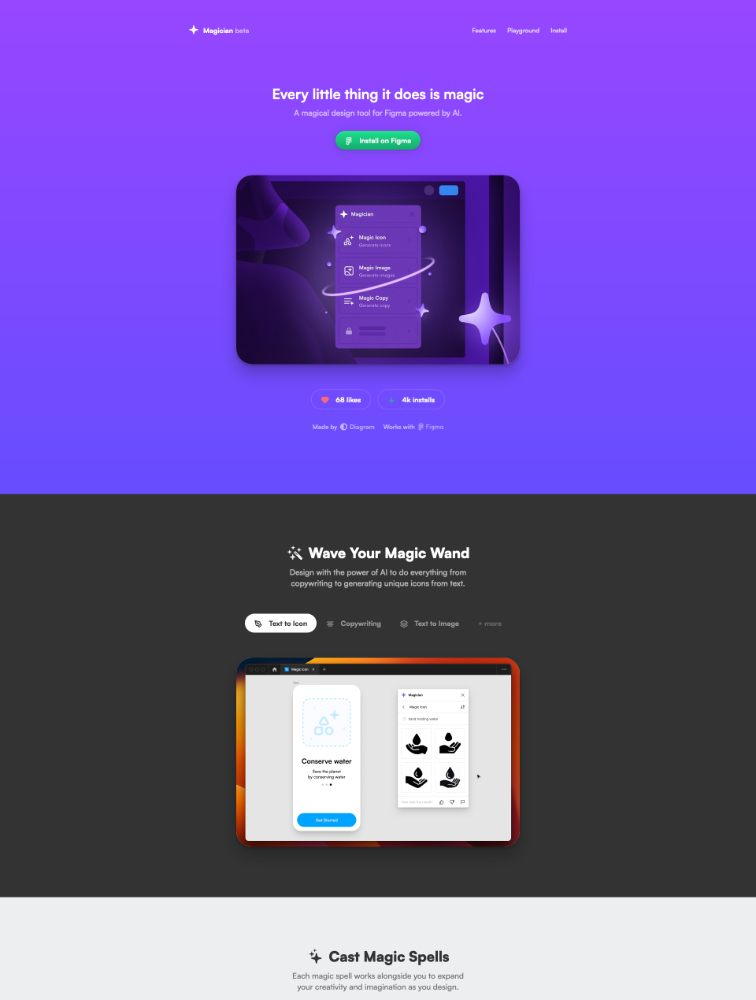
Magician is organized around three main “spells” that run inside the Figma Community plugin:
- Magic Icon — generates original icons from text descriptions, which you can insert directly into your frames. This is arguably the plugin’s signature trick: custom iconography is one of the slowest parts of early UI work, and Magician turns it into a prompt-and-pick loop.
- Magic Image — generates photorealistic or stylized imagery from prompts, useful for hero sections, avatars, placeholders, and mood-board material without leaving the design file.
- Magic Copy — generates interface and product copy (headings, button labels, placeholder text) so you can design with realistic words instead of lorem ipsum.
Everything runs natively in Figma, so there is no tab-switching to a separate AI tool, and the generated assets land in your selection as editable layers. The plugin comes from Diagram, the team behind several well-known Figma plugins.
Who it’s for
- Product designers and UX designers who want to move faster in the concepting phase — generating a dozen icon options or a hero image in minutes rather than searching stock libraries.
- Freelancers and solo builders putting together mockups and prototypes who cannot justify a dedicated illustrator or icon designer for every early draft.
- Marketing and landing-page designers who need on-brand-ish visuals quickly for A/B test variants and campaign pages.
- Design students and beginners learning composition and layout, who benefit from realistic copy and imagery in their practice files.
It is less essential for teams that already have a full-time illustrator or an established icon system — generated icons will not automatically match an existing design language, and hand-tuning them back into consistency takes real effort.
What to watch out for
- Beta status and moving targets. Magician has spent an extended period in public beta / early access. Features, limits, and pricing have been reported inconsistently across sources, so anything you read about its plans should be re-checked on the Figma Community listing itself.
- Quality is prompt-dependent. Output quality swings with how well you describe what you want. Icon consistency across a full set is a known weak spot — expect to iterate and touch up.
- Licensing and commercial use. AI-generated imagery comes with the usual open questions about training data and commercial-use rights. If you are producing client work or shipping production assets, review the plugin’s current terms and your own risk tolerance rather than assuming generated images are clean-room originals.
- Brand consistency takes work. Generated icons and images arrive in whatever style the model produced. Matching them to an existing brand system — stroke weights, corner radii, color palettes — is manual cleanup work, not something the plugin does for you.
- No hands-on guarantee. This review is research-based; we have not installed and tested Magician ourselves, so treat community reviews and the plugin’s own documentation as your ground truth before paying.
Pricing
Pricing: check current pricing. At research time, Magician was still described as being in a public beta / early-access tier with free access reported, while some third-party sources reported paid plans starting around $9/month. Beta-era terms change frequently — go to the plugin’s Figma Community page and confirm what is free, what is limited, and what paid tiers (if any) currently exist before you commit.
Pros
- Runs natively inside Figma — no context switching, and generated assets drop in as usable layers.
- Magic Icon fills a genuinely painful gap: fast, original-ish icon options for early concepts.
- Magic Copy lets you design with realistic text instead of lorem ipsum, which improves layout decisions.
- From Diagram, a team with a track record of popular Figma plugins, which adds credibility to the tool’s staying power.
- Long-running free / beta access reported, so it is cheap to try.
Cons
- Icon and image consistency across a full set is unreliable — expect manual cleanup for production work.
- Open questions around commercial-use rights for AI-generated imagery; check terms before client work.
- Pricing and plan structure have been reported inconsistently; there is no single verified price list we can point to.
- Extended beta status means features and limits can shift without much notice.
- Generated assets do not automatically match an existing brand system.
Frequently asked questions
Is Magician by Diagram free?
Magician has been available in a free public beta / early-access tier, but paid plans have been reported by third-party sources and the pricing situation has shifted over time. Check current pricing on its Figma Community listing, since beta-era terms change.
What can Magician generate?
Its three main features generate icons, images, and interface copy from text prompts, all inside Figma. Icons are the standout use case; images work well for placeholders and concept art; copy generation covers headings, labels, and placeholder text.
Can I use Magician’s generated images commercially?
Review the plugin’s current terms of service before using generated assets in commercial or client work. AI-image licensing is a gray area across the industry, and the safe move is to confirm the current terms rather than assume.
Who makes Magician?
Magician is made by Diagram, the design-tools team behind several popular Figma plugins. It is distributed through the Figma Community plugin directory.
Will Magician’s icons match my design system?
Not automatically — generated icons usually need manual adjustment of stroke weights, corner radii, and colors to sit inside an existing design system.