
Quick verdict
JobCRM Review 2026: AI Job Management Built for Cabinet and Millwork Shops
Updated November 28, 2026 – Tested Intelligence
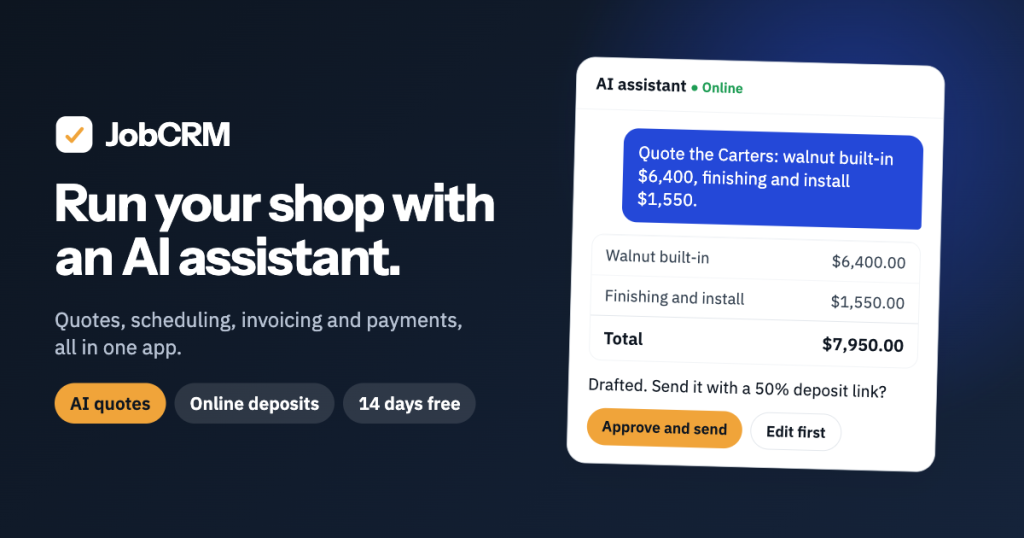
Quick verdict: JobCRM is job management and payments software built specifically for cabinet, kitchen, closet and millwork shops, with an AI assistant that drafts quotes from your voice or a photo, turns a snapped parts list into a purchase order, and flags what needs attention each morning. Pricing is fully published, from $49 a month for one user. It runs the business side of the shop — it does not design cabinets or drive a CNC, and its AI is metered in credits that heavy quoters will need to watch.
What it is
JobCRM runs a cabinet job from first lead to paid in full in one browser app: clients, quotes with e-signature, deposits, scheduling, parts orders, job costing and a branded client portal. Pick “cabinets” at signup and the job stages arrive preset — Lead, Appointment, Measure, Quote Sent, Sold (Deposit), Ordered / In Production, Install Scheduled, Install Complete, Paid in Full — with starter items for cabinets, countertops, installation and delivery ready for your prices. Named cabinet shops, including Eagle Woodworking and Dream Closets, appear as customers on the vendor’s site, and the product is also listed on Capterra.
The AI assistant is the differentiator. It drafts quote lines when you talk through a job or snap a photo of a sketch, cut sheet or supplier quote, reads a parts list into a purchase order, turns dictated site-visit notes into measurements and to-dos on the job, and answers questions about your real records — who owes what, which quotes have gone quiet, what is unbilled. It also connects to Claude and ChatGPT. Two guardrails are built in: it asks before anything reaches a client, and it can never move money — only the client can pay a pay link.
Key features
- AI quote drafting: describe the job by voice or photograph a sketch or supplier quote and get priced quote lines from your own price list to check
- Order from a photo: a snapped parts list or PDF becomes a purchase order with sizes copied exactly as written, never recalculated
- Selection sign-offs: door style, finish and hardware choices are signed by the client on their phone, and the job warns before you order anything unsigned
- Live job margin: sold price, parts, materials and labor on one screen, with a warning when parts are due after the install date
- Client portal under your logo: clients approve quotes, pay deposits and invoices, and check job status
- Built-in payments (1% bank transfer; 2.9% plus 30 cents by card) with QuickBooks Online sync on every plan
Pricing
Pricing is published on the vendor’s own pricing page. Basic is $49 a month for 1 user — clients, quotes, scheduling, invoices, built-in payments and the AI assistant. Essential is $199 a month for 5 users and adds automations and automatic reminders. Advanced is $399 a month for 10 users and adds the ClosetPro integration, two-way texting and campaigns. Extra users are $50 a month each. Every plan starts with a 14-day free trial of Advanced, no card required.
What the pricing page doesn’t make obvious: the AI assistant is credit-metered, and the caps differ sharply by plan — Basic includes roughly 100 quotes and questions a month (300 AI credits), Essential roughly 200 (600 credits) and Advanced roughly 500 (1,500 credits). Extra credits cost $0.10 each. Two more add-ons sit below the plan table: an extra texting number is $100 a month plus $0.10 per text, and visual reporting is $50 per user per month. The vendor’s own FAQ adds two trial gotchas: a brand-new trial cannot email clients until its second day unless you put a card on file, and taking payments needs an application usually approved in one to two business days.
Who it’s for
Custom cabinet and millwork shops of roughly one to ten people whose pain is paperwork rather than design: quotes typed twice, parts ordered from memory, selections changed verbally and disputed later. If your design lives in Mozaik, KCD or ClosetPro, JobCRM is the business layer those tools lack.
Who should skip it
Shops needing design-to-manufacture software should skip it: there is no design engine, cut-list optimization or CNC output. Larger shops should do the seat math first — past ten users, $50 a head narrows the gap with bigger CRMs — and high-volume quoters will find Basic’s 100 AI quotes a month tight.
Pros
- Built for cabinet and millwork workflow specifically, down to preset stages and selection sign-offs
- AI drafts from voice and photos but never sends to a client or moves money without approval
- Fully published pricing, a no-card free trial, and data export on every plan
- Parts ordering and live margin on the job, where most small-shop software stops at the invoice
Cons
- AI use is credit-capped per plan; overage, extra texting numbers and visual reporting cost extra
- No design, cut-list or CNC capability — you still need your design software
- A young, small vendor next to established trade platforms, with a short customer list
- Two-way texting and the ClosetPro integration are locked to the $399 Advanced plan
FAQ
How much does JobCRM cost?
Basic is $49 a month for one user, Essential is $199 a month for five users and Advanced is $399 a month for ten users, with extra users at $50 a month each. A 14-day trial of Advanced is free with no card.
Does the AI assistant send quotes without asking?
No. Inside JobCRM it asks before anything reaches a client, and it cannot move money at all — it can prepare a pay link, but only the client can pay it. Your team’s role permissions still apply to what it can see.
Does JobCRM replace my cabinet design software?
No. It has no design engine or CNC output. It imports parts lists from your design software — including a ClosetPro integration on Advanced — and handles quoting, ordering, scheduling, sign-offs, invoicing and job costing around the design.
Bottom line
For a small cabinet or millwork shop drowning in quote typing, parts chasing and verbal change orders, JobCRM is a focused, honestly priced answer: the AI does the paperwork, you approve everything, and the margin is visible while you can still fix the job. Just size the plan to your quoting volume — the AI credit cap, not the headline price, decides which tier you actually need.