
Quick verdict
JETCAM Expert Review 2026: AI Fly-Cutting and High-Performance Nesting for Sheet Metal Shops
Updated November 13, 2026 – Tested Intelligence
Quick verdict: JETCAM Expert is long-established CAD/CAM nesting and automation software for CNC punch, laser, plasma, oxyfuel, waterjet and routing machines. Its AI feature, JET-Cut, fly-cuts complex grids of holes without the programmer having to mark which areas get the logic — the software finds suitable geometry itself. It suits sheet metal shops drowning in programming time across mixed machines. The costs are opacity and age in places: pricing is not public, and buyers need a current maintenance contract to receive the newest releases.
What it is
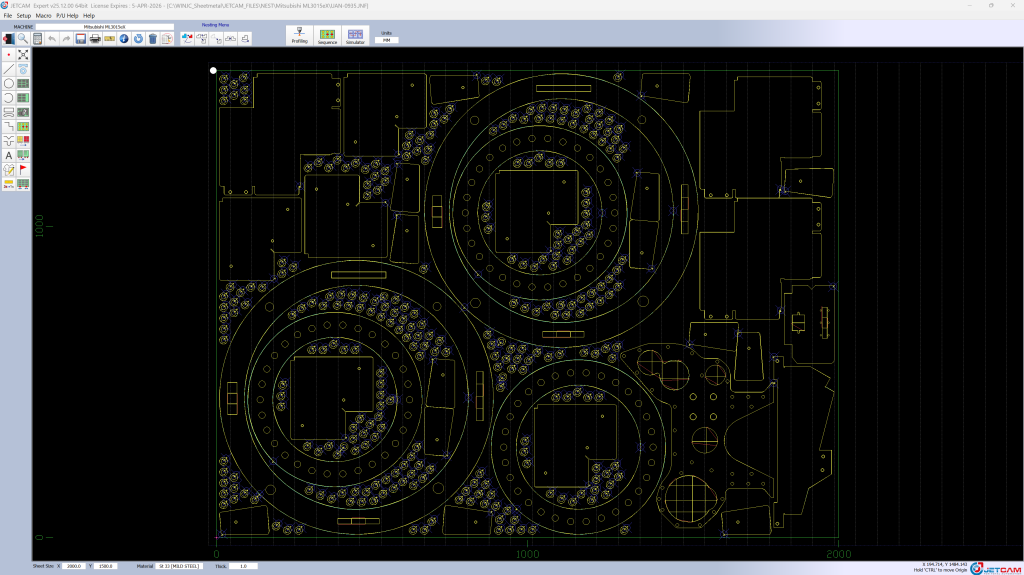
JETCAM Expert is the flagship nesting product from JETCAM International, which has developed CAD/CAM software for the sheet metal and composites industries since 1986. Expert imports CAD files, applies profiling and tooling information, nests components — in the vendor’s words, in seconds and fully automatically — and generates optimized NC code for hundreds of CNC machine models from different manufacturers. Around it sit JETCAM Orders Controller (JOC) for populating the orders list, CrossTrack for material tracking, scheduling and ERP integration, a 3D unfolder that flattens popular 3D files into DXF flat patterns, and a browser-based quoting tool that runs from initial quote to job card.
The AI lives in JET-Cut, introduced with Expert v20 and still carried in current releases. Trade coverage in Cutting Tool Engineering and Modern Machine Shop describes it the same way the vendor does: JET-Cut allows complex grids of holes to be laser cut using artificial intelligence far quicker than traditional methods, without the user specifying which areas should have the logic applied — it applies the logic on any suitable geometry. Its partner feature, JET-Optimizer, sequences the cutting of internal holes to minimize machine movement and avoid travel over already-cut holes. In a published case study from the same trade press, a refrigeration manufacturer running Expert v20 reported programming time reduced by 80 percent and machine runtime reduced by 13.2 percent on the same nests versus its previously supplied software — the shop’s reported figures, not a lab test.
What the vendor’s product pages don’t make obvious is in its own release notes. JETCAM Expert v25 is the last version available in both 32-bit and 64-bit: from Expert v26, releases are 64-bit only — and Windows 10, the last common 32-bit-era system in many shops, reached end of support in October 2025. Separately, the vendor’s own update announcements state that new versions are free only to customers with a current maintenance contract. A shop on old hardware or a lapsed contract is not getting JET-Cut’s successors or v25’s new anti-tipping microjoints for free, so both belong in the purchase conversation up front.
Key features
- JET-Cut AI fly-cutting: artificial intelligence finds suitable hole-grid geometry and applies fly-cutting logic automatically, with no areas to mark up by hand
- JET-Optimizer: sequences internal-hole cutting to minimize head movement and avoid travel over already-cut holes
- High Performance Nesting: true-shape and rectangular nesting for single and multi-sheet work, aimed at material savings that the vendor says often pay for the software in weeks or months
- Machine breadth: optimized NC output for hundreds of CNC brands across punch, laser, combination, waterjet, plasma, oxyfuel, routing and knife cutting
- Remote-control processing: the system can listen for instructions from external systems such as MRP, process them and report back, de-skilling CNC programming
- Orders and tracking ecosystem: JOC Lite (now free) populates Expert’s orders list, and CrossTrack adds nest scheduling, material location and consumption tracking with ERP integration
- 3D unfolding and quoting: popular 3D files unfold manually or automatically to DXF, and browser-based quoting runs from quote to job card
Pricing
Pricing is not public. JETCAM sells Expert through a global reseller network, with a demo and a free nesting benchmark comparison offered up front: send your best nest from your existing CAD/CAM software plus the DXFs, and JETCAM will return a comparison nest so you can see the material difference before buying. Two cost facts are documented in the vendor’s own material: new versions are free to existing customers with a current maintenance contract, which makes that contract a real recurring cost to budget, and JOC Lite is now free. Expect the quote to depend on machine posts, nesting options and seats — get the maintenance terms in writing alongside the license price.
Who it’s for
Sheet metal fabricators running laser, punch or plasma work across one or more machine brands, whose programmers spend hours nesting and sequencing work that software should do. It fits best when material cost and programming time are both visible problems — the free benchmark exists precisely for shops that want the material-saving claim tested on their own parts first. Shops serving defence work may also value the vendor’s on-premise option, which keeps data on site.
Who should skip it
Very small shops with one machine and simple parts may recover the cost faster with a lighter tool: SigmaNEST, Lantek or ProNest — all covered by Tested Intelligence for sheet metal workers — compete in nesting, and simpler CAM packages exist well below enterprise nesting money. Shops that mainly need quoting, rather than NC programming, should look at quoting-first tools instead. And any shop unwilling to keep a maintenance contract current, or still running 32-bit systems it cannot replace before v26, should resolve that before signing, per the release-notes detail above.
Pros
- JET-Cut removes real programmer labor: the AI finds the geometry instead of waiting to be told
- One system programs hundreds of machine models, which suits mixed-brand shops
- The free nesting benchmark tests the material-saving claim on your own DXFs before purchase
- A deep surrounding suite: orders, material tracking, scheduling, unfolding and quoting
- Nearly four decades in sheet metal CAD/CAM, with a global reseller and support network
Cons
- Pricing is not public — every budget starts with a reseller conversation
- New versions are free only with a current maintenance contract, an ongoing cost
- Expert v25 is the last 32-bit release; v26 is 64-bit only, a hardware checkpoint for older shops
- The AI is narrow: JET-Cut optimizes hole-grid fly-cutting, it is not a general design or quoting AI
- Full value needs the surrounding modules and ERP links, which expands the implementation
FAQ
What does JETCAM Expert’s AI actually do?
JET-Cut uses artificial intelligence to recognize complex grids of holes in imported geometry and apply fly-cutting logic automatically, without the programmer specifying which areas qualify. JET-Optimizer then sequences internal-hole cutting to minimize machine movement and avoid already-cut areas.
How much does JETCAM Expert cost?
Pricing is not public; it is sold through resellers and depends on machines, options and seats. The vendor offers a free nesting benchmark comparison on your own parts, JOC Lite is free, and new Expert versions are free only while a maintenance contract is current — so ask for license and maintenance figures together.
How does JETCAM Expert compare with SigmaNEST?
Both are enterprise nesting systems with quote-only pricing. SigmaNEST leads on machine-specific processing preparation tied to downstream run documentation; JETCAM Expert’s distinction is automation breadth — JET-Cut’s AI fly-cutting, remote-control processing from MRP systems, and the CrossTrack tracking and scheduling suite around the nest.
Bottom line
JETCAM Expert earns its place for sheet metal shops where programming time and sheet yield are measured in real money. JET-Cut’s AI is narrow but genuinely labor-saving, the benchmark offer lets you verify the nesting claim on your own parts, and the ecosystem reaches from order to job card. Enter with eyes open on the two documented gotchas: budget the maintenance contract as a permanent cost, and be on 64-bit hardware before v26 arrives.