
Quick verdict
Finch Review 2026: AI Floor Plans Generated From Your Firm’s Own Standards
Updated November 18, 2026 – Tested Intelligence
Quick verdict: Finch (the product formerly branded Finch3D, at finch3d.com) is an AI-native early-design platform that generates building floor plans from your firm’s own plan library and rules, with live performance metrics as you edit and BIM geometry out the other end. It is genuinely different from massing-only feasibility tools — but the generation most buyers picture is gated hard: the free plan cannot generate at all, Basic only generates unit mix and circulation, and full floor-plan generation starts on Enterprise at €14,500 a year for three seats.
What it is
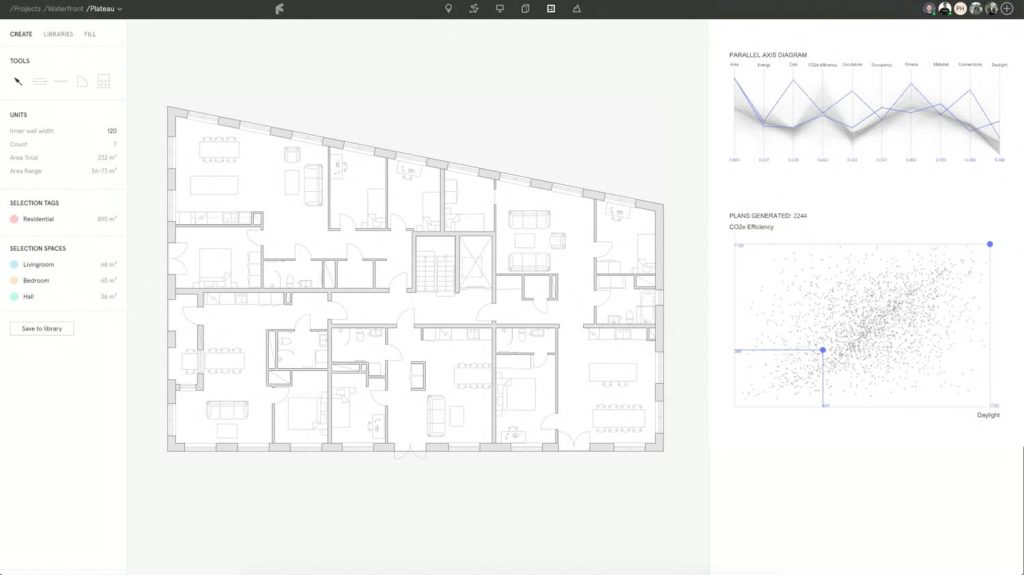
Finch is built for the earliest, highest-leverage stage of a project: you start from a massing model or site boundary and a program, and its graph-based AI generates floor-plan layouts — units, corridors and cores placed — scored in real time on area, daylight, energy, cost and circulation metrics. The differentiator is where the rules come from. Instead of generic presets, a firm encodes its own design standards, unit types and local requirements into a plan library and graph rules, so generated options follow the way that firm already designs. Finch’s founders — Martin Kretz, Pamela Nunez Wallgren and Jesper Wallgren — are architects, and the homepage today pitches master plans, residential, high-rise and office test fits; independent coverage of the vendor’s own positioning notes the generative engine is deepest for multifamily residential, with massing tools covering the rest. Output is real model geometry, not pictures: Finch connects to Revit (2023 to 2027), Rhino and Grasshopper, and Autodesk Forma, per its FAQ. Sweco Denmark’s lead for AI and data-driven design is quoted on the homepage calling it “the right combination of architectural control and generative AI.” The vendor promises detailed floor plans, area calculations and BIM geometry “in hours, not weeks.”
Key features
- Generative floor plans: AI generates and scores layout options from your massing and program in seconds, iterating unit mix, circulation and core placement
- Firm plan library and graph rules: your own unit types, standards and design rules become the constraints the generator works inside, so output matches house style
- Real-time performance metrics: area, efficiency and building-performance feedback update live as you edit, on every plan including the free one
- BIM out, not images: generated designs export as structured BIM geometry, with Revit, Rhino/Grasshopper and Forma connections
- Code and compliance check: listed on the Enterprise plan, checking generated plans against encoded rules
- AI agent for automated design workflows: also Enterprise-only, per the vendor’s plan page
- Typology range: master planning, residential, high-rise and office test fits on the current homepage
Pricing
Three plans, listed on the vendor’s own get-started page (checked November 18, 2026). Free costs €0 for a single user: all editing tools plus real-time building performance metrics — and no generation of any kind. Basic is €79 per month billed monthly for a single user, with a 14-day free trial; it adds generation of an optimized unit mix and circulation. Enterprise starts at €14,500 per year billed annually for three seats, and adds the full package: AI-powered floor-plan generation, a firm-wide plan library, code and compliance check, custom BIM export and integrations, the AI agent, and SSO. The vendor describes Enterprise output as running “from concept to Schematic design with LOD 300-level precision.”
What the pricing page doesn’t make obvious: the headline capability — generating floor plans — is not in the €79 plan. Basic generates unit mix and circulation only; complete floor-plan generation, the plan library shared across a firm, and the AI agent all sit on Enterprise, which works out to roughly €403 per seat per month at the three-seat minimum. Budget for Enterprise if generation is why you are buying, and treat Free as an editor with live metrics, not a trial of the AI.
Who it’s for
Architecture firms and developers doing repeatable residential and mixed-use work, where the same unit types and standards recur project after project — that repetition is exactly what a plan library monetizes. It also fits computational-design teams already living in Revit, Rhino and Grasshopper who want generated options inside their existing toolchain rather than in a separate viewer.
Who should skip it
Skip it if you need construction documents — Finch is an early-stage tool and stops at schematic-level output. Skip it if your work is mostly one-off building types with no repeating standards to encode; the library setup earns its keep through reuse. And skip the free and Basic plans if full floor-plan generation is the requirement: on the vendor’s own plan split, that is Enterprise or nothing. Teams that only need site massing and feasibility math should compare it with the feasibility-first tools in our TestFit review before paying Enterprise money.
Pros
- Generates real BIM geometry and floor plans, not renderings or massing blocks
- Your firm’s own standards drive the generator — the output is checkable against house rules
- Live performance metrics on every tier, including free, make manual editing genuinely useful
- Revit, Rhino/Grasshopper and Forma connections meet design teams where they already work
- Pricing is published, including the Enterprise floor — no quote-only guessing to start budgeting
Cons
- Full floor-plan generation is Enterprise-only: from €14,500 a year, three seats minimum, billed annually
- Free plan cannot generate at all, and Basic stops at unit mix and circulation — the tier names undersell the gap
- Generative depth is strongest in multifamily residential; other typologies lean more on massing and test fits
- Early-stage only: schematic-level output still needs a full documentation workflow downstream
- Prices are in euros, which US buyers should note when comparing against dollar-priced rivals
FAQ
Is Finch actually free?
There is a permanent free plan, but it is an editor, not a generator. On the vendor’s plan page, Free (€0, single user) includes all editing tools and real-time building performance metrics, with no AI generation. Generation starts on Basic at €79 per month, and full floor-plan generation is Enterprise-only.
What software does Finch work with?
Per the vendor’s FAQ as reported in current coverage, Finch supports Revit 2023 to 2027, Rhino (with Grasshopper) and Autodesk Forma. Generated work is delivered as BIM geometry, and custom BIM export and integrations are listed as Enterprise features.
How is Finch different from TestFit or Autodesk Forma?
Depth of output. TestFit and Forma concentrate on massing, feasibility and site analysis; Finch goes one level deeper, generating the actual unit layouts and floor plans inside the massing, scored against your own plan library. If a feasibility answer is all you need, the shallower tools are cheaper; if your bottleneck is drawing the plans themselves, Finch is aimed at that step.
Bottom line
Finch is the generative-design tool for firms whose floor plans follow repeatable standards and who are tired of redrawing them from scratch on every scheme. Go in with the tier split clear-eyed — Free to learn the editor, Basic for unit-mix studies, Enterprise (from €14,500 a year, three seats) for the floor-plan generation in the headlines — and it can compress the concept-to-schematic stretch from weeks to hours. If your projects never repeat, the library never pays back, and a massing tool is the better buy.