
Divi AI Review 2026: Unlimited Images, Text and Layouts — With an Agent That Is Quietly Metered
Divi AI is the AI layer built into the Divi Visual Builder for WordPress: it generates layouts, sections and whole sites, writes and rewrites copy, creates and edits images, and writes code fine-tuned on the Divi module codebase — and since September 2026 it also includes the Divi AI Agent, a chat panel in the Divi 5 builder that builds and edits pages from plain-language commands. Generation of text, images, code and layouts is unlimited on as many websites as you want, subject to a fair use policy. The catch is in Elegant Themes’ own help center: the Agent is not part of that unlimited promise. It runs on a $5 monthly balance that does not roll over, and Divi AI itself is a subscription that can never be bought as a lifetime product — not even by lifetime members.
What it is
Divi is Elegant Themes’ flagship WordPress theme and visual builder, sold as a membership covering unlimited websites. Divi AI is the subscription add-on that lives inside that builder: the quick tools generate a section, a page or a full Quick Site from a description, write and rewrite module copy, generate images from prompts, and edit existing images — restyling them, replacing areas, extending the frame and upscaling. Its code generation is fine-tuned on the Divi module codebase, so the code it writes speaks Divi’s own language.
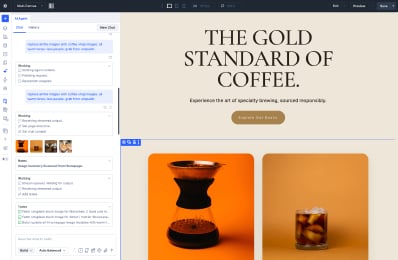
The September 2026 addition is the Divi AI Agent, in the Divi 5 Visual Builder: a chat panel where you describe the change — fix spelling across every text module, add missing alt text to every image, replace static colors with global variables — and the agent makes the edits on the canvas. It works in Ask or Build mode, keeps saved rules and reusable slash commands, takes screenshots, mockups and external URLs as layout references, and can spawn parallel subagents for larger jobs.
Key features
- Unlimited quick generation. Text, image, code and layout generation inside the builder — including Divi Quick Sites, which drafts a full starter website with pages, copy and images — on unlimited websites, subject to fair use.
- Image generation and editing. Generate images from prompts in chosen styles, or work from a reference image: edit a selected area, swap a background, extend a photo beyond its frame, and upscale small or blurry images, with output saved to your media library.
- The Divi AI Agent (Divi 5). A chat panel that adds, edits, moves and deletes modules, updates design settings and presets, manages pages and menus, and runs page-wide cleanups — alt text, contrast, spelling, oversized-image hunts — from one prompt, with a work summary after each task.
- Rules, commands and context. Save site rules the agent must follow, store repeat prompts as slash commands, and pull page elements, media and site content into the conversation as context, with checkpoints you can revert to.
- Code fine-tuned on Divi. The code model is trained on the Divi module codebase, and the agent can audit custom CSS and JS on a page for dead code and cleanup opportunities.
- Context-aware writing. Text generation reads your site name, page content and surrounding modules, so drafts arrive closer to on-brand than a blank external chatbot’s would.
Pricing
Divi AI needs a Divi membership underneath it. The membership itself is $89/year, or $249 one-time for lifetime access, both covering unlimited websites. Divi AI is then sold two ways on Elegant Themes’ pricing: standalone at $193/year (about $16.08/month billed annually, or $21.36 month to month) for existing members, or bundled in Divi Pro at $277/year, which also adds Divi Cloud, Divi VIP support and Divi Teams. A limited free trial lets existing Divi customers try Divi AI before subscribing, and purchases carry a 30-day money-back guarantee. Elegant Themes runs frequent promotions — a Black Friday sale was live at research time — so the checkout price can sit below these list prices.
What the pricing page doesn’t make obvious: Elegant Themes’ own Divi AI pricing overview in its help center (updated October 1, 2026) splits the product in two. The “unlimited” headline covers only text, image, code and layout generation. The Divi AI Agent is metered: your subscription includes $5 of agent usage per month, the balance resets on your renewal date, unused balance does not roll over, and once it is gone you top up an AI Wallet in your members area and pay per request. The same help page confirms Divi AI, Cloud, VIP and Teams are subscriptions only and are not available as lifetime purchases — so even a $249 lifetime member who wants AI pays for it every year.
Who it’s for
- Divi freelancers and agencies — unlimited generation across unlimited client sites makes the per-site AI cost effectively zero, and Quick Sites plus the Agent compress the blank-page phase of every build.
- Site owners already on Divi 5 — the Agent’s page-wide fixes (alt text, contrast, spelling, preset cleanup) are genuinely useful maintenance you can run in one prompt.
- Designers who want AI inside the canvas — image generation, editing and code help without round-tripping to external tools and back into the media library.
What to watch out for
- The Agent is metered, not unlimited. $5 a month is included; heavier agent use draws on a paid AI Wallet balance billed per request at model rates plus markup, so a busy agency month costs more than the subscription.
- No lifetime AI, ever. Divi itself can be bought once; Divi AI cannot. Budget it as a permanent yearly line, or as part of Divi Pro at $277/year.
- It only exists inside Divi. Sites built with Gutenberg, Elementor or another builder get nothing from this subscription — the AI is inseparable from the Divi builder and its module system.
- Agent features need Divi 5. The quick tools run in Divi 4.22 and above, but the Agent is Divi 5 only, so older Divi 4 sites must migrate before the headline feature works.
Pros
- Truly unlimited text, image, code and layout generation on unlimited websites — no credit packs for the core tools.
- The Agent does page-wide busywork (alt text, contrast, spelling, style consistency) in a single prompt, with revertible checkpoints.
- Image editing goes beyond generation: inpainting-style area edits, background swaps, outpainting and upscaling in the builder.
- Code generation fine-tuned on Divi’s own module codebase, not generic CSS guesswork.
Cons
- Agent usage is metered behind a $5 monthly balance that never rolls over; extra use is pay-per-request.
- AI is subscription-only with no lifetime option, stacked on top of the Divi membership itself.
- Useless outside the Divi ecosystem — no value for Gutenberg or Elementor sites.
- The newest headline feature requires migrating to Divi 5.
Frequently asked questions
Is Divi AI free?
No. Existing Divi customers can try it in a limited capacity for free, but continued use needs a subscription: $193/year standalone, or Divi Pro at $277/year, which bundles Divi AI with Divi Cloud, Divi VIP and Divi Teams. Both routes also require the underlying Divi membership ($89/year or $249 lifetime). Purchases carry a 30-day money-back guarantee.
Is Divi AI really unlimited?
Half of it is. Per Elegant Themes’ own help center, text, image, code and layout generation — including Quick Sites — is unlimited on as many websites as you want, subject to fair use. The Divi AI Agent is the exception: it draws on an included $5 monthly balance that resets each month and does not roll over, and further agent requests are billed per use through an AI Wallet top-up.
Does the Divi lifetime deal include Divi AI?
No. Elegant Themes states that Divi AI, Divi Cloud, Divi VIP and Divi Teams are monthly or yearly subscriptions and are not available as lifetime purchases. A lifetime member can add Divi AI at $193/year, or take a Lifetime + Pro bundle that pairs the one-time Divi payment with a recurring yearly charge for the Pro services — the AI portion renews every year either way.