
Quick verdict
CutQuote Review 2026: Laser Quoting With an AI Inbox That Only Drafts
Updated November 10, 2026 – Tested Intelligence
Quick verdict: CutQuote is quoting software built specifically for laser, plasma and waterjet shops: upload a DXF or a STEP file, let it unfold the sheet metal part, nest it true-shape, and price it from your own machine rates and margins. Its one AI feature, the AI Quote Inbox, is honest about its limits — it drafts, a human sends. The catch every buyer should know first is that the AI sits only on the top Business plan, while the quoting engine most shops actually need is already in the $85 Starter plan.
What it is
CutQuote is made by Idronic, the Australian team behind the older LaserQuote and RanFab fabrication software. It covers the run from a customer’s file arriving to an accepted quote moving toward production: DXF, DWG and manual shapes on every plan, STEP import with sheet metal unfolding and bend recognition, tube and structural work, true-shape nesting, and secondary operations such as folding, welding, coating and machining priced from your own rules. Quotes are branded, customers can view and accept them online, and accounting links cover Xero and MYOB, with QuickBooks listed by the vendor as coming.
The AI is deliberately narrow. The AI Quote Inbox, listed on the pricing page as “drafts only,” turns incoming quote requests into draft quotes for a person to check and send — it does not auto-quote customers. That restraint matters in sheet metal, where a misread thickness or a missed bend costs real money. Everything else that makes a quote fast here is geometry and rules, not AI: cutting time from the actual path, pierce counts, material cost from a real nest, and your machine rates applied the same way whoever is quoting.
What the pricing page doesn’t make obvious is how the free trial is capped. The headline says 25 STEP parts, but trials that start on a free email provider begin with only 10 STEP parts until the email is verified and a company phone number is provided — and reprocessing a part uses the STEP allowance again. Live payments are also off during the trial. None of that makes the trial unfair, but a shop that burns its allowance reprocessing its test parts will judge the tool on less evidence than it expected.
Key features
- AI Quote Inbox (Business only): incoming requests become draft quotes only — a human reviews and sends every quote
- STEP unfolding on every plan: 3D sheet metal parts are flattened with bend recognition, with no monthly cap on paid plans under fair use
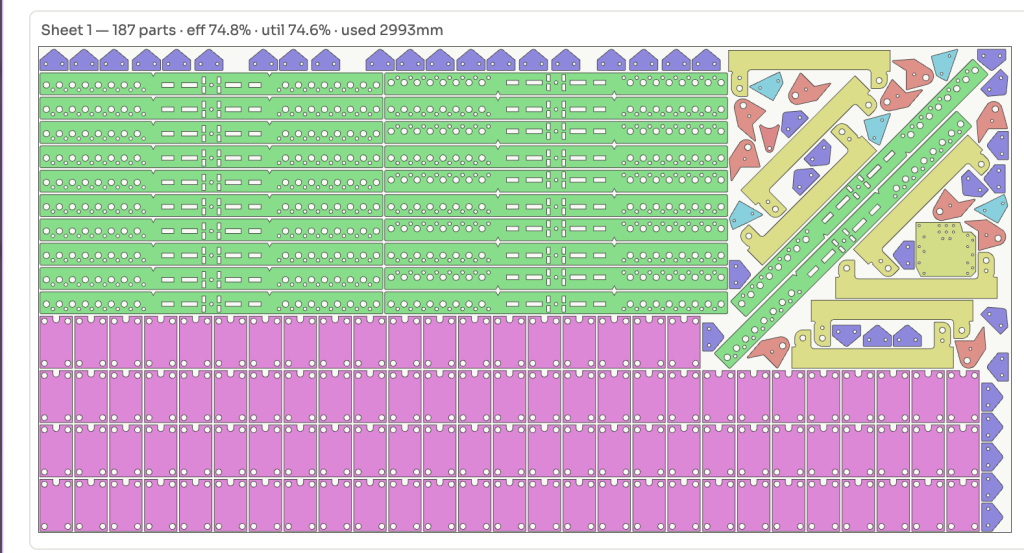
- True-shape nesting on every plan: unlimited under fair use; the vendor’s own published example nests 187 parts at 74.8% efficiency
- Geometry-based pricing: cutting time with acceleration, pierce counts, gas and material from the real nest, priced at your machine rates and margins
- Tube and structural quoting included, alongside folding, welding, coating and machining as priced secondary operations
- Customer workflows: branded quotes and online acceptance on every plan; a self-serve quoting portal on Professional and Business; website widget and white-label on Business
- Production on Business: job cards, Gantt scheduling, CRM pipeline, follow-ups and profit reporting
- No CutQuote transaction fee: 0% on every plan — only Stripe’s own processing rate applies
Pricing
CutQuote publishes its pricing in US dollars, billed in your own currency from a list of 19. Starter is $85 a month billed monthly, or $765 a year, for 1 user and 1 machine, with unlimited quotes, STEP and nesting. Professional is $249 a month, or $2,241 a year, adding assemblies and BOM, vector PDF import and the customer self-serve portal, for up to 10 users. Business is $425 a month, or $3,825 a year, adding production, scheduling, the AI Quote Inbox, widget, white-label and API. Every plan includes one user; each extra user on Professional costs $125 a month and on Business $213 a month — half the plan price — while shop-floor operators clocking on at a kiosk with a PIN need no seat. Annual billing saves 25% and is paid upfront. The 14-day trial gives one user the Business feature set with no card required, subject to the STEP and nesting caps described above.
Who it’s for
Small and mid-size sheet metal and laser cutting shops that quote from customer DXF and STEP files all day and lose margin to inconsistent spreadsheet pricing. It fits best when one or a few estimators need the same rates applied the same way every time, and when customers sending files through a portal would save real phone and email time. A rival guide for fabrication job shops, published by Tempus Tools, lists CutQuote as its pick for fast file-based laser quoting — that is the lane it is built for.
Who should skip it
Shops buying mainly for the AI should do the maths first: the AI Quote Inbox exists only at $425 a month, and it only drafts. If your inbox volume is low, Starter or Professional plus a human estimator does the same job for far less. Shops that need full ERP — purchasing, inventory and broader manufacturing management — are pointed by CutQuote itself to FabOps, its sister product. And accounting is Xero and MYOB today; a QuickBooks-only shop should confirm the vendor’s “coming” integration timeline before relying on it.
Pros
- Published, flat pricing with unlimited quotes and no transaction fee of its own
- STEP unfolding and true-shape nesting are on the cheapest plan, not held back as upsells
- The AI is scoped honestly: drafts only, with a human sending every quote
- Extra seats are a predictable half-price, and kiosk operators need no seat at all
- A real 14-day trial with no card and no sales call required
Cons
- The only AI feature is locked to the top Business plan at $425 a month
- Trial fine print is easy to miss: free-email trials start at 10 STEP parts, and reprocessing burns the allowance again
- Starter is strictly one user and one machine
- QuickBooks integration is listed as coming, not shipped; live accounting is Xero and MYOB
- Annual billing is paid upfront, so the 25% saving is a cash-flow decision, not just a discount
FAQ
What does the AI Quote Inbox actually do?
It turns an incoming quote request into a draft quote. The pricing page labels it “drafts only”: an estimator still checks and sends the quote, which keeps a human between the AI and your customer on price.
Is nesting really unlimited?
On paid plans, STEP processing and true-shape nesting carry no monthly cap, under a fair-use note. The trial is different: up to 25 STEP parts and 500 unique nested parts per month, with the free-email starting cap described above.
How does CutQuote compare with Tempus Tools?
Both quote laser work from files with published pricing. CutQuote charges a flat plan price with 0% transaction fees and puts nesting and STEP on every plan; Tempus Tools, which Tested Intelligence readers can compare in rival guides, charges per quoting user and takes 0.5% to 2% on payments through its store, depending on workflow.
Bottom line
Buy CutQuote for its quoting engine, not its AI badge. The geometry, nesting and your-own-rates pricing are the value, and they start at $85. Step up to Business only when incoming request volume makes an AI drafting inbox — and production scheduling in the same system — worth five times the Starter price.