
Quick verdict
Coast Review 2026: AI Work Orders Built From a Photo, a Voice Note or a Plain Description
Updated November 9, 2026 – Tested Intelligence
Quick verdict: Coast is a mobile-first maintenance management app whose AI is aimed at the two moments maintenance work usually dies: getting a work order created in the first place, and getting the system set up to match how your shop actually works. Describe a workflow in plain language and Coast AI builds it; talk, photograph or drop a file and it drafts the work order for your approval. The limits are just as clear: the free plan keeps only 7 days of history, and the reporting and integrations depth sits on the paid tiers.
What it is
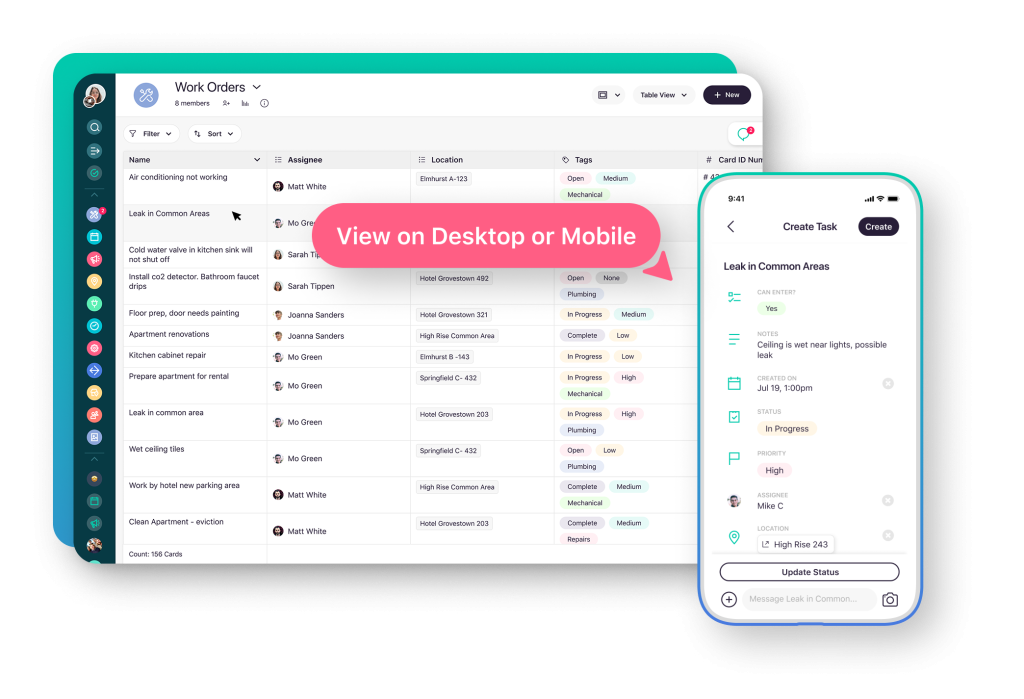
Coast is a computerized maintenance management system (CMMS) built for deskless maintenance teams: work orders, preventive maintenance through repeating work orders, asset records with QR codes, parts and inventory, and team messaging that lives inside the work order instead of in a separate chat app. A technician scans a QR code on a pump or an air handler and gets its full history, manuals and open work; managers build custom fields, checklists and approval steps so the app follows the shop’s process rather than forcing a template on it.
The AI works at intake and at setup. At intake, Coast’s own launch material puts it three ways: say it — describe the problem out loud and Coast AI creates the work order; snap it — photograph a nameplate, receipt or meter reading and it becomes a new asset, expense or log entry; drop it in — drag in a vendor quote, service report or certificate and the AI pulls out the details. Anything the AI is unsure about gets flagged, it asks for your approval before filing, and the original photo, transcript or file stays attached as proof. At setup, you describe the workflow you want — Coast’s example is a daily forklift inspection with a checklist that flags failures and opens a work order — and the AI builds the fields, checklist and automations for you.
What the pricing page doesn’t make obvious is how short the free plan’s memory is. Coast’s vendor-provided plan listings show the free tier keeps just 7 days of history and allows 5 repeating work orders. For a maintenance team, history is the product — a free plan that forgets last month is a trial in disguise, and the real starting point is Starter, which unlocks unlimited history and unlimited repeating work orders with procedures.
Key features
- Coast AI intake: a voice description, a photo of a nameplate or meter, or a dropped vendor file becomes a drafted work order, asset or log entry, held for your approval
- AI workflow builder: describe a process in plain language and Coast builds the form, checklist and automations
- Uncertainty flagging: items the AI cannot read confidently are flagged, with the original photo, transcript or file kept attached
- QR code asset records: scan an asset for its history, manuals and service forms, and raise a request on the spot
- Work orders with built-in messaging: updates, photos and conversation stay on the job, not in personal texts
- Preventive maintenance: repeating work orders with procedures, plus meter-reading automations that can alert or trigger work at a threshold
- Custom fields, checklists and approvals: workflows shaped to your process on every plan, fully customisable on Pro
Pricing
Coast publishes per-user pricing. The Free plan is $0 and includes unlimited work orders and real-time messaging, but only 7 days of history and 5 repeating work orders. Paid plans start at $25 a user a month on Coast’s own site: Starter adds unlimited history, unlimited repeating work orders with procedures, time and cost tracking and 5 workflow automations. Pro, listed at $65 a user a month, adds full workflow customisation, reporting and analytics with custom dashboards, external work request forms, automated time tracking, automated downtime tracking and 30 workflow automations. Enterprise is custom-priced and adds the deeper integrations and single sign-on. A 7-day Pro trial is offered. Check the live pricing page before budgeting — annual billing is listed lower than monthly on third-party plan listings.
Who it’s for
Small and mid-size maintenance teams — facilities, property, plant and field-service shops — whose work orders currently live in texts, spreadsheets and hallway conversations, and whose technicians will use a phone app but will never love a desktop CMMS. It fits best when intake is the bottleneck: requests arrive as photos, voicemails and paperwork, and someone loses an hour a day turning them into jobs.
Who should skip it
Teams that need deep asset, inventory and reporting machinery from day one should compare carefully: reviewers note Coast is lighter on asset and inventory depth than full CMMS platforms such as MaintainX and UpKeep, both of which Tested Intelligence has covered for maintenance technicians, and Coast’s own AI is an intake and setup assistant — it will not do predictive failure analysis or audit your maintenance data for you. If failure prediction is the job, look at sensor-led tools instead.
Pros
- AI intake matches how maintenance requests really arrive: voice, photos and dropped paperwork
- The AI asks for approval and flags what it is unsure about, keeping the source attached as proof
- Messaging inside the work order ends the separate text-thread problem
- QR asset history is fast in the field, where it matters
- Published per-user pricing and a free plan to start on
Cons
- Free plan keeps only 7 days of history and 5 repeating work orders — a trial in effect
- Reporting, dashboards and integrations are gated to Pro and Enterprise
- Lighter asset and inventory depth than full CMMS rivals
- No predictive-maintenance AI: the AI builds and files work, it does not forecast failures
- A small public review pool compared with the big CMMS names, so long-track-record evidence is thin
FAQ
What does Coast AI actually do?
Two things: intake and setup. It turns a spoken description, a photo or a dropped file into a drafted work order, asset or log entry for your approval, and it builds complete workflows — fields, checklists and automations — from a plain-language description of your process.
Is Coast free?
There is a free plan with unlimited work orders and messaging, but it keeps only 7 days of history and 5 repeating work orders. Most working maintenance teams will land on Starter or Pro.
How is Coast different from MaintainX or UpKeep?
Coast leads on intake and custom workflow building, with chat built into the work order. MaintainX and UpKeep go deeper on assets, inventory and reporting, and UpKeep’s Nova AI works inside daily maintenance data rather than mainly at intake and setup.
Bottom line
Coast earns its place for maintenance teams whose real enemy is friction: work that never becomes a work order, and software nobody finished setting up. Its AI attacks both, honestly and with a human approval step. Just skip the free tier’s short memory in your budgeting, and do not buy it expecting predictive maintenance — that is a different tool category.