
Quick verdict
Cedreo Review 2026: 2D Plans, 3D Models and AI-Enhanced Renders in About Two Hours
Updated November 11, 2026 – Tested Intelligence
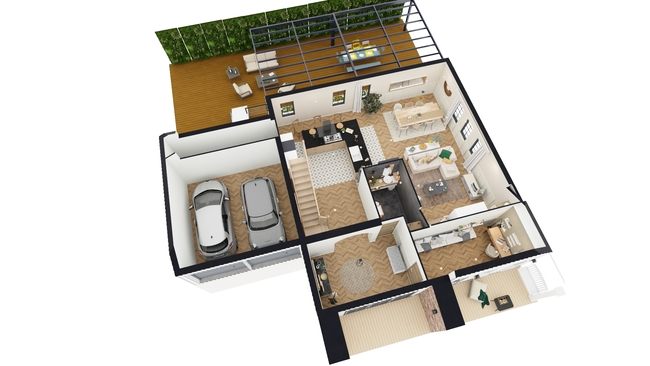
Quick verdict: Cedreo is cloud home design software built only for contractors, home builders and remodelers: draw a 2D floor plan in the browser and the platform builds the 3D model, generates the roof and produces client-ready presentation documents in as little as two hours, by the vendor’s own timing. For a carpentry shop, the appeal is selling the job before building it — photorealistic renders in about five minutes, with AI effects that restyle the season, time of day or drawing style. Read the plan terms first: renders are metered, monthly credits expire instead of rolling over, and Cedreo allows no plan downgrades at all.
What it is
Cedreo is 100% online — nothing to install — and runs in a browser on Mac or Windows. It is deliberately not a general CAD or BIM program. You draw a plan, or import a JPEG, PNG, PDF, DWG or DXF file as a background to trace, and Cedreo treats walls, doors, windows and roofs as real building objects rather than raw geometry. From that one file it generates floor plans, elevations, cross sections, site plans and basic electrical plans, plus a furnished 3D model a client can actually understand. The target work is the carpenter-remodeler’s daily mix: kitchen and bath remodels, additions, whole-home renovations, basements, garages and ADUs. Independent coverage in ArchitectureLab reaches the same positioning — a browser tool for housing professionals who do not want complicated CAD or BIM, stopping at preliminary design rather than construction documents.
Key features
- 2D-to-3D workflow: draw the floor plan and the 3D model, roof, elevations and site plan build from it
- Photorealistic renderings in about 5 minutes, cloud-processed, with two renders able to run at once
- Automatic rendering mode: Cedreo selects camera angles and lighting setup for each room
- AI effects: change a render’s season, time of day or drawing style (including watercolor and pencil), combine effects, and apply them to renders saved from earlier projects
- Branded presentation documents compiling plans, elevations and renders into one client PDF
- Library of more than 2,400 customizable doors and windows, plus electrical symbols and roofing tools — no plugins to buy
Pricing
Free is $0 for one user and one project, with basic drawing tools and no renderings. Cedreo’s own comparison pages price Pro from $129/month per user billed monthly. A pricing breakdown of Cedreo’s own pricing page checked in October 2026 puts Personal at $139 per project (paid once), Pro at $79/month billed annually, and Enterprise at $119 per user/month billed annually or $159 monthly — confirm annual figures on the pricing page, which serves prices by location. Rendering quotas are part of the price: 20 per project on Personal, 40 per month on Pro, 80 per month per user on Enterprise.
What the pricing page doesn’t make obvious: three terms from Cedreo’s own pricing FAQ. First, there are no downgrades — you cannot move from Pro to Personal, from Personal back to Free, or switch annual billing back to monthly. Second, included monthly renderings do not roll over: unused credits expire each cycle, while separately purchased rendering packs never expire. Third, cancelling brings no refund for the unused period, and a Personal project is deleted after 10 years if never upgraded. Pick the tier you can stay on, not the tier you hope to drop back from.
Who it’s for
Remodeling carpenters and small general contractors who lose bids because clients cannot picture the finished kitchen or addition from a flat plan. Cedreo needs no CAD background, and before-and-after views from matched angles are exactly the sales material a carpentry shop needs at the kitchen table. User ratings cited by the vendor (4.4/5 on Capterra, 4.8/5 on G2, per its comparison pages) are strongest on ease of use and customer service.
Who should skip it
Carpenters who need shop drawings, cut lists or CNC output should stay with a design-to-manufacture tool such as Mozaik, reviewed here previously — Cedreo stops at conceptual design and presentation. Firms needing BIM coordination or IFC exchange will not find it here, and an existing house has to be drawn before it can be redesigned: Cedreo is a modeler, not a photo editor.
Pros
- Whole house — plans, 3D model, renders and presentation — from one browser-based project file
- Renders in about five minutes with automatic framing and lighting; no render expertise needed
- AI effects produce distinctive client visuals without a second tool
- No plugins, render engines or powerful local hardware required
- Free plan is a genuine trial of the drawing workflow, no credit card required
Cons
- No plan downgrades and no refunds on cancellation, per the vendor’s own FAQ
- Included renderings expire monthly instead of rolling over
- Conceptual and presentation output only — not construction documents, shop drawings or BIM
- Free plan includes no renderings, so the selling feature starts on a paid tier
FAQ
What does Cedreo’s AI actually do?
Automatic rendering mode chooses camera positioning and lighting for photorealistic renders, and AI effects restyle a finished render — changing its season, time of day or graphic style. AI effects run on their own allowance, separate from standard rendering credits, per Cedreo’s rendering pages.
How much does Cedreo cost?
Free covers one project with no renderings. Pro starts at $129/month per user billed monthly on Cedreo’s own comparison pages, with annual billing lower; Personal is a one-off per-project purchase and Enterprise is per-user team pricing. Included renderings are capped per plan and do not roll over.
Is Cedreo a replacement for SketchUp for a carpenter?
For residential selling work, often yes — Tested Intelligence has reviewed SketchUp for carpenters separately. Cedreo is faster to a complete house presentation because walls, roofs and openings are building objects, while SketchUp remains the more flexible general modeler for custom joinery.
Bottom line
Cedreo is worth a free-plan trial for a remodeling carpenter whose close rate depends on how well clients can see the finished job. The plan-to-presentation workflow and five-minute AI-enhanced renders are a real sales edge, and everything runs in a browser. Just choose the plan as a commitment: with no downgrades, no refunds and renderings that expire monthly, the wrong tier costs more than the headline price suggests.