
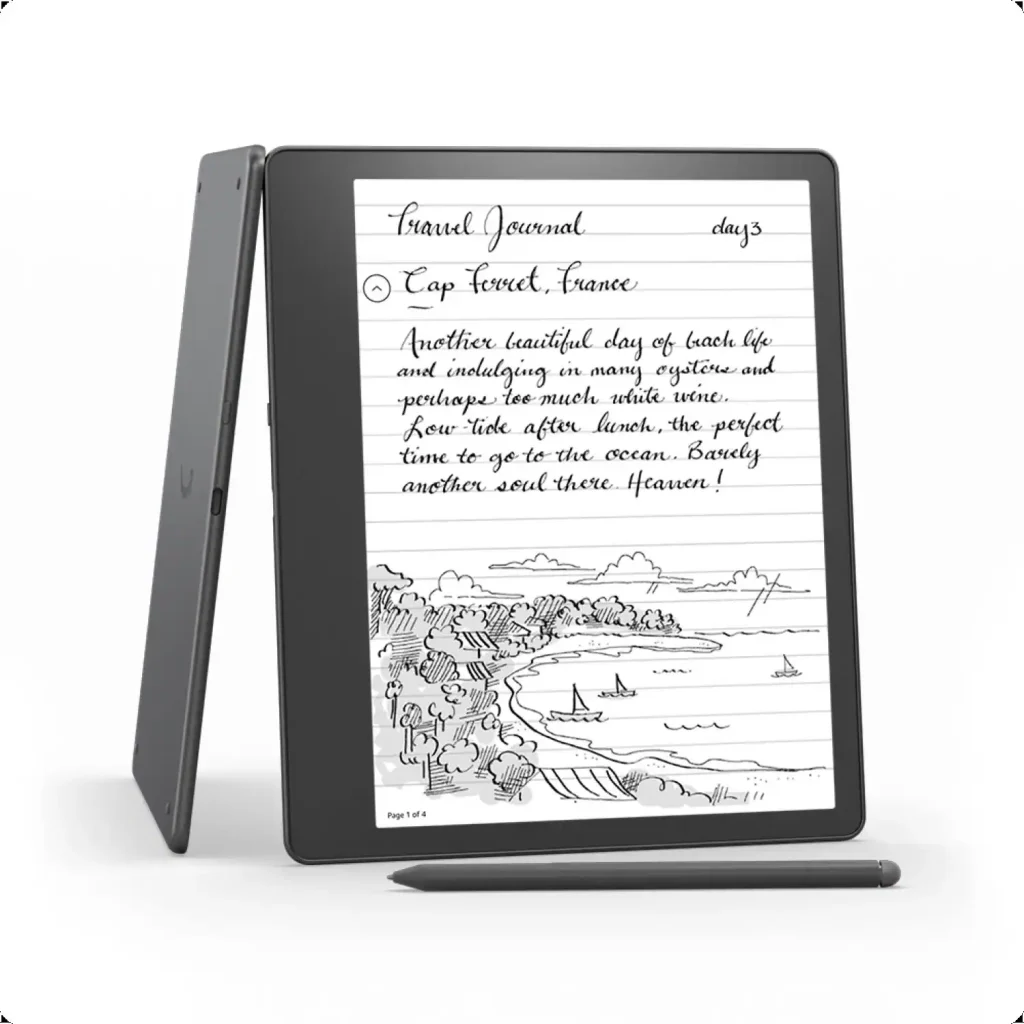
The Kindle Scribe is our overall winner: its 10.2-inch 300ppi display, battery-free Premium Pen, and built-in AI notebook summarization make it the best e-ink device of 2026 for readers who annotate, study, and journal. If you just want the cheapest sharp screen for linear reading, the Kindle (11th Gen) is the best value in e-readers, full stop.
Quick comparison
| Product | Standout feature | Best for | Link |
|---|---|---|---|
| Kindle Scribe (2024, 16GB) | AI notebook summarization + Premium Pen | Annotators, students, journalers | Check price on Amazon |
| Kindle (11th Gen, 16GB) | 300ppi screen at the lowest Kindle price | Budget readers and first-time e-reader buyers | Check price on Amazon |
| Kobo Libra Colour | Color E Ink with library borrowing built in | Readers outside the Amazon ecosystem | — |
| Kindle Colorsoft | Kindle’s first color E Ink display | Color Kindle loyalists | — |
| Boox Go Color 7 (Gen II) | Android-based color E Ink | Tinkerers who want apps on e-ink | — |
Best overall: Kindle Scribe (2024, 16GB)
The Kindle Scribe is the first Kindle that is as much a thinking tool as a reading device — and the most interesting e-ink launch of the past two years. Its 10.2-inch 300ppi glare-free display is the largest Kindle screen ever, making PDFs, textbooks, sheet music, and comics genuinely legible at full page size. The included Premium Pen needs no charging or pairing and attaches magnetically to the edge, so it is always ready for marginalia, underlining, and sketching.
The 2024 refresh’s headline feature is the built-in AI notebook: it summarizes your handwritten notebook pages and converts handwriting to typed text, turning scattered margin scribbles into organized, searchable summaries. Active Canvas goes further, anchoring your handwritten notes directly in the flow of a book’s text so they reflow if you change the font size. Send to Kindle makes it easy to import PDFs and documents from anywhere, and battery life stretches to weeks or months on a charge.
Who is it for? Students, researchers, lawyers, and executives who read long documents and think in the margins — plus journalers who want a distraction-free digital notebook with e-ink’s paper feel. It is less suited to pure novel readers: the size and price are overkill if you read fiction linearly, and it is too big and heavy for comfortable one-handed bedtime reading. Note-taking, while good, is less fluid than an iPad with Apple Pencil for sketching; the Scribe wins on focus, battery life, and eye comfort.
- Pro: Huge 10.2-inch 300ppi display — great for PDFs and textbooks.
- Pro: AI notebook summarization and handwriting-to-text actually work.
- Con: Too big and heavy for comfortable one-handed reading.
- Con: Premium price; overkill for fiction-only readers.
Best value: Kindle (11th Gen, 16GB)
The 2024 base Kindle is the cheapest way into the Kindle ecosystem without meaningful compromise, and it remains the best value in e-readers. Its 6-inch 300ppi glare-free display renders text exactly as sharply as the Paperwhite — for pure reading, the screen-quality difference is negligible. Faster page turns keep navigation responsive, and the adjustable front light makes night reading comfortable in a dark room.
At just 5.56 ounces, it is the lightest Kindle — genuinely pocketable in a jacket and effortless to hold one-handed for hours. You get 16GB of storage (thousands of books), USB-C charging, up to six weeks of battery life, and VoiceView over Bluetooth for accessibility. There is no waterproofing, no warm-light adjustment, and the 6-inch screen is cramped for PDFs, comics, and textbooks — but none of that matters much for novel and nonfiction readers. The base Kindle is the perfect first e-reader, a great gift at an impulse-friendly price, and even a sensible second Kindle (one for the bag, one for the nightstand).
- Pro: Sharp 300ppi display at the lowest Kindle price.
- Pro: Featherlight at 5.56oz — the most portable Kindle.
- Pro: 16GB storage, USB-C, up to 6-week battery.
- Con: No waterproofing — keep it away from pools and bathtubs.
- Con: No warm-light adjustment; 6-inch screen is small for PDFs.
Also in our library
These e-readers were covered in earlier reviews. Summaries below; follow the links for the full reviews.
Kobo Libra Colour
The Kobo Libra Colour is the color e-reader to beat for anyone outside the Amazon ecosystem. Its color E Ink display makes covers, comics, and highlighted passages genuinely pleasant, and built-in OverDrive support lets you borrow library books directly on the device — no side-loading hoops. The asymmetrical design with page-turn buttons suits one-handed reading, and ComfortLight PRO reduces blue light automatically as the day wears on. For readers who live in public libraries and independent bookstores rather than the Kindle store, this is the natural pick. Read our full review.
- Pro: Color E Ink with library borrowing built in via OverDrive.
- Pro: Physical page-turn buttons and ergonomic one-handed design.
- Con: Locked out of the Kindle store — best only if you are Kobo- or library-based.
Kindle Colorsoft
The Kindle Colorsoft is color finally coming to Kindle: the same comfortable reading experience and massive Kindle store, now with a color E Ink display for covers, comics, and highlighted passages. It keeps everything Kindle users like — weeks of battery, Audible over Bluetooth, and the familiar library sync — while adding the visual richness the Paperwhite lacks. The tradeoff is the usual one with color E Ink: a slightly dimmer, lower-contrast display than monochrome in black-and-white reading. If you are deep in the Kindle ecosystem and read illustrated content, it is the color upgrade worth considering. Read our full review.
- Pro: Color E Ink within the full Kindle ecosystem and store.
- Pro: Weeks of battery with Audible and library sync intact.
- Con: Color E Ink is dimmer than monochrome for plain text reading.
Boox Go Color 7 (Gen II)
The Boox Go Color 7 (Gen II) is the Android color e-reader for people who want their e-ink device to do more than read: it runs a full Android build, so reading apps, note apps, and even light productivity tools all install directly. That flexibility is unmatched by Kindle or Kobo, and the color display handles comics and magazines well. The tradeoff is that Android on E Ink is never quite as smooth or simple as a dedicated reading device, and Boox’s software has a learning curve. For tinkerers who want one device that reads everything and runs anything, though, nothing else in our library comes close. Read our full review.
- Pro: Full Android — install any reading or note app you like.
- Pro: Color E Ink good for comics and magazines.
- Con: Android on E Ink has a learning curve; not as simple as a Kindle.
E-reader FAQs
Which e-reader should I buy in 2026?
For most readers, a monochrome Kindle (Paperwhite or the budget base Kindle) remains the safe default: sharp text, weeks of battery, and the biggest ebook store. Choose the Kindle Scribe if you annotate and take notes, a color device (Kindle Colorsoft or Kobo Libra Colour) if you read comics or want highlighted color, and a Boox only if you want Android apps on e-ink.
Is a color e-reader worth it?
It depends on what you read. Color E Ink makes covers, comics, manga, and highlighted passages much nicer — but it trades away some contrast and sharpness for plain black-and-white text. If you read mostly novels, a monochrome display still gives the better reading experience.
Kindle or Kobo — which ecosystem is better?
Kindle wins on store size, Audible integration, and the AI-notetaking Scribe; Kobo wins on open formats (EPUB works natively), library borrowing via OverDrive, and a more open ecosystem. Pick the one that matches where you actually get your books.
How long does an e-reader battery last?
Weeks to months on a single charge with typical reading, because E Ink only draws power when the page changes. Reading for an hour a day with the light low, most devices in this roundup go a month or more between charges — Wi-Fi and heavy note-taking shorten that, but never to phone-like levels.
As an Amazon Associate we earn from qualifying purchases.