
Digs Review 2026: AI Floor-Plan Collaboration and Instant Answers From Your Own Plans
Updated November 15, 2026 – Tested Intelligence
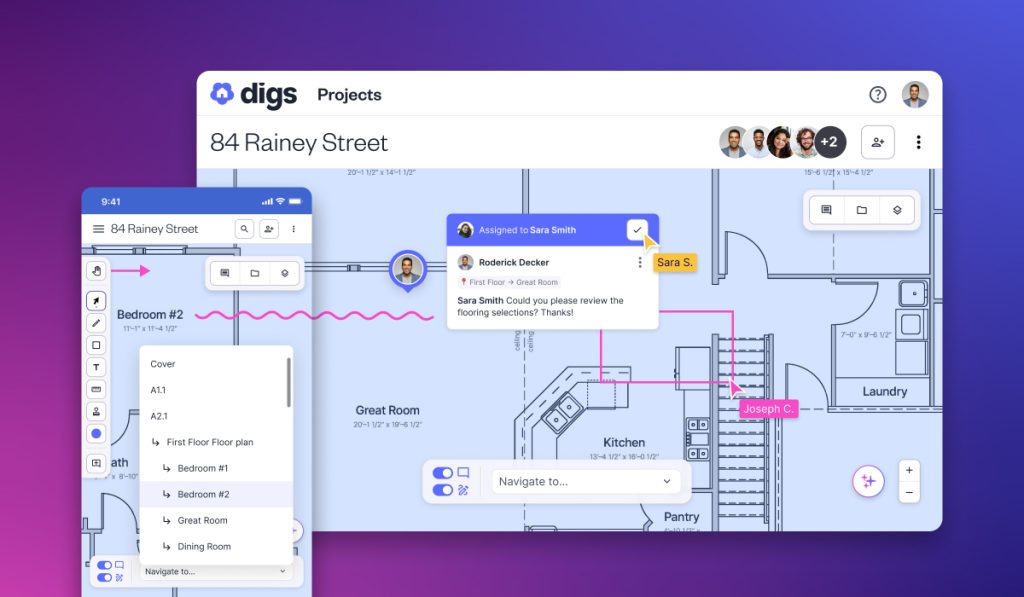
Quick verdict: Digs is an AI collaboration platform built only for residential builders, remodelers and designers: every plan, selection and document for a job lives on one interactive floor plan, and the AskDigs AI chat answers questions from those files instead of making your crew dig through folders and text chains. For a carpentry and remodeling shop, the draw is fewer misread selections and fewer trips back to the site. Read the fine print first: Pro caps e-signatures at 5 per month per seat, and the free plan allows exactly one project.
What it is
Digs centralizes a residential job from pre-construction through homeowner handoff and warranty. You upload plans and documents, and the platform organizes them around a live 2D floor plan that the whole team — your carpenters, subs, suppliers and the homeowner — can open in a browser or on a phone, with no seat charge for clients or collaborators. Comments, photos and decisions are pinned to the room they belong to, and the 2D plan converts into an interactive 3D model the client can walk through. Digs describes its underlying technology as patented AI that turns disconnected construction documents into a single source of truth, and trade coverage backs the positioning: Pro Builder profiled Moser Homes, a semi-custom builder, moving its field teams onto Digs on iPads so crews could pull up project information on site instead of routing every question through the office. In August 2026, Builders FirstSource led Digs’ $25.3 million Series A and signed a five-year commercial agreement with the company — a serious supply-chain bet that the platform is not a side project.
Key features
- AskDigs AI chat: ask a question in plain language and get an answer drawn from the project’s plans, documents and files, with the source file surfaced
- Live floor-plan collaboration: synchronized commenting, markup, diagramming tools and tasks pinned to exact locations on the plan
- 2D-to-3D conversion: an uploaded 2D plan becomes an interactive 3D model, with automatic room segmentation and separate visual layers for trades such as plumbing and electrical
- Digital measurements taken directly from the floor plan, which Digs positions as AI-powered measurements and takeoffs in minutes
- Selections collaboration: finishes and fixtures tracked and approved on the plan itself, instead of in a text chain
- QR codes and share links that connect a printed plan or a room on site to the right digital file
- E-signatures for contracts and change orders, plus dynamic scheduling
- Homeowner handoff: a one-click digital record of the finished home, an AI-enhanced homeowner portal, and DigsCare warranty ticketing as an add-on
Pricing
The free Starter plan costs $0 and covers one active project, with collaborators and subcontractors always free. Digs Pro is $59 per seat per month billed annually, or $69 per seat per month billed monthly, for your own company team members only — clients and vendors you invite do not consume seats. Pro allows up to 300 active projects and unlocks the company workspace, DigsCloud company files, QR codes and the homeowner handoff. A 14-day free trial unlocks Pro plus DigsCare; if you do not upgrade, the workspace downgrades to the limited free version, and while your existing project files stay accessible, Company Files do not. Enterprise is custom-priced and adds integrations, single sign-on, batch document upload and analytics. DigsCare, the warranty module, is currently included free for a limited time with Pro and is otherwise an add-on.
What the pricing page doesn’t make obvious: three limits sit in the comparison table rather than the headline price. First, Pro e-signatures are capped at 5 per month per seat — a remodeling shop signing contracts and change orders for several jobs at once can hit that ceiling quickly. Second, the free plan’s one-project limit means it is a trial of the workflow, not a way to run a second small job for free. Third, the DigsCare add-on is priced at +$17/month on annual billing but +$20/month on monthly billing, so the warranty module quietly costs more on the flexible plan.
Who it’s for
Remodeling carpenters and custom builders whose jobs die by a thousand cuts: the wrong tile in the wrong bath, a selection approved in a text thread nobody can find, a crew driving back to the shop to check a plan revision. If your clients struggle to read flat drawings, the 2D-to-3D model and room-by-room selections approval are the selling tools here. Digs’ own case material credits Moser Homes with cutting unnecessary site visits sharply after centralizing documentation — a vendor-reported figure, but the mechanism (field crews self-serving answers from the plan) is exactly what a small carpentry shop needs.
Who should skip it
Carpenters who need design-to-manufacture output — shop drawings, cut lists, CNC files — should stay with a tool such as Mozaik, reviewed here previously; Digs manages documents and decisions, it does not design cabinets. Shops that run one job at a time with a paper plan set and a client who answers the phone will not recover $59 a month. And if your work is commercial rather than residential, this is the wrong platform entirely: Digs is built only for home building and remodeling.
Pros
- Every decision lives on the floor plan it belongs to — selections, comments, photos and files in one place
- AskDigs AI answers from your own project documents instead of a generic chatbot’s guesses
- Clients and collaborators are free; you pay only for your own team seats
- 2D plans become client-friendly interactive 3D without a separate modeling tool
- Homeowner handoff and warranty handling extend the value past final payment
Cons
- E-signatures capped at 5 per month per seat on Pro
- Free plan limited to a single project
- Collaboration and document layer only — no estimating engine, shop drawings or cut lists
- Residential only; no fit for commercial carpentry work
FAQ
What does the Digs AI actually do?
Two things. AskDigs is an AI chat that searches your project’s plans, documents and files and answers with the source attached, so a crew member can ask where a spec lives instead of calling the office. Behind the scenes, Digs says its patented AI organizes uploaded construction documents into connected project data, and the plan tools add automatic room segmentation and digital measurements taken from the floor plan.
How much does Digs cost for a small remodeling shop?
Pro is $59 per seat per month billed annually ($69 monthly), and you only pay for your own company team — homeowners, subs and suppliers join free. The free Starter plan covers one project. Watch the extras: e-signatures are capped at 5 per month per seat on Pro, and the DigsCare warranty add-on runs +$17 to +$20 per month depending on billing period.
Is Digs a replacement for Houzz Pro or Buildertrend?
Not a full one. Tested Intelligence has reviewed Houzz Pro for carpenters separately: it spans marketing, CRM and project management. Digs is narrower and deeper on one layer — plan-centered collaboration, selections and handoff — and is often positioned as the collaboration companion alongside a broader management platform rather than a substitute for estimating or accounting.
Bottom line
Digs is worth the 14-day trial for a remodeling carpenter whose profit leaks through miscommunication: wrong selections, stale plans and questions only the office can answer. The AI is practical rather than flashy — answers sourced from your own documents, measurements off the plan, decisions pinned to the room. Just go in knowing the real limits: one project on free, five e-signatures a month per seat on Pro, and no design-to-manufacture output at any tier.