
ClockShark Review 2026: GPS Time Tracking With AI Facial Recognition for Field Crews
Updated November 15, 2026 – Tested Intelligence
Quick verdict: ClockShark is a GPS time clock and crew scheduling app built for construction and field service companies that are done with paper timesheets. Workers clock in from their phones against a job and task, GPS and geofencing verify where the punch happened, and the hours flow into payroll tools like QuickBooks and ADP. The catch is on the vendor’s own pricing page: a contract term of three years applies to all pricing plans, which is a long commitment for a time clock.
What it is
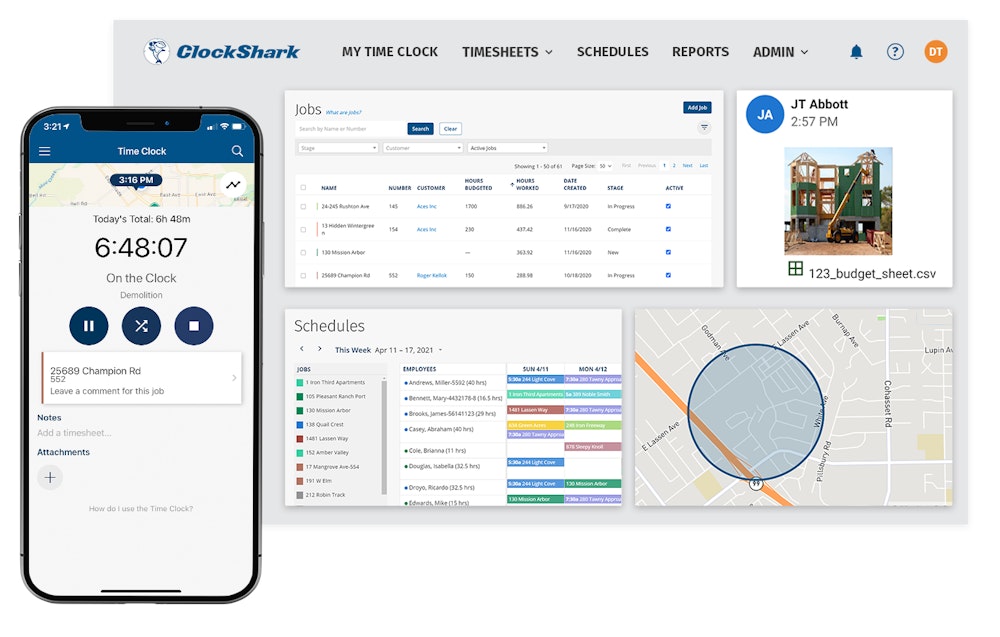
ClockShark replaces paper timesheets and end-of-week memory games with phone-based clock-ins tied to jobs, tasks and cost codes. Every punch captures GPS location, managers see crews on a live map, and drag-and-drop scheduling pushes assignments and changes straight to workers’ phones. The company says more than 9,500 field service and trades businesses use it – a vendor-reported figure, so treat it as directional.
The AI piece is narrow but real: ClockShark markets AI-powered facial recognition as its answer to buddy punching. What the pricing page does not make obvious is where that recognition actually lives – in the Kiosk Clock, a shared tablet at the shop or site trailer where crew members punch in with a PIN and a face check. A worker clocking in from a personal phone on a scattered site gets GPS and geofence verification, not an identity check. That distinction matters if buddy punching, not location, is your problem.
Key features
- GPS time clock: every mobile clock-in records location, with geofence reminders and alerts for punches outside the job boundary
- Kiosk Clock and CrewClock: shared-device punching with PIN plus AI facial recognition, and a foreman-led crew clock option
- Job and task tracking: hours land against jobs, tasks and cost codes for job costing and labor reporting
- Drag-and-drop scheduling with automatic notifications when assignments change
- Clock-out questions, task checklists and shift wrap-up and compliance forms (Pro)
- Advanced job costing, PTO tracking, multi-department controls and mileage tracking on the Pro plan
- Payroll and accounting integrations including QuickBooks, Sage 100 Contractor, ADP, Gusto, Paychex and Xero
Pricing
ClockShark sells two plans, Standard and Pro, priced as a monthly base fee plus a per-user fee, billed in US dollars. The vendor’s pricing page renders its dollar figures dynamically and they do not appear in the page text, so the figures here are directory-checked against multiple October 2026 pricing roundups that read the live page: Standard at $42 per month plus $9.50 per user, and Pro at $63 per month plus $11.50 per user – confirm the current numbers on the pricing page before you sign. Two terms are stated plainly on that page: a 14-day trial with all Pro features, and a contract term of three (3) years on all plans. One genuinely friendly term: you only pay for active users, pro-rated by the days they were active, so seasonal crews do not bill year-round.
Who it’s for
Contractors and field service shops with crews spread across multiple sites who need verified hours for payroll and job costing without handing out hardware. The Sage 100 Contractor and QuickBooks integrations make it a natural fit for shops whose office already runs on those systems, and the kiosk mode suits a central shop or trailer where everyone starts the day in one place.
Who should skip it
Anyone unwilling to sign a three-year term for time tracking should look hard at month-to-month rivals first – Workyard, which we have reviewed, sells workforce tracking without that framing. Very small crews should also do the base-fee math: the platform fee sits on top of the per-user rate, so a five-person crew pays far more per head than the headline per-user price suggests. And if your crews all carry personal phones and never pass a shared kiosk, the facial-recognition headline does not apply to your punches.
Pros
- Built for construction workflows – jobs, tasks, cost codes – not adapted from an office timer
- GPS, geofencing and a live crew map on every plan, not locked behind the top tier
- Active-user billing is pro-rated by day, which suits seasonal and project-based crews
- Deep payroll integration list, including Sage 100 Contractor
Cons
- Three-year contract term on all plans, stated on the vendor’s own pricing page
- Facial recognition only works through the Kiosk Clock, not on personal-phone punches
- Base fee plus per-user pricing makes small crews pay a premium per head
- No free plan – a 14-day trial is the only free look
FAQ
Does ClockShark verify who is clocking in?
Only at a kiosk. The Kiosk Clock pairs a PIN with AI facial recognition on a shared device. Mobile punches from personal phones are verified by GPS location and geofencing, which proves where the phone was, not who was holding it.
How long is the ClockShark contract?
Three years. The vendor’s pricing page states that a contract term of three (3) years applies to all pricing plans. The trial is 14 days with Pro features, so use it to test GPS accuracy on your real sites before committing.
Does ClockShark integrate with construction accounting?
Yes. Listed integrations include QuickBooks, Sage 100 Contractor, ADP, Gusto, Paychex, Xero and others, so approved timesheets can flow into payroll without retyping.
Bottom line
ClockShark is a solid, construction-first time clock with honest GPS verification and unusually good payroll plumbing. Buy it for the job-costed hours and the integrations – not for the facial-recognition headline, which only covers kiosk punches – and go in clear-eyed about the three-year term. If that term is a dealbreaker, start with a month-to-month workforce tool and revisit ClockShark when your crew size makes the base fee trivial.