
Audo Studio Review: One-Click AI Audio Cleanup (Free Tier)
What Audo Studio Is
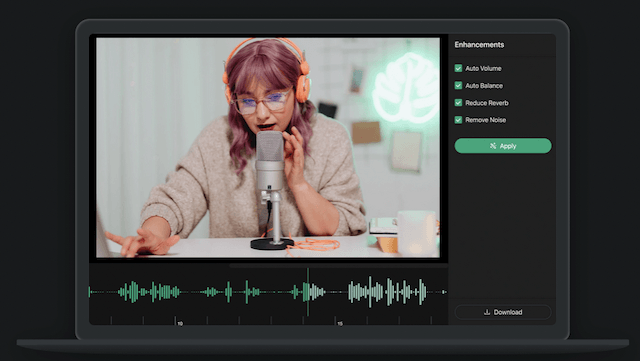
Audo Studio (from Audo AI) is a cloud-based audio cleaning tool that lives entirely in your browser. Upload a recording, and its AI handles three jobs: stripping background noise (traffic, barking dogs, mic buzz, air conditioning), reducing echo and reverb, and auto-leveling volume so quiet and loud passages sit consistently. An intensity slider lets you control how aggressively it processes.
The pitch is simplicity for non-engineers: podcasters, course creators, and YouTubers who want cleaner audio without learning a DAW. It works on Mac, Windows, and Linux with nothing to install, and Audo also offers a REST API and SDKs for developers who want to embed speech enhancement into their own apps.
Based on specs, pricing pages, and published reviews, Audo Studio’s noise removal is effective on common problems (steady hums, background chatter, room tone) though, like all AI enhancers, it can introduce subtle artifacts on already-clean audio. It’s a simpler, narrower tool than Descript or Adobe Enhance — which is the point.
What’s Actually Free
Audo Studio’s Starter plan is free forever (not a trial), verified from its pricing page and 2026 directory listings:
- 20 minutes of audio enhancement per month
- Background noise removal
- Auto volume leveling
- Browser-based — works on any OS, no install
The limits are obvious: 20 minutes a month covers occasional use only — roughly one short podcast episode or a handful of voice memos. Dereverberation/echo reduction has been listed as “coming soon” on Starter, and there’s no batch processing.
The Creator plan ($12/month, discounted from $20) raises the cap to 600 minutes/month with all features, and a pay-as-you-go option ($20 for 600 extra minutes, $10 for Creator subscribers) covers overflow without a subscription.
Key Features
- One-click background noise removal — traffic, dogs, HVAC, mic buzz, crowd noise
- Echo and reverb reduction for untreated rooms
- Auto volume leveling for consistent loudness across a recording
- Intensity slider to dial processing from subtle to aggressive
- Browser-based workflow — upload, enhance, download; nothing to install
- REST API and SDKs for developers adding enhancement to their own products
- Video file support — clean audio straight from video uploads
Pros and Cons
✓ Pros
- Dead simple — genuinely one click, no learning curve
- No install, works on any operating system
- Free tier requires no credit card and never expires
- Intensity slider gives more control than Adobe Enhance’s fixed free strength
- API access makes it useful for developers, not just creators
✗ Cons
- 20 minutes/month is tiny — you’ll hit the wall fast with regular content
- Narrower feature set than Descript or Adobe Podcast (no transcription, no editing)
- Echo reduction was still rolling out on the free tier at last check
- Smaller company with less track record than Adobe or Descript
- Like all AI enhancers, can add artifacts to already-good audio
Who It’s Best For
Audo Studio’s free tier is best for creators with occasional cleanup needs — a noisy interview segment, a course lesson recorded near a busy street, a voice memo that needs to sound professional. If you clean audio a few times a month rather than daily, 20 free minutes might be all you ever need.
For daily podcast production, Adobe Enhance’s free hour-per-day is far more generous. And if you need editing alongside enhancement, Descript’s free tier bundles both. Audo wins on simplicity: when you want one button and no decisions.
FAQ
Is Audo Studio really free?
Yes — the Starter plan is free forever with 20 minutes of enhancement per month. No credit card required.
Do I need to install anything?
No. Audo Studio is entirely browser-based and works on Mac, Windows, and Linux.
What kinds of noise does it remove?
Common background noises: street traffic, barking dogs, microphone buzz, air conditioning, crowd murmur, and similar steady or semi-steady sounds, plus echo/reverb reduction.
Can I use it for video files?
Yes — you can upload video and Audo Studio will process the audio track.
What happens when I hit the 20-minute limit?
Processing pauses until your monthly allowance resets, or you can buy pay-as-you-go minutes ($20 for 600 minutes) without subscribing.
Bottom Line
Audo Studio is the minimalist’s audio cleaner: no timeline, no jargon, one button between noisy and clean. The free 20 minutes won’t sustain a show, but it’s a legitimate free utility for the occasional rescue job — and the most frictionless way to find out whether AI noise removal is enough for your recordings before spending $12/month anywhere.