
Quick verdict
Nomic Review 2026: Document-Grounded AI Agents for Drawings, Specs and RFIs
Updated November 23, 2026 – Tested Intelligence
Quick verdict: Nomic is an AEC AI platform that reads your actual project drawings, specifications, IFC models, submittals and RFI history, then drafts answers and reviews with citations back to the source document. It fits architecture, engineering and construction teams drowning in document lookup. The catch most buyers miss is on its own pricing page: the Business plan is $40 per user per month with a 25-seat minimum, so a real team deployment starts at $1,000 a month before Enterprise is even discussed.
What it is
Nomic started out known for its open-weight Nomic Embed models and Atlas data tool, and has repositioned around a vertical platform for architecture, engineering and construction. The idea is simple and specific: instead of asking a general chatbot to guess, you give Nomic agents the project record itself – drawing sets, spec books, IFC and BIM models, submittals and prior RFIs – and the agents do the lookup work, then draft from what they found.
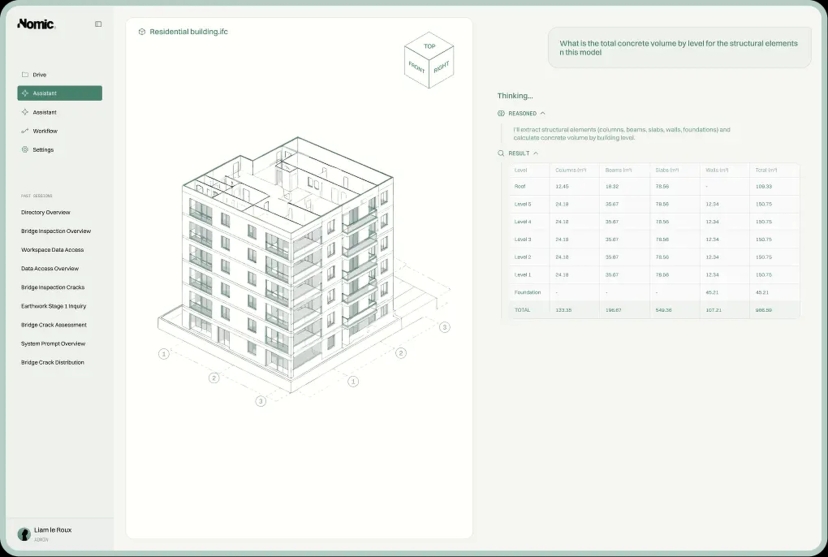
On RFIs, Nomic’s own comparison pages describe the workflow plainly: the agent surfaces the relevant spec sections, drawing details and cross-references for each question, covers drawings, specs, submittals and prior RFI history in one pass, and drafts a response grounded in the actual set. The same engine covers plan review against codes and standards, submittal review, project-wide search and, for models, direct IFC work: upload an .ifc or .ifczip file and the agent extracts the model into queryable tables for takeoffs, room schedules, coordination checks and data validation, with no Revit license required in the browser workflow.
One limit Nomic states itself, and competing roundups usually omit: its Procore integration syncs documents and drawings from the projects you choose, and the agent can read RFIs, submittals and punch items and post an RFI reply after you approve it – but Nomic does not create or edit RFIs in Procore and is not embedded in the Procore interface. Procore stays your system for RFI routing and status.
Key features
- Document-grounded RFI drafting: responses drafted from the actual drawing set and specification sections, with the relevant sheets, sections and details surfaced automatically
- Search across the full stack at once: drawings, specifications, IFC/BIM models, submittals and RFI history in a single natural-language query, with cited sources
- Native IFC handling: IFC2x3, IFC4 and IFC4x3 models extracted into structured tables the agent queries with SQL for takeoffs, schedules and validation
- Plan and code review: drawing QA and code checks presented as part of the same workspace as document Q&A
- Broad sync list: Forma, Procore, Bentley ProjectWise, Trimble ProjectSight, SharePoint, Egnyte, Fieldwire, Google Drive, Dropbox, Microsoft Teams, Outlook and Gmail
- Security posture stated by the vendor: SOC 2 Type II and zero data retention
Pricing
Nomic publishes its AEC platform pricing, which is rarer than it should be in this category. There is a Free plan, an Individual plan at $20 per month, a Business plan at $40 per user per month, and a custom Enterprise tier. What the pricing page does not make obvious – and this is the number to budget around – is that Business carries a 25-seat minimum. That puts the floor for a firm-wide rollout at $1,000 per month, even if only a handful of people use it heavily at first. Individual at $20 is the sensible pilot: prove the drafting quality on one live project before you commit the whole firm.
Who it’s for
Architecture and engineering firms and larger contractors whose bottleneck is document lookup: RFI responses, submittal checks, spec-versus-drawing coordination and plan review across big, messy document sets spread over more than one system.
Who should skip it
Small teams should do the seat math first: if you have five users, Business still bills for 25. Teams that want the AI embedded inside Procore’s own RFI workflow should also skip it – Nomic works alongside Procore, it does not live in it. And if your documents already sit in one tidy system, a lighter search tool may do the job for less.
Pros
- Answers are grounded in your own drawings, specs and models, with citations, not generic model output
- One query covers drawings, specs, models, submittals and RFI history together
- Native IFC querying removes the Revit round-trip for takeoffs and schedules
- Published pricing with a genuine free entry point and a cheap $20 pilot tier
- SOC 2 Type II and zero data retention, stated by the vendor
Cons
- Business has a 25-seat minimum, so the real team floor is $1,000 per month
- Not embedded in Procore and cannot create or edit RFIs there; routing and status stay in Procore
- It is a review and drafting layer, not a system of record for budgets, schedules or field execution
- Value depends on document quality: a disorganized project record limits what the agents can find
FAQ
How much does Nomic actually cost for a team?
Free to start, $20 per month for Individual, and $40 per user per month for Business – with a 25-seat minimum on Business, per Nomic’s own comparison pages. That makes $1,000 per month the minimum Business commitment. Enterprise is custom.
Does Nomic replace Procore for RFIs?
No. Nomic says its agent can read RFIs, submittals and punch items from Procore and post an RFI reply after you approve it, but it does not create or edit RFIs in Procore and is not embedded in the Procore interface. Procore remains the system for routing and status.
Do I need Revit to query a BIM model in Nomic?
No. Nomic’s IFC tools run in the browser: upload an .ifc or .ifczip file (IFC2x3, IFC4 or IFC4x3) and the agent indexes the model into tables it can query. A Revit add-in also exists for teams that work in Revit.
Bottom line
Nomic is the document-intelligence pick when the lookup work itself is the bottleneck: it drafts from your real drawings, specs and models and shows its sources. Budget honestly – pilot on the $20 Individual plan, and only step up when the 25-seat, $1,000-a-month Business floor is justified by the hours it actually saves.