
Quick verdict
ArcSite Review 2026: Mobile CAD That Turns a Field Drawing Into a Takeoff
Updated November 19, 2026 – Tested Intelligence
Quick verdict: ArcSite is a mobile CAD app for specialty contractors who measure and sell work on site: you draw the job to scale on a tablet or phone, and on the Takeoff plan the drawing builds your material list and costs as you go. It fits fencing, concrete, foundation, electrical and similar field-sold trades far better than office-bound plan takeoff. Draw Pro alone does not include automated takeoffs, so most contractors pricing work need the $99/month Takeoff plan, not the cheaper drawing tiers.
What it is
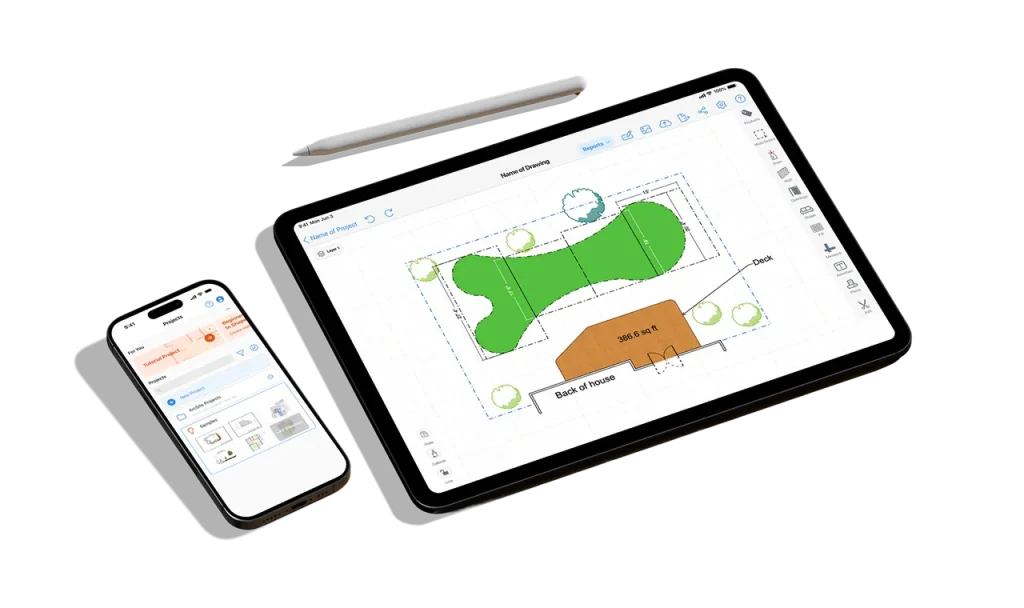
ArcSite is a drawing, takeoff and estimating app built for work that starts with a site visit rather than a plan set. Instead of measuring on paper and rebuilding the job in a spreadsheet back at the office, your rep or foreman sketches the job to scale in the field, drops in products from a trade library, and lets the drawing carry the quantities. The vendor says more than 21 million drawings, takeoffs and proposals have been created in the app, a vendor-reported figure.
Two AI-assisted pieces sit on top of the drawing core. AI Trace, on iPad, turns a hand sketch, photo or PDF into an editable, to-scale plan you can then price. The AR Room Scanner, on Apple Pro devices with LiDAR, scans a room and produces a scaled floor plan without a tape measure. Capterra describes ArcSite as a mobile-first drawing, takeoff and estimating tool for professionals who need to work fast and stay organized on the go, which matches how the vendor positions it: field first, office second.
Key features
- Mobile CAD drawing to scale on iOS, Android and Windows, with snap tools, layers, versioning and industry and custom shape libraries
- AI Trace (iPad) converts a hand sketch, photo or PDF into an editable, to-scale plan; AR Room Scanner builds a scaled floor plan on LiDAR-equipped Apple Pro devices
- Automated material takeoffs on the Takeoff plan: counts, lengths and areas build from the drawing and map to your custom product library and digital price book
- Satellite map access, laser measure device integration, unlimited photo uploads and annotation and drawing markups
- Exports to PNG, PDF, DXF and DWG, with cloud backup, cross-device sync and a shared team account
- Branded proposals from the same drawing, with customer sign-off and payment, plus integrations the vendor lists including Jobber, Housecall Pro, ServiceTitan, QuickBooks and Salesforce
Pricing
Pricing is published and per the vendor’s pricing page: Draw Basic is $10/month, aimed at homeowners planning a project. Draw Pro is $30/month billed yearly, or $34.99/month billed monthly, with unlimited projects and drawings. Takeoff is listed at $99/month and adds automated material takeoffs, the custom product library and the digital price book. Enterprise is custom-priced for franchises and multi-location teams. There is a free 14-day trial.
What the pricing page doesn’t make obvious: the plan most contractors will land on first, Draw Pro, contains no automated takeoffs, no custom product library and no price book at all – those start at the $99/month Takeoff tier, roughly triple the Draw Pro price. The second catch is platform-specific: AI Trace is iPad-only, and the AR Room Scanner needs a LiDAR-equipped Apple Pro device, so an Android or standard iPad crew does not get either AI capture feature. On the plus side, the vendor’s FAQ states there is no long-term contract and you can cancel at any time.
Who it’s for
Specialty and residential contractors who sell at the kitchen table or in the driveway: fencing, concrete and foundations, decks and patios, electrical service upgrades, pest and similar trades where there is often no plan set and the person measuring is also the person quoting. Teams that want the customer to see a to-scale drawing and a priced proposal on the first visit get the most from it.
Who should skip it
Estimators who mainly take off large commercial PDF or BIM plan sets in the office should look at a plan-first takeoff tool such as Togal.AI, STACK or Kreo, all reviewed here – ArcSite is built around drawing the job yourself, not auto-reading a 200-sheet set. General contractors who need project management, scheduling and field execution after award also need a different layer; ArcSite stops at the drawing, the takeoff and the proposal.
Pros
- One field workflow: measure, draw, take off and propose without re-entering the job back at the office
- Published pricing with a 14-day trial and no long-term contract, per the vendor
- Quantities update automatically when the drawing changes, which cuts revision errors
- Only admins set up products and prices, so reps place items without touching the math
- Runs across iOS, Android and Windows instead of locking a crew to one device type for basic drawing
Cons
- Automated takeoffs require the $99/month Takeoff plan; the cheaper tiers are drawing-only in practice
- AI Trace is iPad-only and the room scanner needs LiDAR hardware, so AI capture is not fleet-wide
- Your prices are only as good as the product library and price book you build first – setup comes before the first real estimate
- Not a project management or field execution platform once the job is won
FAQ
How much does ArcSite cost?
Draw Basic is $10/month, Draw Pro is $30/month billed yearly or $34.99/month billed monthly, and Takeoff is listed at $99/month, all per the vendor’s pricing page. Enterprise is custom. A free 14-day trial is offered, and the vendor says there is no long-term contract.
Does ArcSite do the takeoff automatically?
On the Takeoff plan, yes, from your drawing: as you place line, area and count-based products, ArcSite builds the material list and applies your prices. It does not read a commercial plan set for you the way a plan-based AI takeoff tool does – the takeoff follows the drawing you make or trace.
What devices does ArcSite run on?
Basic drawing runs on iOS, Android and Windows. Two features are narrower: AI Trace is listed for iPad, and the AR Room Scanner requires an Apple Pro device with LiDAR. Check your crew’s actual hardware before counting on either.
Bottom line
ArcSite earns its place for contractors whose estimate starts with a tape measure and a site walk: draw it once, to scale, and let the takeoff and proposal follow. Budget for the $99/month Takeoff plan rather than the headline drawing prices, and check iPad and LiDAR availability before promising your crew the AI capture features.