
Quick verdict
AI Text to Speech Review 2026: One-Click OpenAI Audio for Every Post, Billed by the Character
AI Text to Speech by RelyWP turns a WordPress post into a generated audio version in one click, using your own OpenAI text-to-speech API key — no monthly character allowance, no hosted platform in the middle. The plugin is on WordPress.org (version 3.3.0, updated October 2026, rated 4.3 out of 5 from 6 ratings; the vendor reports 100+ active installs). It offers 13 OpenAI voices, voice-style presets, and generation in over 50 languages, with an audio player that appears automatically at the top of the post.
What it is
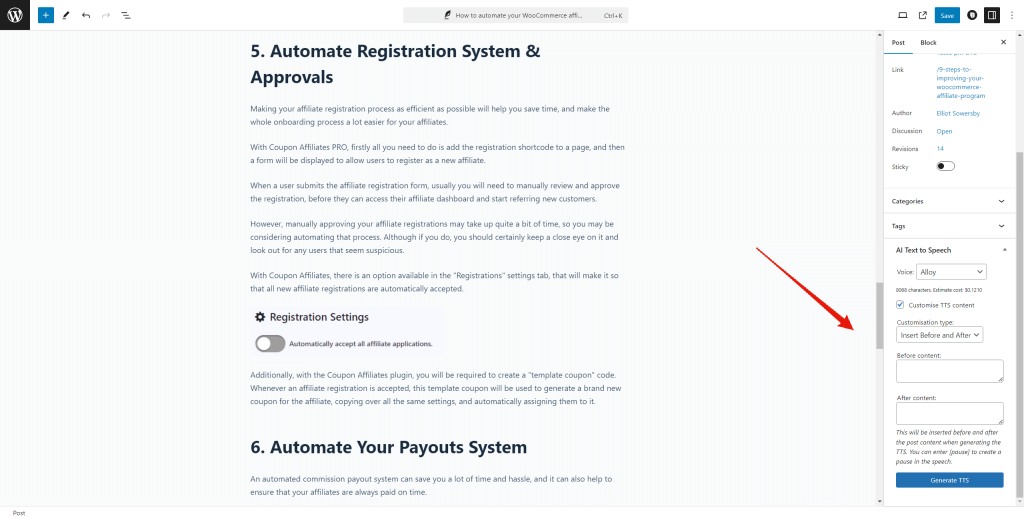
AI Text to Speech is a WordPress plugin from RelyWP that connects your site to OpenAI’s Text to Speech API. Add your OpenAI API key in the settings, open a post, pick a voice and a style in the sidebar panel, and click generate. The plugin sends the post text to OpenAI, saves the returned audio as an MP3 file on your site, and displays a player automatically at the top of the post — or wherever you place the [ai_tts_player] shortcode. A separate generator page in the admin can turn any pasted text into audio, not just posts.
Two OpenAI models are supported: the default GPT-4o mini TTS, which supports steerable voice-style instructions, and the older TTS-1. Version 3.3.0 (October 2026) added an Audio Language setting that tells the model which language to speak, so non-English posts are no longer read with an English accent. Unlike live-browser-speech tools such as ResponsiveVoice, the output here is a real audio file you keep — edit the post and you regenerate it, but the file itself stays yours.
Key features
- 13 OpenAI voices. Alloy, Ash, Ballad, Coral, Echo, Fable, Nova, Onyx, Sage, Shimmer, plus Marin, Cedar and Verse, added in version 3.2.0.
- Voice styles and instructions. Preset styles such as Conversational, Narration, News Report and Whispering; the free version includes 5 styles, and PRO expands the set and lets you write your own style instructions.
- Cost estimate before you generate. The editor panel shows the estimated OpenAI cost for the post before you click, and a log keeps the last 50 API requests.
- PRO extras. Listening statistics and analytics, Dropbox storage for audio files, custom text before and after the audio, custom pronunciations, multi-voice posts using a [voice] shortcode, a default voice, player colour customisation, and automatic generation when a post is published.
Pricing
The free plugin on WordPress.org covers one-click generation, the standalone generator page, the automatic player and the basic voice styles. Pro Yearly is $59.99 a year for one website, with unlimited usage, one year of updates and premium support. Pro Lifetime is $149.99 one-time for one website, with updates forever. Both Pro plans carry a 14-day money-back guarantee, and the vendor regularly discounts the first payment — renewals are at the normal price.
What the pricing page doesn’t make obvious: the plugin price is only half the bill, and the guarantee only covers half of it. Narration runs on your own OpenAI account at roughly $0.012 per 1,000 characters on the default GPT-4o mini TTS model (about $0.015 on TTS-1) — the vendor’s own guide puts a typical 1,500-word post at roughly 10 cents, or about $1 per hour of audio. That is genuinely cheap, but RelyWP’s pricing page states plainly that the 14-day money-back guarantee covers your payment for the plugin and does not cover any OpenAI usage costs you have already incurred. Generate a large back catalogue during your trial fortnight and that API spend is yours either way.
Who it’s for
- Bloggers and news sites adding a listen option on a budget — a flat plugin fee plus pennies per post beats a hosted audio platform’s monthly character tiers if you publish often.
- Site owners who want to own the audio files — generated MP3s live on your server (or in Dropbox on Pro), not inside a vendor’s player you rent.
- Multilingual publishers — over 50 supported languages, with the 3.3.0 Audio Language setting fixing the accent mismatch for non-English content.
What to watch out for
- A thin public record. At 100+ active installs and 4.3 stars from just 6 WordPress.org ratings, there is very little crowd evidence either way — and at least one WordPress.org reviewer reports the plugin breaking block-based pages and struggling to reach premium support. Test it on a staging copy first.
- An OpenAI key is mandatory. There is no built-in voice allowance at any price: no OpenAI account with billing enabled means no audio, in the free version or in Pro.
- Two bills, forever. Pro Yearly renews for updates and support, and OpenAI usage is metered separately for as long as you generate audio.
- Research-based review. This review is based on the plugin’s WordPress.org listing and changelog and RelyWP’s own product and pricing pages; we have not run it on a live site ourselves.
Pros
- Among the cheapest narration routes available: roughly 10 cents of OpenAI usage for a typical post, with the estimate shown before you generate.
- Real MP3 files you keep, with an automatic player and a shortcode for manual placement.
- 13 current OpenAI voices, steerable styles, and 50+ languages, including a proper language setting for non-English audio.
- A lifetime Pro option at $149.99 — rare among text-to-speech plugins, most of which are subscription-only.
Cons
- Very small install base (100+) and only 6 public ratings — the least-proven record in its class.
- Requires your own OpenAI API key and billing; there is no managed, key-free tier.
- The money-back guarantee excludes OpenAI usage costs, so a big trial batch is not refundable.
- One website per Pro licence — multi-site publishers pay per site.
Frequently asked questions
Is AI Text to Speech free?
The plugin itself is free on WordPress.org, and the free version generates audio, shows the player and includes 5 voice styles. But it is not free to run: every generation is billed by OpenAI to your own API account at roughly $0.012–$0.015 per 1,000 characters. Pro ($59.99 a year or $149.99 lifetime, one website) adds statistics, Dropbox storage, pronunciations, multi-voice posts and automatic generation on publish.
How does AI Text to Speech compare with GSpeech?
They take opposite approaches to the bill. In Tested Intelligence’s own GSpeech review, GSpeech manages the AI voices for you — its free plan includes 50,000 machine-voice characters a month with no API keys to set up. AI Text to Speech instead hands you the provider relationship: you bring an OpenAI key and pay OpenAI’s per-character rate directly, which works out far cheaper at volume, but the setup and the second bill are yours.
What happens to my audio if I cancel Pro?
The generated MP3 files are stored on your own site (or your Dropbox on Pro), so published players keep working from files you already have. What lapses with a Yearly plan is future plugin updates and premium support — the vendor states an active Pro subscription is required for both.