
Quick verdict
SureForms Review 2026: The AI Form Builder That Generates Native Gutenberg Forms From a Prompt
SureForms is an AI form generator and WordPress form builder from Brainstorm Force that turns a plain-language prompt into a ready-to-edit form built from native Gutenberg blocks — no external API key, and no separate form-builder canvas to learn. The free plugin is at version 2.13.1 on WordPress.org, installed on 500,000+ sites and rated 4.8 out of 5. Paid plans start at $59 a year, and the pricing page’s headline promise is unusual: no feature gates.
What it is
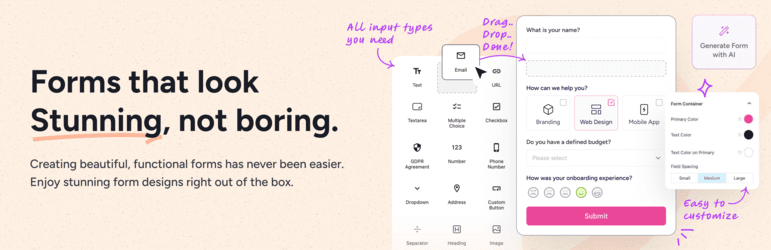
SureForms (sureforms.com) comes from Brainstorm Force, the team behind the Astra theme, and that heritage shows in the design decision that defines it: a form is not a proprietary object stored in a custom builder — it is a set of ordinary WordPress blocks. You generate a form with AI, start from a template, or drag fields in manually, and either way you are editing in the same block editor you use for posts and pages. Forms embed with a block or shortcode, or publish standalone as “Instant Forms” with their own shareable URL, so a form does not even need a page to live on.
The AI is the headline. Describe what you need — a booking request, a quote form, a job application — and SureForms generates suitable fields, labels and structure as editable blocks. Crucially, the WordPress.org listing confirms two things most AI form tools do not offer: AI form generation is available in the free plugin, and no external API key is required, so there is no OpenAI bill or key setup standing between installation and your first generated form.
Key features
- AI form generation in the free plugin. Prompt-to-form drafting with every generated field fully editable afterwards, and no API key to supply.
- Stripe payment forms for free. Donation, order, membership and event payment forms without a separate payment addon; PayPal joins on the paid plans.
- Entries stored in your dashboard. Submissions live inside WordPress — searchable and exportable — rather than in a vendor cloud.
- Paid Business form types. Surveys and NPS, scored quizzes, calculator forms, multi-step and conversational forms, plus registration and login forms.
- Advanced fields and workflows on paid plans. File upload, signature, repeater and date/time fields, conditional logic, PDF generation from submissions, partial entries and save-and-resume.
- Spam protection and integrations. reCAPTCHA, hCaptcha, Cloudflare Turnstile and honeypot, plus 25+ native integrations (Mailchimp, HubSpot, Google Sheets, FluentCRM and more) and Zapier/OttoKit for the long tail.
Pricing
Pricing is from SureForms’ own pricing page, whose headline reads “Plans From $59/year With No Feature Gates.” The free plugin on WordPress.org includes AI generation, contact and custom forms, Stripe payments, entries in your dashboard and spam protection. Paid plans are billed by site count only: Solo is $59 a year (shown struck through from $69) for 1 site, Team is $149 a year (from $179) for 10 sites, and Agency is $229 a year (from $249) for 1,000 sites — every tier lists “All Features Included.” Lifetime options exist too: Solo $249 one-time, Team $499, Agency $649. A 14-day money-back guarantee covers paid plans.
What the pricing page doesn’t make obvious: the “no feature gates” structure is the real story, and it cuts two ways. Unlike WPForms — whose tiers spread payments, surveys and conversational forms across Pro and Elite, and whose introductory prices roughly double at renewal, as our WPForms review documents — SureForms charges for sites, not features, so a one-site business gets the same quiz, calculator and PDF tools as a 1,000-site agency. The flip side is in the vendor’s own FAQ: SureForms stores no submission data on its servers at all — entries live only on your site. That is a privacy plus, but it makes your own backups the only copy of your leads.
Who it’s for
- Gutenberg-first site owners who want forms that feel like part of WordPress, not an embedded third-party app.
- Small businesses taking Stripe payments — donations, bookings, service deposits — who want payment forms without buying a payments tier.
- Agencies who would rather pay for site count once than re-check which features each client’s plan unlocks.
What to watch out for
- Advanced form types are paid. Surveys, quizzes, calculators, multi-step and conversational forms are Business features, whatever the “no feature gates” headline suggests about tiers.
- PayPal is paid too. Stripe is free; if your customers insist on PayPal, budget for a paid plan from day one.
- A young plugin. Launched in 2024, it has a smaller rating base (around 100 WordPress.org ratings) and a shorter integration track record than WPForms or Gravity Forms.
- Your entries, your responsibility. With no vendor-side copy of submissions, a site failure without backups means lost form data.
- Research-based review. This review is based on SureForms’ WordPress.org listing and its own pricing and product pages; we have not run a live client enquiry funnel through it ourselves.
Pros
- AI form generation included free, with no API key and no separate builder to learn.
- Forms are native Gutenberg blocks — fully editable, theme-friendly, and portable.
- Stripe payment forms and dashboard entry storage in the free version.
- Paid pricing is simple: one feature set, priced by site count, with lifetime options.
Cons
- Surveys, quizzes, calculators and conversational forms require a paid plan.
- PayPal payments are paid-only, unlike the free Stripe support.
- Smaller, younger ecosystem than the decade-old form plugins it competes with.
- No vendor-side backup of submissions — your hosting backups are it.
Frequently asked questions
Is SureForms free?
Yes. The free WordPress.org plugin includes AI form generation, contact and custom forms, Stripe payment forms, entry storage in your dashboard and spam protection. Paid plans start at $59 a year for 1 site and mainly add the Business form types — surveys, quizzes, calculators, conversational forms — plus PayPal and advanced fields.
Does SureForms need an OpenAI API key for its AI?
No. The WordPress.org listing states plainly that no external API key is required: you describe the form, SureForms AI generates it, and you edit the result as native blocks in Gutenberg.
Where are SureForms submissions stored?
On your own WordPress site. The vendor’s pricing FAQ states SureForms does not store form submission data on its servers, so entries stay in your dashboard — private by design, but dependent on your own backups.