
Quick verdict
Dalux Review 2026: The Free BIM Viewer That Puts the Model in Every Pocket
Updated November 9, 2026 – Tested Intelligence
Quick verdict: Dalux is a Danish construction platform built around one idea: get the BIM model and drawings onto every phone on site, for free, and charge for the controlled field workflows on top. Its BIM Viewer and Field Basic are genuinely free with unlimited invited users, which makes it the easiest way to carry a supply chain that will never buy seats. It is not an AI-first product and it is not estimating software – its value is model-based field work, snagging and handover.
What it is
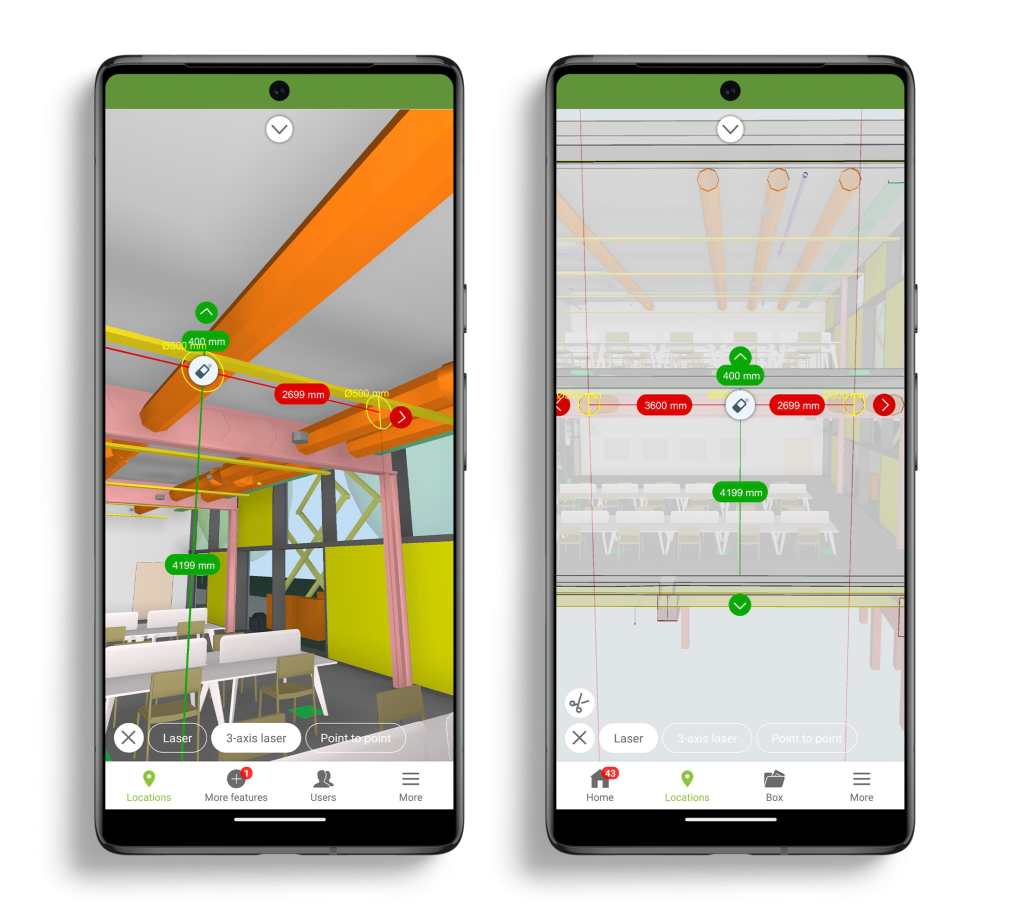
Dalux, headquartered in Denmark, builds a 3D BIM engine and modules from design through operation: BIM Viewer, Dalux Box (common data environment), Tender, Dalux Field, InfraField, Handover, and Dalux FM. The viewer combines discipline models and drawings – native BIM, IFC and drawings – with measuring, filtering and comments on desktop and mobile.
Key features
- Free BIM Viewer: combine native BIM, IFC and drawings, measure, filter and comment, on desktop and mobile
- Dalux Field Basic: free punch-list and site-task tool with 3D model uploads, task assignment and unlimited tasks
- Dalux Field: quality, safety and compliance work around the model – snagging, RFIs, forms, inspections and reports
- Dalux Box, Tender, InfraField, Handover and FM: document control, tendering, infrastructure field work, delivery and operations modules, each licensed separately
- API for custom workflows and dashboards, gated to a company license (see Pricing)
Pricing
Pricing is not public for paid modules: no per-user rate for Field, Box, InfraField, Handover, Tender or FM, and directory coverage confirms quotes come through sales. The free tier is real, though: BIM Viewer and Field Basic cost nothing.
What the pricing page does not make obvious: free use is capped at three active projects or buildings, even though invited users are unlimited – a limit verified on Dalux’s own free-product pages and in independent plan checks in September 2026. Field Basic also has no checklists, document control or reporting, so free users are mostly consumers of information, not participants in a controlled process. And the API is not self-serve: it requires a company license and an API key issued by a Dalux Customer Success Manager. Budget for the fourth project and the first checklist as the moment Dalux stops being free.
Who it’s for
BIM-driven contractors, owners and design teams who need subcontractors to actually open the model on site without a seat-fee fight, and owners who want the same model carried into handover and FM instead of rebuilt at closeout.
Who should skip it
Skip Dalux if you need cost management, estimating, budgeting or pay applications – it has none of those, so commercial teams keep a separate system and reconcile by hand. Skip it, too, if you came looking for generative AI drafting or automated takeoff: Dalux’s automation is workflow and model navigation, not an AI estimator.
Pros
- Genuinely free BIM viewing with unlimited invited users – the supply-chain adoption problem mostly disappears
- One model engine from viewer through field, handover and FM, instead of a new tool at each phase
- Field work is pinned to the model and drawings, so snags and tasks carry their location with them
Cons
- Paid pricing is quote-only for every serious module – no way to benchmark against Procore or Autodesk without a sales process
- Free tier stops at three active projects or buildings, and Field Basic lacks checklists, document control and reporting
- No estimating, budgeting or cost management at all
FAQ
Is Dalux really free?
Partly. BIM Viewer and Field Basic are free with unlimited invited users and, for Field Basic, unlimited tasks. Free use is limited to three active projects or buildings, and the full Field, Box, InfraField, Handover, Tender and FM modules are paid and quoted privately.
Does Dalux replace Procore or Autodesk Construction Cloud?
For model viewing and field snagging it can. For cost, estimating and pay applications it cannot – Dalux has no commercial module, so most contractors would run it alongside, not instead of, a project platform.
What does Dalux need to run in the field?
A model or drawings to publish, and a phone or tablet. Independent plan checks list apps requiring iOS 16.0 or Android 11.0 or higher – check older site devices before rollout.
Bottom line
Dalux wins on a simple trade: the model in everyone’s pocket for free, paid control when you need it. If your pain is subcontractors working from stale drawings, start with the free viewer and count your projects honestly – the three-project cap, not a seat price, is where the buying decision happens.