
Krom Automation Review 2026: Visual WordPress Workflows With AI Actions Included Free
Krom Automation is a self-hosted, drag-and-drop workflow builder for WordPress that automates what happens after a user registers, a post publishes, a comment lands or a WooCommerce order completes — including three AI actions that are included in the free plugin, not sold as an add-on. The plugin is on WordPress.org (version 1.0.3, updated October 2026, rated 5.0 out of 5 from 1 rating). Everything runs on your own installation through WordPress Action Scheduler: there is no execution metering, no per-task billing and no usage credits, and your workflow data and logs stay in your own database.
What it is
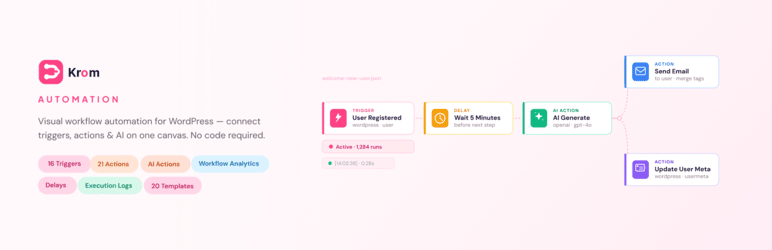
Krom Automation, built by wpRigel, works on a simple pattern: pick a trigger, add actions, optionally insert conditions, delays or an AI step, test the flow in the built-in simulator with zero side effects, then activate it. The ReactFlow canvas with auto-layout keeps branching flows readable, and every run produces a step-by-step execution trace plus analytics covering executions, active workflows and failures.
The free plugin ships 16 triggers — user registration, profile updates, logins, role changes and password resets; post published, updated, deleted and status-changed; comment submitted and approved; media uploaded; and WooCommerce order created and completed — and 21 actions covering email, user management, post management, comment management, HTTP requests in all five methods, WooCommerce coupon creation and order status, and the three AI actions. Workflows can be imported and exported as portable JSON files, carry internal notes for team handoff, and can be driven programmatically through a full REST API.
Key features
- AI actions included free. AI Generate Text, AI Content Moderation and AI Auto-Tag work with OpenAI, Google Gemini, Groq or Anthropic Claude. You supply your own API key for at least one provider and pay that provider directly at standard rates — wpRigel does not charge per AI call or mark up tokens. Typical uses: personalised emails, post summaries, social copy drafts, automatic spam and toxicity filtering, and tagging new posts.
- Workflow simulator. Dry-run any workflow with real-looking data and zero side effects before it touches live users, posts or orders — a testing step most list-based automators do not offer at any tier.
- No run limits, ever. Because execution happens on your server, there is no task counter and no credit pack to exhaust; a site running thousands of executions pays the same as one running dozens.
- WooCommerce in the free version. Order created and completed triggers, coupon creation and order-status actions are bundled free, along with starter templates for order and customer sequences.
Pricing
The plugin itself is free on WordPress.org, with the full canvas, triggers, actions, branching, delays, simulator, logs, templates and AI actions included and no run limits. Krom Automation Pro adds 80+ additional triggers and 60+ additional actions across the vendor’s integration categories — form plugins, extended WooCommerce (subscriptions, refunds, low-stock alerts), CRM and email marketing, LMS and membership, messaging, social publishing, spreadsheets and calendars — plus AI workflow generation from a plain-English description, a Gutenberg visual email builder, a schedule trigger, an incoming webhook receiver with HMAC signatures, and 101+ Pro templates. On the vendor’s own pricing page the annual plans are shown discounted at Basic $59/year for 1 site (list $99), Standard $99/year for 5 sites (list $149) and Business $149/year for unlimited sites (list $299), each with a 14-day money-back guarantee; lifetime options are also offered. Your AI usage is billed separately by whichever provider’s key you connect.
What the pricing page doesn’t make obvious: the three Pro plans are not feature tiers. Every plan — Basic included — includes all 25 Pro integrations, the email builder, schedules, webhooks and the full template library; the only differences are how many sites the licence covers and the level of support. And if you cancel Pro, the vendor’s pricing FAQ says workflows you built keep running — only the Pro-only features inside those flows pause, while the free plugin keeps working.
Who it’s for
- Site owners tired of manual follow-up — welcome emails, post notifications, comment moderation and customer sequences that run themselves.
- WooCommerce stores on a budget — order automation and coupon flows without a per-task SaaS bill.
- Agencies and developers — exportable workflow JSON, a REST API, and per-step logs.
What to watch out for
- It is brand new. Version 1.0.3 with a single public rating on WordPress.org is not a proven track record; the feature list is strong, but longevity and support depth are still being established.
- AI is bring-your-own-key. The AI actions are free as plugin features, but the generation itself is billed by OpenAI, Gemini, Groq or Claude on your own account.
- Self-hosted means self-managed. Execution runs through Action Scheduler on your hosting; very high-volume flows depend on your server’s cron reliability, not a vendor cloud.
- Discounted pricing may not last. The annual prices on the pricing page are shown struck through from higher list prices, so budget on the list price if you renew after a launch period.
- Research-based review. This review is based on Krom Automation’s WordPress.org listing and the vendor’s own site and pricing page; we have not run it on a live site ourselves.
Pros
- AI generation, moderation and auto-tagging included in the free plugin — no AI upsell tier.
- No execution metering or per-task fees at any tier, because it runs on your own site.
- Dry-run simulator and step-by-step execution traces make flows safe to test and easy to debug.
- Pro starts well under rival WordPress automators, and every Pro plan includes every integration.
Cons
- Version 1.0 software with a very small public install and review record so far.
- AI costs still apply — they are just billed by your AI provider instead of the plugin vendor.
- Third-party integrations, schedules and webhooks all sit behind Pro.
Frequently asked questions
Is Krom Automation really free?
Yes. The WordPress.org plugin includes the visual builder, 16 triggers, 21 actions, the three AI actions, the simulator, execution logs and starter templates with no run limits. You only pay if you connect a paid AI provider key and use its API, or if you upgrade to Pro for third-party integrations.
How does Krom Automation compare with Uncanny Automator?
In Tested Intelligence’s own coverage, Uncanny Automator is the established WordPress automator with an AI agent and no-code recipes. Krom’s counter-pitch is price and testing: Pro starts at $59 a year for one site on its pricing page versus Uncanny Automator plans the vendor cites as starting at $199 a year, and Krom includes a true dry-run simulator in its free version.
What happens to my workflows if I cancel Pro?
According to the vendor’s pricing FAQ, workflows you built keep running; only Pro-only features inside them pause, and the free plugin remains available.