
Quick verdict
HCSS HeavyBid Review 2026: Heavy Civil Estimating With an AI Assistant and a Beta Estimate Builder
Updated October 30, 2026 – Tested Intelligence
Quick verdict: HeavyBid is the estimating platform heavy civil contractors have standardized on for decades, and HCSS is now layering AI on top: an AI assistant live today that summarizes estimate changes, answers document questions and searches in plain language, plus an Estimate Builder agent in beta for fall 2026. If you bid DOT and infrastructure work, it belongs on your shortlist. If you build buildings, look elsewhere – and bring patience, because HCSS does not publish pricing.
What it is
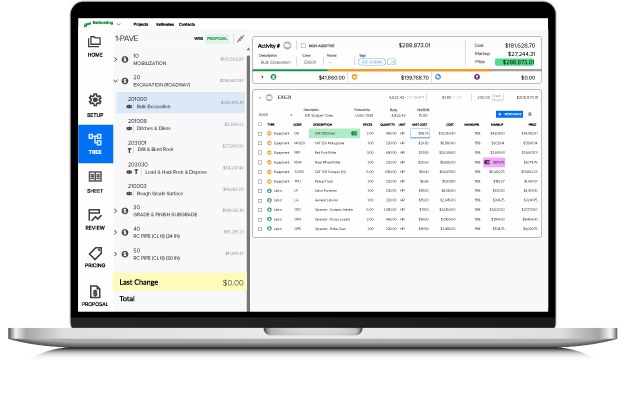
HeavyBid is the flagship estimating product from HCSS, a software company founded in 1986 that builds only for heavy construction. HCSS says more than 50,000 estimators use HeavyBid and that 43 of the ENR Top 50 heavy civil contractors use HCSS products. It is built around how civil work is bid: pay items, crew-based production, codebooks and master estimates carrying your rates from bid to bid.
The AI story is recent and specific. The HCSS AI Assistant – formerly HCSS Copilot – is live across HeavyBid, HeavyJob, HeavyJob Safety and HeavyJob Docs & Plans; HCSS says it is included in the subscription and used by more than 3,000 users at 800+ companies. In HeavyBid its headline trick is the estimate audit summary: a readable narrative of an estimate’s change history. In the Fall 2026 release, HCSS opened beta access (from October 15, 2026) to two agents – a HeavyBid Estimate Builder that drafts a first-pass estimate from your historical estimates, with every AI-generated value flagged for review, and a HeavyJob Production Analyst – managed through a new AI Studio. Those agents are beta; broader availability is planned for 2027.
Key features
- Crew-based estimating: labor, equipment and production rates organized in codebooks and master estimates
- Quote management: solicit, organize and compare subcontractor and supplier quotes side by side, including against self-perform costs
- AI Assistant (live today): estimate audit summaries, smart search and navigation, and document Q&A over uploaded SOPs, contracts and safety documents
- Estimate Builder agent (beta, fall 2026): drafts a first-pass estimate from historical HeavyBid data, flagging every AI value for human review
- Integrations: QuickBooks, Sage 300, Primavera P6, Microsoft Project, RSMeans import, and the wider HCSS platform
Pricing
Pricing is not public. HCSS sells HeavyBid through demos and quotes. Third-party directories put the starting point at $3,195 per user per year (SelectHub’s figure, directory-sourced and to be verified in a quote) – treat that as a floor for budgeting, not a price list. Expect enterprise-style per-seat costs that climb across a full estimating department, plus implementation and training time.
Who it’s for
Heavy civil and infrastructure contractors – highways, bridges, utilities, site development – whose estimators bid unit-price work against DOT-style pay items and live in quote comparisons on bid day. The AI pays off most where there is history: firms with years of estimates get audit summaries and, in beta, first-pass drafts from their own rates.
Who should skip it
Commercial general contractors and vertical builders should skip it – HeavyBid’s data model assumes civil pay items and crew production, and tools like DESTINI or STACK fit building work better. Small civil firms bidding a handful of jobs a year should also pause: per-seat enterprise pricing and a real learning curve are hard to justify at low bid volume.
Pros
- The heavy civil standard: codebooks, crews and quote management match how DOT work is bid
- AI assistant is live and included, not a vaporware roadmap slide
- Estimate audit summaries solve a real chief-estimator pain on bid day
Cons
- Pricing is not public; directory figures suggest premium per-seat costs
- The headline agents are beta in fall 2026, with general availability planned for 2027
- Steep learning curve – proficiency takes real training, per independent comparisons
FAQ
Is the HCSS AI Assistant included or an add-on?
Included, per HCSS: the assistant (formerly Copilot) is live across HeavyBid, HeavyJob, Safety and Docs & Plans as part of the subscription. The newer agents and AI Studio entered beta in fall 2026, with broader availability planned for 2027.
Does HeavyBid replace takeoff software?
Not fully. HeavyBid imports takeoff quantities and external data (including RSMeans) and prices them, but most teams still measure in a dedicated takeoff tool and feed HeavyBid. Its strength is pricing, quote management and bid-day control, not measuring plans.
What does HeavyBid cost?
HCSS does not publish pricing. Directories list $3,195 per user per year, but that is directory-sourced, not an HCSS quote. Budget for a demo and a per-seat annual quote on top.
Bottom line
HeavyBid remains the estimating system of record for heavy civil, and the AI layer is a sensible evolution: audit summaries and document Q&A today, an estimate-drafting agent in beta. Civil contractors already on HCSS should turn the assistant on and test the beta. Everyone else should weigh the unpublished premium pricing and training load against how much civil work they truly bid.