
Quick verdict
GibbsCAM Review 2026: Established CNC CAM With an AI Copilot and AI Toolpath Proposals
Updated October 28, 2026 – Tested Intelligence
Quick verdict: GibbsCAM is long-established CAM software for production machining — 2- to 5-axis milling, turning, Swiss machining, multi-task machining and wire EDM — that now layers AI on top in two places: a Copilot for instant user support, and an up2parts plug-in that proposes machining strategies automatically. Pricing is not public, and the AI assists a programmer rather than replacing one.
What it is
GibbsCAM, part of Sandvik Manufacturing Solutions, is CAD/CAM software machinists use to program CNC machine tools. It integrates with all major CAD systems and covers milling, turning, Swiss-type machines, multi-task machines and wire EDM in one environment, with toolpaths and post-processors intended to get the most out of each machine.
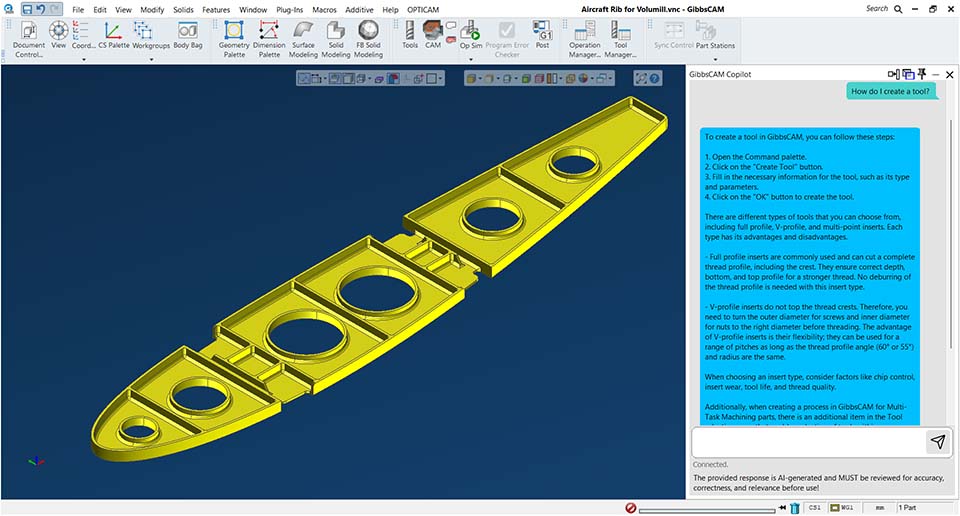
The AI arrived with GibbsCAM 2025. The Copilot, accessible from the Online Help menu, uses Microsoft Azure OpenAI on a dedicated database trained by the GibbsCAM team to answer user questions at any time, instead of making a programmer hunt through documentation or wait for support. Separately, a plug-in to up2parts autoCAM uses a 3D model with tolerance information to generate proposals for six-sided machining — clamping, steps, operations and tools — which the programmer can post-process immediately or simulate and edit first.
Key features
- GibbsCAM Copilot: Azure OpenAI support assistant trained on a dedicated GibbsCAM database, available from the Online Help menu
- up2parts autoCAM plug-in: AI proposals for clamping, steps, operations and tools from a 3D model and its tolerance/PMI data
- Full machining range: 2- to 5-axis milling, turning, Swiss machining, multi-task machining and wire EDM
- Sandvik turning technologies: OptiThreading, PrimeTurning and Y-axis turning, plus the Rib Cut Plunge roughing strategy
- Simulation and verification: machine simulation with digital-twin models, with collision detection and alerts on by default in the 2025 release
- Tool management: CoroPlus Tool Library integration and an Order Tool that carries catalog numbers through to ordering pages
Pricing
Pricing is not public. GibbsCAM does not publish a list price; the software is sold through resellers, with flexible licensing — short-term rental, purchase and subscription — described on its reseller pages. Product pages offer a free 30-day trial on request. Expect the quote to depend on the GO milling and turning levels and options selected, so get the module list and post-processors in writing before comparing quotes.
Who it’s for
Production machine shops and CNC programmers who live in CAM every day — especially shops running mill-turn, Swiss or multi-task machines, and Sandvik tooling users who want PrimeTurning and OptiThreading natively. The Copilot helps newer programmers get unstuck without stopping a senior, and autoCAM targets the repetitive first draft of a program.
Who should skip it
Hobbyists and very small shops that only need occasional 3-axis work will find lighter, transparently priced CAM easier to justify. Shops that want the AI to write a finished, trusted program unattended should also pass for now: both AI pieces here propose and answer — a programmer still reviews, simulates and owns the result.
Pros
- Real AI in two useful places: instant support answers and automatic machining proposals, not a chatbot bolted onto a brochure
- Deep, proven machining coverage from simple turning to multi-task and Swiss work
- Proposals stay editable: simulate and adjust the autoCAM output before posting
- Backed by Sandvik, with its tooling data and turning technologies built in
- Free 30-day trial available on request through the product pages
Cons
- No public pricing — every comparison starts with a reseller quote
- Modular licensing means the useful configuration can cost well more than a base seat
- The Copilot answers questions; it does not program the part for you
- autoCAM proposals still need an experienced eye — a plausible strategy is not automatically a safe or efficient one
FAQ
What does GibbsCAM’s AI actually do?
Two things. The Copilot answers how-to and support questions using Azure OpenAI trained on GibbsCAM’s own database. The up2parts autoCAM plug-in reads a 3D model with tolerance information and proposes clamping, machining steps, operations and tools, which you can post as-is or simulate and edit first.
How much does GibbsCAM cost?
Pricing is not public. It is sold through resellers with rental, purchase and subscription options, and the total depends on the milling/turning levels and add-ons selected. A free 30-day trial is offered on request — use it on a real part from your shop before signing.
Which machines and work does GibbsCAM cover?
Per the vendor: 2- to 5-axis milling, turning, Swiss machining, multi-task machining and wire EDM, integrating with all major CAD systems. It is production CAM for machine shops, not a design tool or a machine-monitoring platform.
Bottom line
GibbsCAM earns its look when a shop’s bottleneck is programming time on varied, real production work — and wants AI that drafts strategies and answers questions inside a mature CAM system, with simulation as the safety net. Run the 30-day trial on your hardest recurring part, time the Copilot and autoCAM against your current workflow, and only then weigh the reseller quote.