
Quick verdict
Arcol Review 2026: Browser-Based Building Design With Live Metrics and AI Agents
Updated October 24, 2026 – Tested Intelligence
Quick verdict: Arcol moves early building design into the browser: teams model together in real time while area, cost-related and project metrics update live as the design changes, and the vendor now builds AI agents into that same shared model. It is a feasibility tool, not a Revit replacement. Pricing is unusually clear – free for solo personal use, and $100 per user per month for teams.
What it is
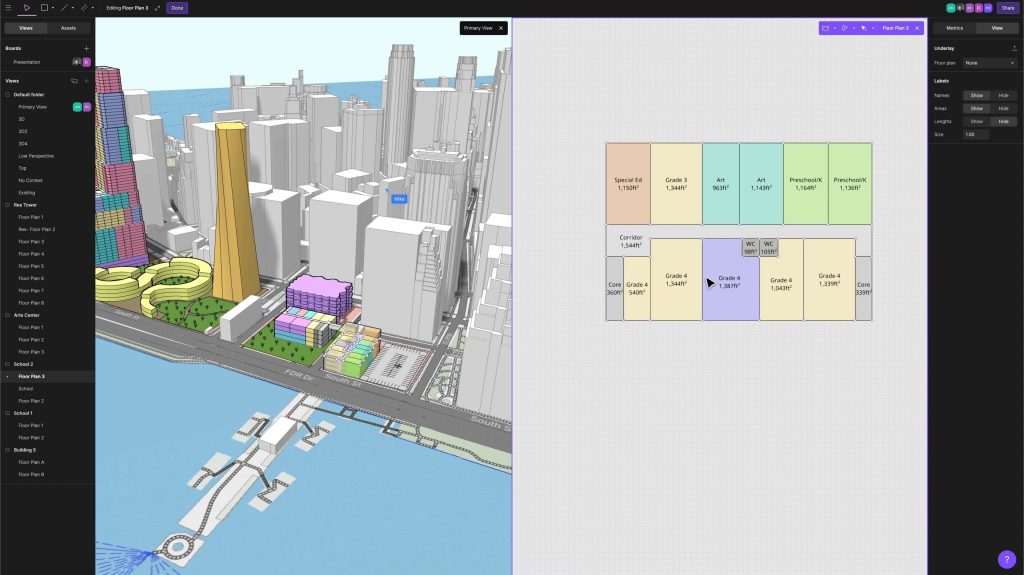
Arcol is a collaborative, browser-based building design platform for architects, developers and AEC teams working at the front end of a project. Instead of modelling alone in a desktop file and exporting boards and spreadsheets for every review, the team works in one web environment where the 3D model, presentation boards and live metrics stay in sync.
The vendor now positions Arcol around construction intelligence and agentic workflows, with AI agents and teams collaborating in the same model. Trade coverage in AEC Magazine and ENGtechnica describes the same core – real-time collaboration and feasibility work – while noting it is an early-stage design tool, not a full documentation suite.
Key features
- Browser-based 3D modelling with real-time multiplayer collaboration – no desktop install or file version chaos
- Live-updating metrics tied to the model, so areas and project data change as you design rather than in a separate spreadsheet
- Automatic site context and presentation boards generated from the model for client and stakeholder reviews
- Sheet sets and project templates on the paid Team plan, with Revit export available on paid plans only
- Unlimited collaborators who can view and comment via shared access; editors are the licensed seats who model and change metrics
- AI-agent direction: the vendor says the model architecture is built so agents can take on more of the manual work – counts, decks and rework – over time
Pricing
Arcol publishes its pricing. A Basic plan for solo users working on personal projects is free, with unlimited collaborators, live-updating metrics, advanced 3D modelling tools, sheets and automatic site context, though some capabilities such as Revit export are reserved for paid plans. The Team plan is $100 per user per month billed monthly, with an annual option that trade coverage says adds a dedicated customer success manager, personalised onboarding and early access to new features. Only editors need a licence; viewers and commenters are free collaborators.
Who it’s for
Architecture practices, developers and design teams who live in feasibility studies, test fits, masterplanning and client option reviews – the stage where speed and clear communication win work. Firms tired of rebuilding slide decks and area schedules after every model change will feel the benefit first.
Who should skip it
Teams needing construction documentation, detailed BIM authoring or complex parametric modelling today should stay with Revit-class tools – Arcol’s own positioning is early design, and Revit export is a bridge, not a round-trip replacement. Safari-only shops should also note the browser limitation before standardising on it.
Pros
- Published pricing with a genuinely usable free solo tier and free collaborator seats
- Live metrics remove the model-versus-spreadsheet mismatch that plagues feasibility reviews
- Real-time browser collaboration suits distributed teams and client workshops
- Boards and presentations stay synced with the design instead of being rebuilt
Cons
- Concept and feasibility stage only – not a documentation or detailed BIM tool
- Revit export is paid-only and one-way; complex projects still finish elsewhere
- No Safari support, per trade coverage of the vendor’s guidance
- AI agent features are a developing direction, so judge the product on what it does today
FAQ
How much does Arcol cost?
The vendor lists a free Basic plan for solo personal projects, and a Team plan at $100 per user per month billed monthly. Only editor seats are licensed; collaborators who view and comment are free.
Does Arcol replace Revit?
No. Arcol is built for early-stage design, feasibility and presentation. Paid plans include Revit export so a concept can move into a documentation tool, but detailed BIM authoring still belongs in Revit-class software.
What do Arcol’s live metrics do?
Project metrics are tied directly to the model and update as the design changes, so teams compare options using current numbers instead of manually maintained spreadsheets and rebuilt presentation decks.
Bottom line
Arcol is one of the easiest design tools here to try: free to start, $100 per editor per month when the team joins, and built for the feasibility conversations where projects are won. Pilot it on a live test fit against your current SketchUp-plus-spreadsheet workflow.