
Quick verdict
Lantek Review 2026: Sheet Metal Nesting, Quoting and the KAI AI Assistant
Updated October 20, 2026 – Tested Intelligence
Quick verdict: Lantek is a full sheet metal suite — Expert CAD/CAM nesting, iQuoting, MES and bending — and its newest layer is KAI, an AI assistant introduced in v45 that analyses shop data and supports technicians across the applications, with v46 extending it into quoting. It is deep, machine-agnostic software for serious cutting shops; pricing is not public, and small shops should start with iQuoting.
What it is
Lantek builds software only for sheet metal, tube and structural steel fabrication, and has done so for 40 years — the vendor says it serves more than 38,000 customers worldwide, a vendor figure. The suite connects office to shop floor: Expert nests parts, iQuoting turns CAD files into prices, MES and WOS track production, stock and capacity, and Lantek Bend handles bending, tied together in its 360 Platform.
The AI arrives in two places. In v45, KAI debuted as a transversal assistant across several applications — Fabricating & Metalworking describes it analysing data and suggesting strategies for technicians, and Metalworking International calls it the start of Lantek’s new generation of AI services. In v46, Industrial Machinery Digest describes KAI supporting iQuoting: analysing manufacturing information, interpreting design data and automating quotation decisions, alongside feasibility rules that check whether a part can be made on your machines.
Key features
- KAI AI assistant: cross-functional help across applications, analysing data and suggesting strategies; extended into quoting in v46
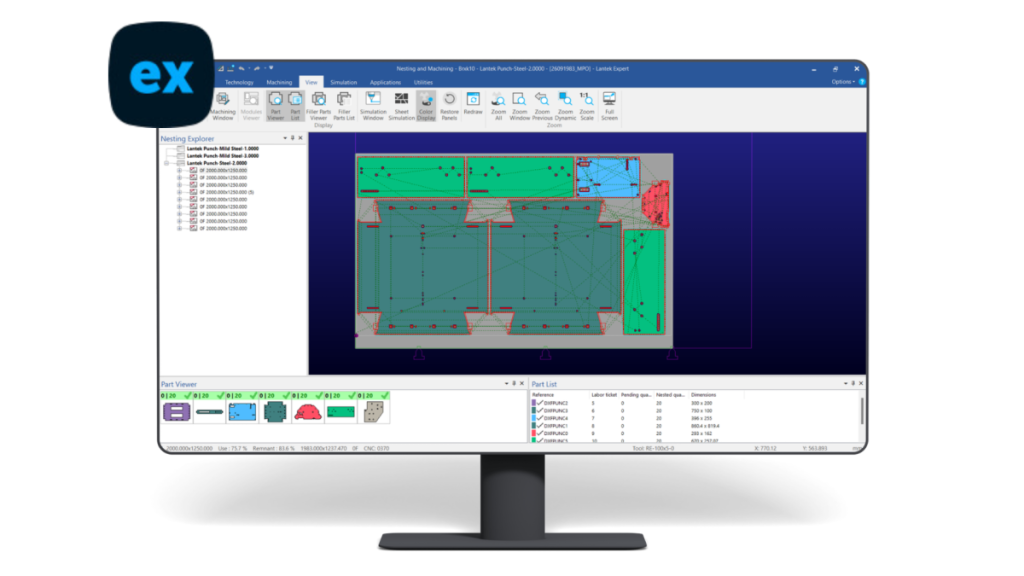
- Lantek Expert: CAD/CAM nesting for laser, plasma, oxy-cut, waterjet, punching and combination machines
- iQuoting: cloud quoting using AI with Expert’s processing times and material use to price in minutes
- ThinkingMetal nesting: AI-based optimisation for less waste and shorter production times
- Lantek MES / WOS and Integra: production control, stock, remnant, capacity and cost tracking
- Lantek Bend and Flex3D: bending simulation and tube cutting in the same environment
- Machine-agnostic: trade coverage puts supported machines at over 1,400 makes and models
Pricing
Pricing is not public. Lantek sells through its own sales network and partners, configured by modules — Expert, iQuoting, MES, Bend — so the quote depends on which pieces you take and how many machines and users they cover. One detail the vendor does publish: iQuoting is a cloud SaaS product on an annual subscription, the lowest-commitment way into the platform. For everything else, expect a configured quote, and ask what implementation, training and maintenance are included.
Who it’s for
Sheet metal shops running more than one cutting technology or machine brand, where quoting speed, nest yield and production visibility decide margin. Subcontract laser shops are the textbook case: trade press describes iQuoting replacing spreadsheet quoting built on one estimator’s experience, using Expert’s real cutting times so a non-specialist can quote accurately in minutes.
Who should skip it
A one-machine shop that only needs nesting should compare nesting-only tools first; the full suite is a platform decision, with implementation to match. And KAI is new — v45 is its debut — so buy Lantek for Expert, iQuoting and MES as they stand today, and treat the AI assistant as upside, not the reason.
Pros
- One connected suite from quote to nest to production, instead of stitched-together tools
- Machine-agnostic Expert protects you when you change or add cutting machines
- iQuoting prices from real processing times and material use, not estimator guesswork
- KAI applies AI where estimators and technicians already work, including feasibility checks in v46 quoting
Cons
- Pricing is not public — every module is a configured quote
- Significant implementation for a small shop
- Value depends on accurate machine, material and rate data
FAQ
What is KAI in Lantek v45?
KAI is Lantek’s AI assistant, introduced in v45 as a cross-functional helper across its applications. Trade coverage describes it analysing data and suggesting strategies for technicians; in v46 it also supports iQuoting, interpreting design data and automating parts of the quotation decision-making, with human expertise kept in charge.
Does Lantek Expert work with my cutting machine?
Probably. Expert is machine-agnostic nesting for laser, punching, plasma, oxy-cut, waterjet, tube and combination machines, and trade coverage puts the supported library at over 1,400 makes and models. Confirm your exact machine in the quote process.
How much does Lantek cost?
Pricing is not public. Modules are quoted by configuration, machines and users. The published exception is the model, not the amount: iQuoting is a cloud SaaS product on an annual subscription, per the vendor.
Bottom line
Lantek is the sheet metal platform pick: Expert nesting and iQuoting remove the two biggest margin leaks — scrap and slow, inconsistent quotes — and KAI is a credible AI layer on top of software shops already trust. Start with iQuoting or Expert, get the configured quote in writing, and let KAI prove itself on your parts.