
Quick verdict
Grain Review 2026: AI Meeting Notes With Clips and Coaching for Growing Teams
Grain is an AI notetaker for Zoom, Google Meet, Microsoft Teams, Webex and Slack huddles that records the call, writes AI notes and action items, and turns the best moments into shareable clips. Its free plan covers unlimited meetings capped at 45 minutes each, paid Starter is $15 per seat/month billed annually, and the CRM integrations and AI coaching most sales teams actually want sit on Business at $29 per seat/month billed annually.
What it is
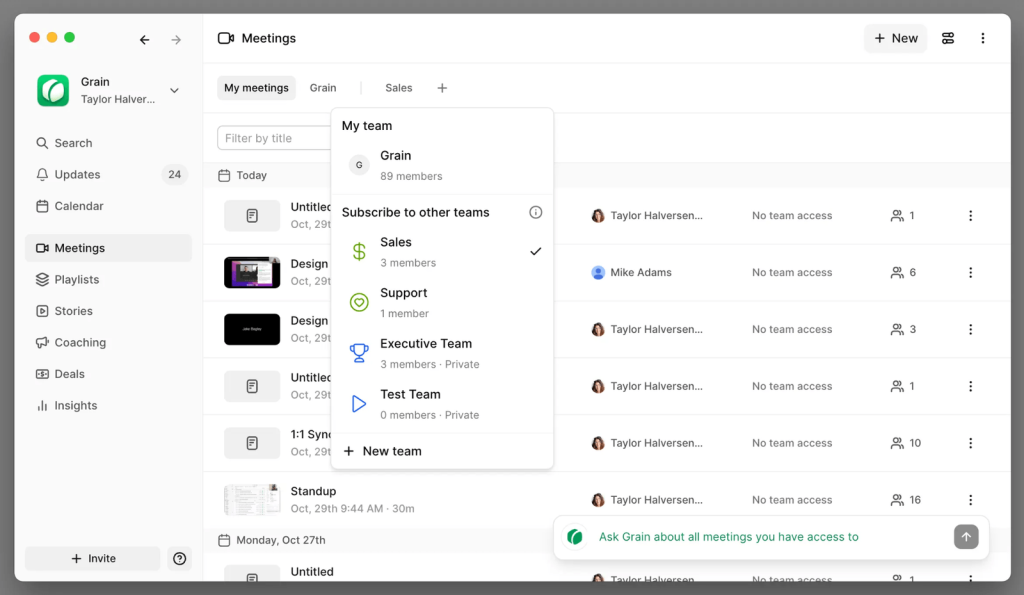
Grain (grain.com) is a meeting-recording and conversation-intelligence tool built for growing teams rather than enterprise revenue departments. Connect a Google Workspace or Microsoft 365 calendar and Grain can record automatically under rules you set for internal, external or all meetings, or capture bot-free from its desktop app. Every call produces a recording, a transcript and AI-generated notes with next steps, all stored in a shared workspace organised into Teams.
Two ideas set Grain apart. First, it is video-first: clips and speaker timelines let a manager share the exact 40 seconds that matter instead of a whole call. Second, its seat model is fair — paid seats are only for people who record, while free viewer seats can watch, comment and read AI notes at no cost.
Key features
- Recording across every major platform. Zoom, Google Meet, Microsoft Teams, Webex and Slack huddles, via a meeting bot or bot-free desktop capture, with calendar-based auto-record rules for Google and Microsoft calendars.
- AI notes on every plan. AI-generated meeting notes, action items and next steps, plus the ability to ask Grain’s AI questions about your recordings. Custom AI prompts and custom note templates arrive on Starter and above.
- Clips and collaborative workspace. An AI Notepad with live notes, transcript and clip creation, timestamped comments and a collaborative workspace where free viewer seats can watch and discuss shared meetings.
- Conversation intelligence on Business. AI coaching, trackers for keywords and topics, team interaction metrics and custom AI follow-up emails — the layer aimed at sales and customer-success managers.
- Integrations and MCP access. Basic MCP access is included free; Starter adds Slack, personal Zapier and a personal API, while Business adds HubSpot, Salesforce, workspace Zapier and advanced MCP access.
Pricing
Pricing is from Grain’s own pricing page. The free plan is $0: unlimited meetings with a 45-minute limit per meeting, AI notes and action items, basic MCP access, 30-day meeting history, desktop capture and a collaborative workspace. Starter is $15 per seat/month billed annually, or $19 billed monthly: unlimited meeting duration and history, advanced AI notes, custom AI prompts and templates, admin controls, Slack and personal Zapier integrations and audio/video file imports. Business is $29 per seat/month billed annually, or $39 billed monthly: everything in Starter plus HubSpot and Salesforce integrations, AI coaching, trackers, team interaction metrics, custom AI follow-up email and unlimited uploads. Enterprise is custom-priced and adds SAML-based SSO, priority API support, custom invoices and a dedicated customer-success manager. Grain offers a 30-day money-back guarantee.
Who it’s for
- Sales and customer-success teams at growing companies that want call recording, clips and coaching without an enterprise revenue-intelligence contract.
- Product, design and research teams — Grain’s own Starter positioning — that run customer calls and need searchable notes and shareable moments.
- Managers who coach from real calls, using trackers and interaction metrics instead of ride-alongs and memory.
What to watch out for
- The free plan forgets. Meetings are capped at 45 minutes and history lasts only 30 days, so anything you need to keep requires a paid seat before the month is out.
- CRM sync is a Business feature. HubSpot and Salesforce integrations — the main reason many sales teams buy a tool like this — do not exist on Starter, so budget $29 per seat/month billed annually, not $15.
- Per-seat maths still applies to recorders. Viewers are free, but every person who records, uploads or imports needs a paid seat, and all paid seats in a workspace sit on the same plan tier.
- Research-based review. This review is based on Grain’s own product and pricing pages; we have not run it across a live sales team’s call schedule ourselves.
Pros
- Free viewer seats: only people who record need a paid seat.
- Unlimited meetings even on the free plan, across Zoom, Meet, Teams, Webex and Slack huddles.
- Video clips, timestamped comments and speaker timelines make sharing moments easy.
- Clear published per-seat pricing and a 30-day guarantee.
Cons
- Free plan caps meetings at 45 minutes and keeps only 30 days of history.
- HubSpot and Salesforce sync locked to Business at $29/seat/month billed annually.
- AI coaching, trackers and follow-up emails are also Business-only.
Frequently asked questions
Is Grain free?
Yes. The free plan includes unlimited meetings up to 45 minutes each, AI notes and action items, basic MCP access, desktop capture and 30 days of meeting history, with unlimited free viewer seats. Paid plans start with Starter at $15 per seat/month billed annually.
Which meeting platforms does Grain work with?
Grain works with Zoom, Google Meet, Microsoft Teams, Webex and Slack huddles, and connects to both Google Workspace and Microsoft 365 calendars for automatic recording rules. It can join as a bot or record bot-free through desktop capture.
Do I have to pay for everyone on my team?
No. You only pay for seats that record, upload or import meetings. Everyone else can join as a free viewer seat, watch shared recordings, read AI notes and comment — which is why Grain suits teams where a few people run calls and many people consume them.