
Quick verdict
Read AI Review 2026: Meeting Notes Plus Search Across Email and Messages
Read AI is an AI meeting assistant for Zoom, Google Meet and Microsoft Teams that goes one step past transcription: it summarizes meetings, email and messages together, then makes all of it searchable, with engagement and sentiment readouts on every meeting report. Its free plan covers 5 meeting transcripts a month, and paid plans start at $15 per user per month billed annually.
What it is
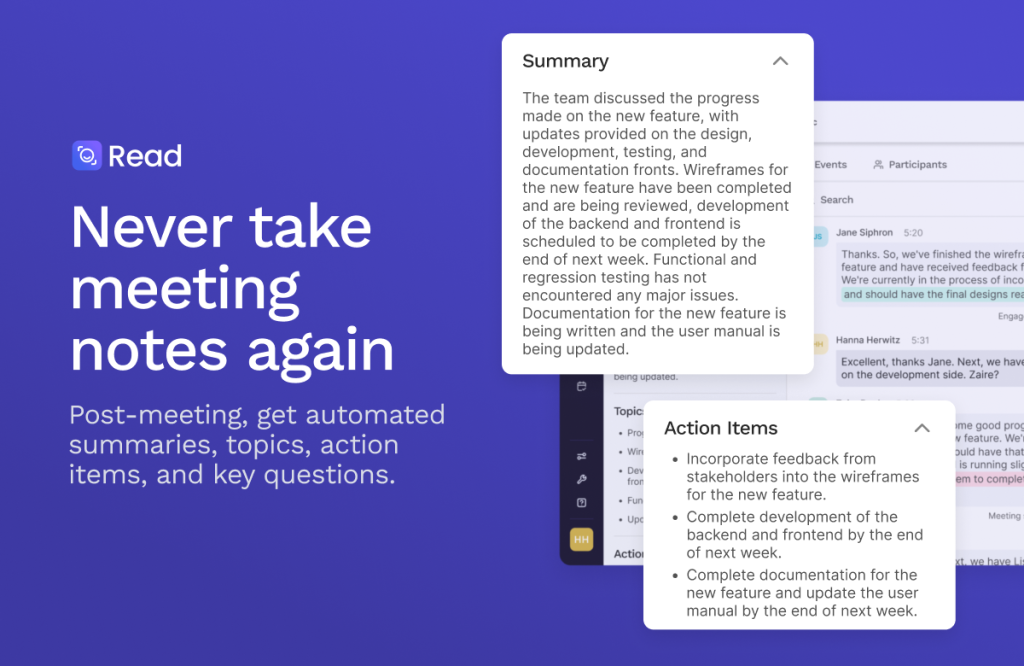
Read AI joins your Zoom, Google Meet or Teams calls and produces a meeting report with a summary, topics, action items and key questions, alongside a speaker-by-speaker transcript. Where most notetakers stop at the call, Read AI also summarizes email and messaging and indexes meetings, emails and messages together for its enterprise search — the idea being that a decision made on a call can be found later alongside the thread that followed it.
Each report also measures engagement and sentiment, and a personalized meeting coach gives feedback on how you presented. Apps cover Windows, macOS, Android and iOS, with 20+ languages on the free plan and in-person capture via mobile.
Key features
- Meeting reports with action items. Automatic summaries covering topics, action items and key questions, with a full transcript broken out by speaker and listener sentiment and engagement noted.
- Search across meetings, email and messages. Enterprise search is included even on the free plan with unlimited queries, and the Search Copilot draws on connected sources to answer questions with the underlying material linked.
- Meeting coach. A personalized coaching section in each report, with metrics intended to show talk patterns and presentation habits over time.
- Works on Zoom, Meet and Teams. One assistant across the three major video platforms, plus desktop and mobile apps and in-person capture.
- Premium integrations on Pro. Notion, Salesforce, HubSpot, Jira, Confluence, Zapier and webhooks. Playback and video highlights are reserved for Enterprise and above.
Pricing
Pricing is from Read AI’s own plans page, per user per month in USD. The free plan includes 5 transcripts per month (1-hour cap), unlimited enterprise search, summaries, the meeting coach, topic readouts, basic integrations and 20+ languages, no credit card required. Pro is $15 billed annually ($19.75 monthly): unlimited transcripts, 4-hour cap, 100 upload credits/month, premium integrations, priority processing. Enterprise is $22.50 billed annually ($29.75 monthly): adds playback, video highlights, 200 credits and premium support. Enterprise+ is $29.75 billed annually ($39.75 monthly), requires 5+ licenses, and adds HIPAA, SAML/SCIM, domain capture, custom retention, 300 credits and 8-hour meetings. All paid plans include unlimited reports and storage.
Who it’s for
- Distributed teams whose context lives across calls, email and chat, and who lose time reconstructing why a decision was made.
- Managers and presenters who want the meeting-coach and engagement readouts, not just a transcript.
- Sales and customer teams on Pro or above who need reports pushed into HubSpot, Salesforce, Notion or Jira.
- Regulated organizations that need HIPAA, SAML/SCIM and custom retention — noting those controls sit only on Enterprise+.
It is more than a casual user needs: if you only want a transcript for an occasional call, a simpler free notetaker will feel lighter.
What to watch out for
- The free cap is tight. Five transcripts a month with a 1-hour ceiling runs out fast for anyone in daily meetings; the free plan is an evaluation tier in practice.
- Playback is paywalled high. Audio and video playback and video highlights require Enterprise at $22.50 per user per month billed annually — Pro users get unlimited transcripts but not playback.
- Compliance lives on the top tier. HIPAA compliance, SAML/SCIM and custom retention require Enterprise+, which also demands at least 5 licenses, so small regulated teams cannot buy a single compliant seat.
- Recording consent still applies. Read AI joins meetings as an assistant; tell attendees it is recording, and follow your jurisdiction’s consent rules, especially for client or sensitive calls.
- Value depends on connecting sources. Cross-platform search needs email and messaging connected, which some organizations will not approve.
- Research-based review. This review is based on the vendor’s own product and pricing pages; we have not run Read AI across a live meeting schedule ourselves.
Pros
- Meeting, email and message summaries unified into one searchable index.
- Engagement, sentiment and meeting-coach readouts go beyond a plain transcript.
- Free plan includes enterprise search and the coach, not just a trial timer.
- Covers Zoom, Google Meet and Teams, with desktop, mobile and in-person capture.
Cons
- Free plan limited to 5 transcripts a month and 1-hour meetings.
- Audio/video playback and highlights require the Enterprise tier.
- HIPAA, SAML/SCIM and custom retention require Enterprise+ with 5+ licenses.
- Premium CRM and workflow integrations require Pro or above.
- Cross-channel search only shines if you connect email and messaging sources.
Frequently asked questions
Is Read AI free?
Yes, there is a free plan with 5 meeting transcripts per month, a 1-hour maximum meeting length, unlimited enterprise search, summaries, topic readouts and the meeting coach, with no credit card required. Paid plans start at $15 per user per month billed annually for Pro.
Which meeting platforms does Read AI work with?
Zoom, Google Meet and Microsoft Teams, with apps for Windows, macOS, Android and iOS. The mobile apps can also capture in-person meetings.
What is the difference between Pro and Enterprise?
Pro ($15 per user per month billed annually) unlocks unlimited transcripts, a 4-hour meeting cap, 100 monthly file upload credits and premium integrations. Enterprise ($22.50 billed annually) mainly adds audio and video playback, video highlights, 200 upload credits and premium support.