
Quick verdict
SkyCiv Structural 3D Review 2026: Cloud Structural Analysis With an AI Assistant and a Real Free Tier
Updated October 13, 2026 – Tested Intelligence
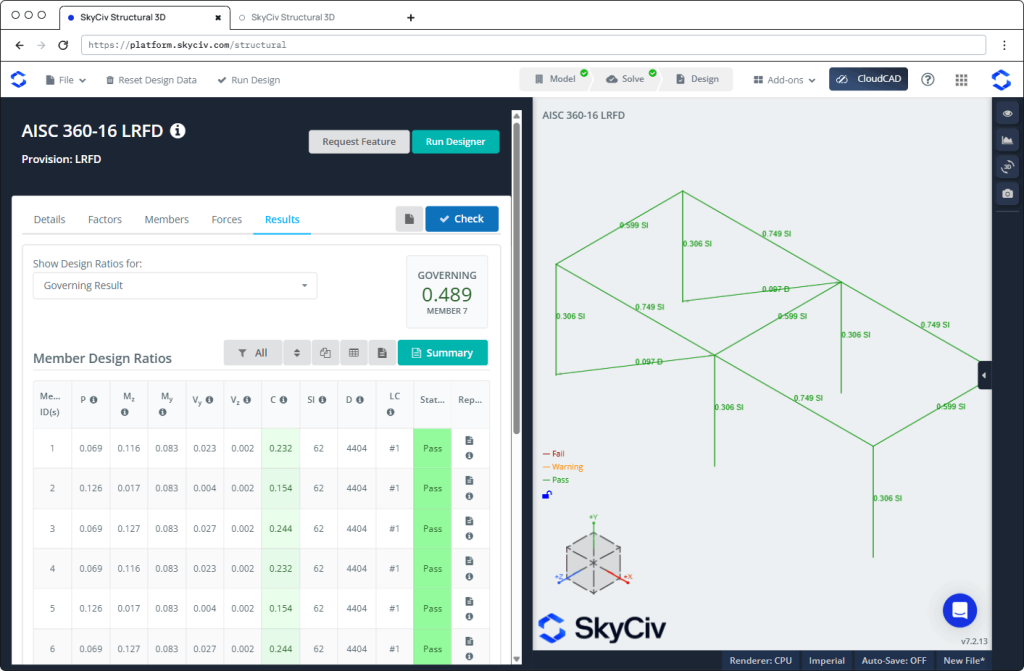
Quick verdict: SkyCiv Structural 3D (S3D) is browser-based structural analysis software positioned by SkyCiv Engineering as FEA with built-in AI. For steel teams, its value is speed: an engineer can sanity-check a frame, a temporary condition, base plates and connections without waiting for a desktop FEA seat. A genuine free version lowers the barrier, although connection design is a paid-tier feature.
What it is
SkyCiv Structural 3D is a cloud structural analysis and design program from SkyCiv Engineering. It runs in a browser, with no install.
The vendor positions the product as FEA “with built-in AI.” Its AI Assistant can build a model from a plain-language description of a structure. That does not remove the need for engineering judgement, but it shortens the setup between a question and a checked answer — the main appeal for a fabricator’s or erector’s engineer checking a frame, a temporary/erection condition, base plates or AISC connections.
Key features
- AI Assistant model building: Describe a structure in plain language and the assistant builds the model.
- Plain-language edits: The assistant can also modify models in plain language.
- Result queries: Query results through the assistant.
- Diagnosis and repair: The assistant can diagnose and repair model and solver problems, then run the solve.
- Connection Design: Connection design to AISC 360 and AS 4100.
- IDEA StatiCa export: Connections can be exported to IDEA StatiCa.
- Cloud access: Browser-based, with no install.
Pricing
A genuine free version exists. SkyCiv promotes it as “Get Started For Free,” and the free version covers the core apps with limited files and users. You can start before committing to a paid plan.
Paid tiers exist — Basic, Professional and Enterprise — but check the vendor’s live pricing page for current figures, since published third-party listings conflict. This review therefore prints no specific dollar figure as vendor pricing.
One limit matters for steel teams: the Connection Design module sits in the Professional tier per listings. Connections are a paid-tier feature, not part of the free version.
Who it’s for
S3D is best for small shops and field engineers who need fast, low-cost AISC analysis and connection checks in the cloud. It suits a fabricator’s or erector’s engineer who needs to sanity-check a frame, a temporary or erection condition, base plates and AISC connections from a browser.
Who should skip it
Skip it if deep, non-standard joint finite-element work is your daily work. Dedicated connection software in the IDEA StatiCa class goes further for that kind of analysis. S3D can export connections to IDEA StatiCa, which softens the limit, but if the non-standard joint is the job itself, start with the dedicated tool.
Pros
- Genuine free version covering the core apps, limited files/users
- No install — runs in a browser, in shops and site trailers
- AI Assistant builds and modifies models from plain-language descriptions
- Assistant can query results, repair problems, then run the solve
- Connection design to AISC 360 and AS 4100, with IDEA StatiCa export
Cons
- Connection Design is in the paid Professional tier per listings, not free
- Third-party pricing listings conflict, so pricing needs checking live
- Free version is limited in files and users
- Less suited to deep, non-standard joint FEA than dedicated software
FAQ
Is SkyCiv Structural 3D really free?
There is a genuine free version covering the core apps, with limited files and users. Paid tiers — Basic, Professional and Enterprise — sit above it, and Connection Design is in the Professional tier per listings, so it is not part of the free version.
What does the AI Assistant do?
Per the vendor, you describe a structure in plain language and the assistant builds the model. It can also modify models in plain language, query results, and diagnose and repair model and solver problems, then run the solve.
Can it design steel connections?
Yes. S3D includes Connection Design to AISC 360 and AS 4100, and exports connections to IDEA StatiCa. Connection design is a paid-tier feature, and dedicated connection software goes further for deep, non-standard joint work.
Bottom line
SkyCiv Structural 3D suits teams where speed and access matter more than maximum depth. The AI Assistant, browser workflow and free version make it easy to start, while AISC connection design — in the paid Professional tier — gives steel teams a reason to upgrade. Engineers doing deep, non-standard joint analysis daily should use dedicated software instead.