
Quick verdict
Vericut Review 2026: G-Code Verification With AI That Stays Off Your Data
Updated November 26, 2026 – Tested Intelligence
Quick verdict: Vericut is the established CNC simulation, verification and optimization suite from CGTech: it simulates the actual post-processed G-code against a digital twin of your machine to catch crashes before metal is cut. Version 9.6 adds Vericut Intelligence and Vericut Assistant AI on top of that twin. Pricing is not public and modular — the AI helps you use the system, it does not replace proving out a program.
What it is
Vericut, from CGTech (founded 1988, Irvine, California), simulates CNC machining from the same post-processed NC program that will run on the machine — not from the CAM system’s internal toolpath. That distinction is the product: errors introduced by post-processing, machine kinematics, tooling definitions and control behavior show up in Vericut when a CAM simulation would miss them. It covers milling, turning, multi-axis, additive and hybrid processes, and integrates with major CAM, tooling and modeling systems.
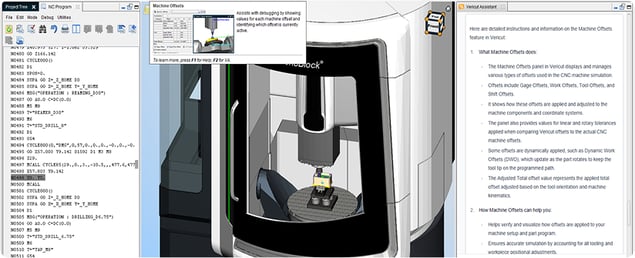
Vericut 9.6 adds two AI tools: Vericut Intelligence, a knowledge layer across the suite that answers product questions in context, and Vericut Assistant, which guides how-to tasks step by step.
Key features
- G-code verification and machine simulation: reads the real post-processed program and simulates machine motion, material removal and collisions before the part runs
- Vericut Intelligence (VI): AI knowledge layer that answers questions such as what X-Caliper is or how Force Optimization improves cycle time, without leaving the suite
- Vericut Assistant (VA): step-by-step guided help today, with task execution — for example populating a tool definition from a plain description — presented by the vendor as the next step, not the current one
- Force Optimization: analyzes cutting forces and adjusts feed rates to balance cycle time against tool life
- AUTO-DIFF and Reviewer: compares the simulated cut part against the design model, and the free Reviewer shares simulations, now with AUTO-DIFF results and HUD status displays in 9.6
- PMI support in 9.6: manufacturing annotations stay visible during review
Pricing
Pricing is not public. Vericut is licensed by module — Verification, Machine Simulation, Multi-Axis, AUTO-DIFF, Force and interfaces are separate pieces — as perpetual or subscription licenses, with the first year of maintenance included on a purchase per the vendor’s install guide, and subscriptions including maintenance. Directory and reseller figures for individual modules vary widely and are not vendor list prices; label any number you see elsewhere as an estimate and get a module-by-module quote.
What the pricing page doesn’t make obvious: the vendor states plainly in its own AI documentation that customer data is not used to train its AI — nor will it be in the future — and that the AI works from CNC machining knowledge, not from your programs. For aerospace, defense and automotive shops, that documented term matters more than the assistant itself: your G-code and part IP are not training input. Confirm the same wording in your license, because it is a vendor policy statement, not a substitute for contract language.
Who it’s for
CNC programmers running expensive machines or complex multi-axis work, where one crash costs more than the license. It also helps shops onboarding newer machinists: VI answers suite questions in context instead of sending them to manuals and forums.
Who should skip it
Small shops running simple 3-axis parts on forgiving machines, with a CAM simulation they already trust and no crash history, will struggle to justify modular enterprise licensing. Buyers who want the AI to write or fix programs autonomously should also skip it for now — VA guides today; direct task execution is the vendor’s stated future direction.
Pros
- Simulates the actual G-code, catching post and kinematics errors CAM misses
- Over 35 years in CNC verification, with broad CAM and tooling integrations
- Force Optimization turns simulation data into feed-rate improvements
- AI is grounded in the verified digital twin, not generic chat
- Vendor-documented no-training-on-customer-data policy for its AI
Cons
- No published pricing, and modules stack — a full suite is enterprise money
- Separate verification step adds time to the programming workflow
- Vericut Assistant executes tasks only in the vendor’s future roadmap, not today
- Value depends on building accurate machine and tooling digital twins first
- No free version; evaluation runs through sales
FAQ
Does Vericut train its AI on my machining programs?
No, by the vendor’s own statement: customer data is not used to train Vericut Intelligence or Vericut Assistant, and Vericut says it will not be in the future. The AI operates from product and machining knowledge. Still, get the commitment reflected in your agreement if IP sensitivity is high.
How much does Vericut cost?
Pricing is not public. Licensing is modular and quote-based, perpetual or subscription, varying by the Verification, Simulation, Multi-Axis, AUTO-DIFF and Force modules you need. Third-party per-module figures circulating online are estimates, not CGTech list prices.
Is Vericut the same as my CAM system’s simulation?
No. CAM simulation checks the toolpath as intended. Vericut simulates the post-processed G-code with machine kinematics and control definitions, catching errors CAM simulation structurally cannot see — which is why shops run both.
Bottom line
Vericut remains the reference for independent G-code verification, and 9.6’s AI is sensibly scoped: help programmers learn and navigate a proven twin, with a clear no-training-on-your-data stance. The blockers are price opacity and modular cost — justify it against the cost of one serious crash on your most expensive machine.